
Our New Dashboard Is Live: One Balance, More Possibilities

Donata Norkūnaitė
Last updated on
2026-10-21
3 min read
 AI Summary:
The new Oxylabs Dashboard replaces separate product plans with credit-based billing: one subscription and one shared balance across all products. This article explains why the update was made and what it adds, including real-time visibility and more control over how each product is managed. It also covers how new users can get started with free credits.
A busy year of new developments has brought Web API and another big release to match: the new Oxylabs Dashboard, available now.
It's a major upgrade to the overall user experience, introducing credit-based billing, one shared balance across products, and real-time spending and usage visibility.
Why a new dashboard
As the offering grew into a wider range of products, the platform around it needed to grow too, with billing and controls that work consistently across the board.
Many users combine several products, such as Datacenter Proxies, Residential Proxies, and the Web API. Managing each through its own plan and billing cycle adds overhead that doesn't need to be there.
The new dashboard was designed to ensure you can try, manage, and scale web data collection with less friction, if any at all.
The biggest change: one shared balance
Billing now runs on credits: a single subscription with one shared balance that works across all Oxylabs products, replacing separate plans for each.
Flexibility. Usage can move between all products as needs change, with no new subscriptions to buy.
Simpler billing. Only one subscription and one balance to track.
Plans for different needs. A choice of plans to match different usage levels and budgets, all within the same shared balance.
For custom needs, or help with choosing and managing the right setup, users can contact their account manager directly.
Real-time spending and usage visibility
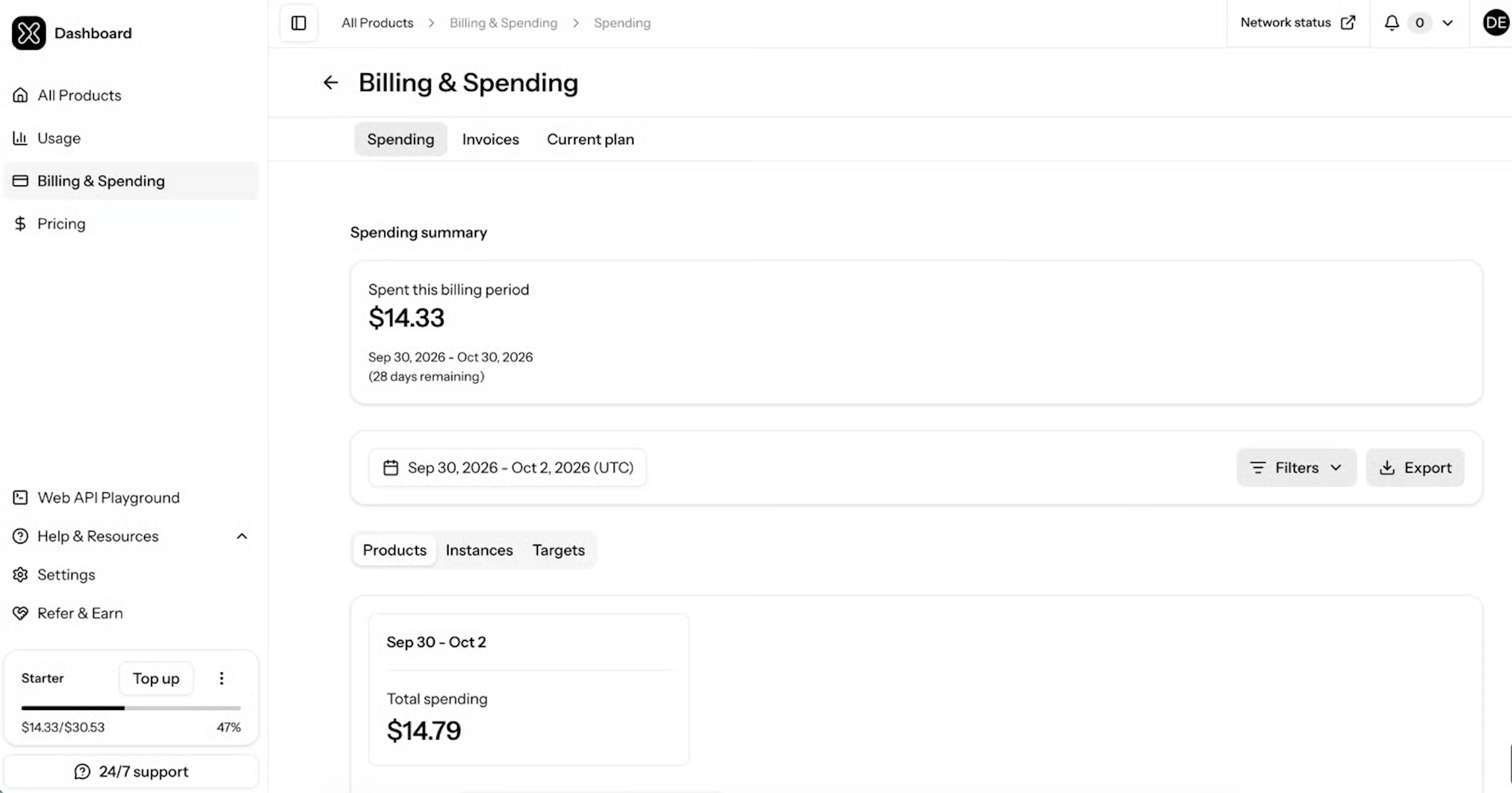
Spending and usage are now visible as they happen across all products, rather than only at the end of the month. Users can:
Filter by instance, target, or country to see where the budget goes.
Export reports for analysis or finance workflows.
Add a top-up when the balance nears its limit, so scraping keeps running.
That level of detail makes it easier to spot which targets cost the most and plan budgets ahead, without waiting for an invoice.
Independent product management
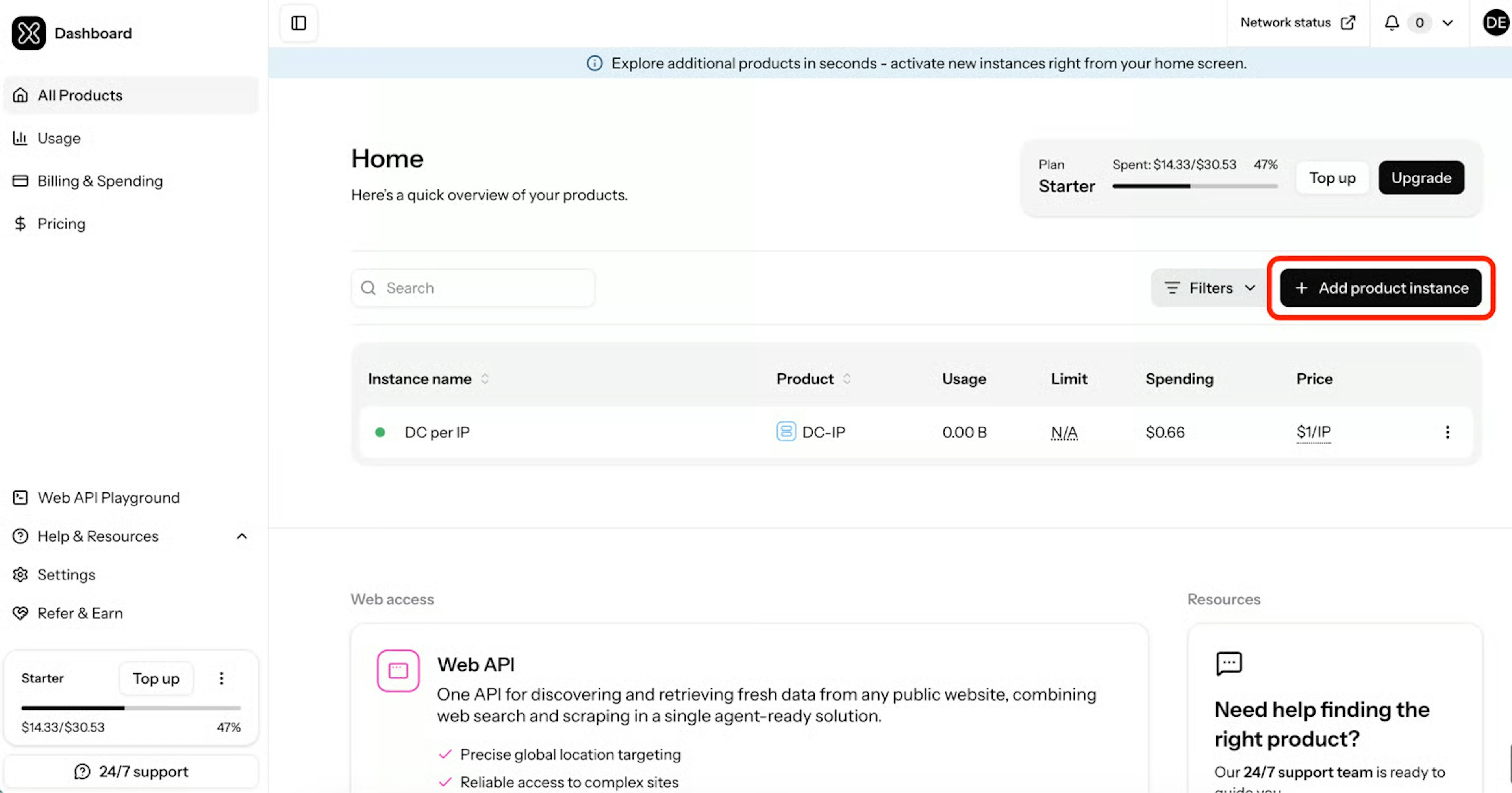
Product management now offers more control over how each product is set up and used. Users can:
Activate products and create instances on their own.
Manage each product instance independently, with its own settings.
Set both usage and monetary limits per instance, where previously only usage limits were available.
Routine tasks that once involved an account manager can now be handled directly in the dashboard.
Free credits to explore every product
New users receive a $5 welcome credit when they register in the dashboard. It can be used on any available product, so users can explore the platform before choosing a paid plan. Users who move to a subscription keep any unused free credits for their first paid billing cycle; they do not roll into later cycles.
Getting started
Curious how it works in practice? The new Oxylabs Dashboard is available now, and getting started takes just a few steps.
1. Sign in, or register to claim the $5 welcome credit.
2. Explore all products and create instances for the selected ones.
3. Set limits, adjust them as you go, and track spending and usage in real time.
The dashboard will keep evolving as Oxylabs continues to improve the experience. For questions, the support team is always happy to help at support@oxylabs.io.
About the author
Donata Norkūnaitė
Content Manager
Dedicated to helping people discover and engage with technology, Donata enjoys finding new and creative ways to shape messages that resonate with our readers.
All information on Oxylabs Blog is provided on an "as is" basis and for informational purposes only. We make no representation and disclaim all liability with respect to your use of any information contained on Oxylabs Blog or any third-party websites that may be linked therein. Before engaging in scraping activities of any kind you should consult your legal advisors and carefully read the particular website's terms of service or receive a scraping license.
Related articles
One API to Get Fresh Web Data: Introducing Oxylabs Web API

Shinthiya Nowsain Promi
2026-10-14


Best Agentic AI Tools in 2026: Top AI Agent Platforms Compared
Donata Norkūnaitė
2026-09-21
Power your agents with Oxylabs' Web API
Search and scrape the live web with one API – get real-time, structured data built for AI agents.

Get the latest news from data gathering world