
 AI Summary:
Oxylabs Web API gives applications and AI agents live web search and reliable data extraction at scale through an endpoint-based architecture – /search finds ranked URLs and /scrape gets page content. This guide covers getting an API key, running your first search-and-scrape request, and how to use AI agent integrations via Agent Skills and an MCP server.
Oxylabs Web API gives your application, or your AI agent, two things the open web makes surprisingly hard: finding the right, fresh pages, and extracting their data reliably at scale. One endpoint searches the live web, the other reads any page, renders JavaScript, and handles any web access challenges to hand back clean Markdown, HTML, JSON, or a screenshot.
In this guide, you will learn how to set up your Web API key, execute your first search and scrape queries, and how to configure it for custom implementations.
Oxylabs Web API Endpoints
| Endpoint | Gives you | Use it when |
|---|---|---|
POST /v1/search |
Ranked results: title, snippet, URL | You don't know which page holds the answer |
POST /v1/scrape |
Full page content: Markdown, HTML, JSON, or a screenshot | You know the URL and need what's on it |
Setting up Web API
1. Register and create an instance
Start by heading to the Oxylabs Dashboard and create an account. If this is your first time with us, you’ll receive a $5 welcome credit to try Web API for free.
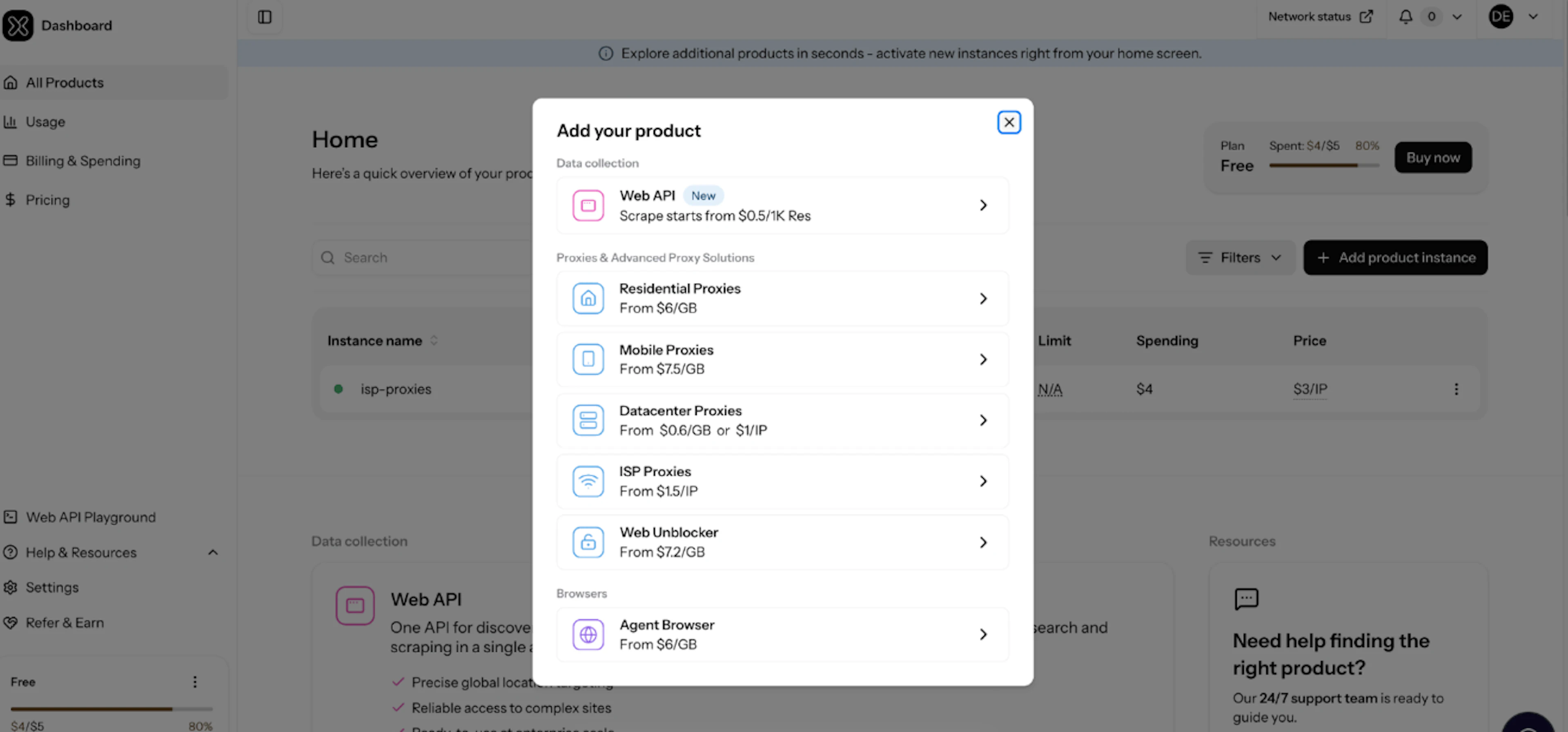
Then, click + Add product instance and select Web API. Finally, choose the instance name, if required – set product usage limits, and create the instance.
2. Get your API key
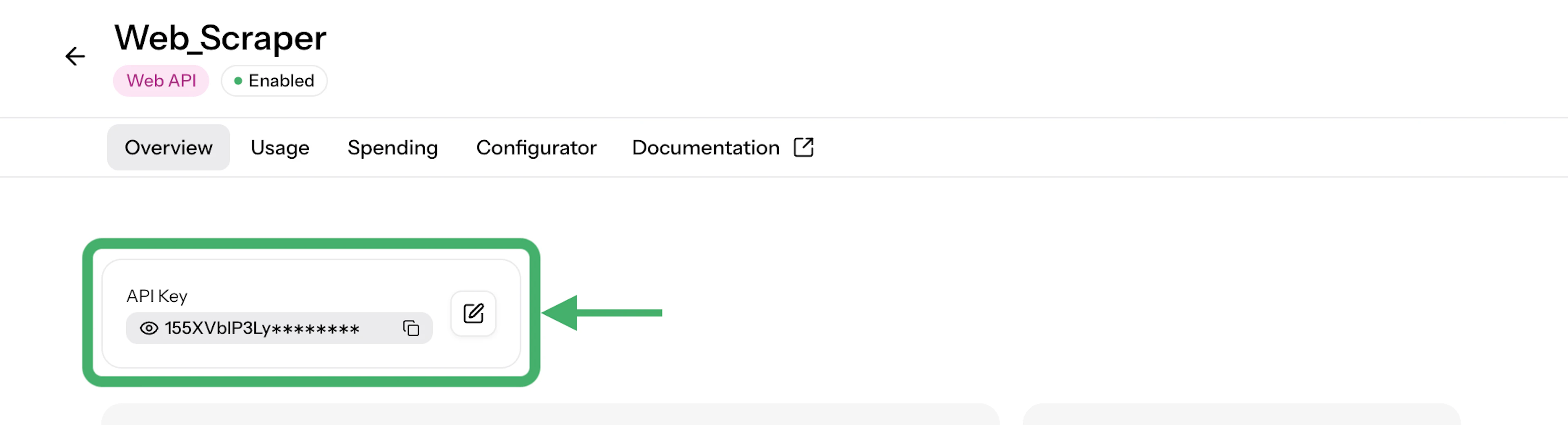
Open your Web API product instance from the dashboard home section. There, look for your new API key at the top of the overview. This key is your access to the Web API.
3. Export the API key
Finally, export your API key into your project environment (e.g. your OS terminal or the CLI terminal of the project workspace)
export OXYLABS_WEB_API_KEY=your_api_key_hereNote: Always keep your key server-side. Never commit it to source control or expose it in client-side code.
Now you have two options:
Plugging this into an AI agent (Claude Code, Cursor, or your own agent)? Skip to AI agent integrations to start using it with one command.
Building your own integration? Start the Manual Integration below.
Manual Web API Integration
1. Search for relevant URLs
The Web API operates on a core design pattern of search to find, scrape to extract. To start, find which pages hold the answer using POST /v1/search:
curl https://webapi.oxylabs.io/v1/search \
  -H "Authorization: Bearer $OXYLABS_WEB_API_KEY" \
  -H "Content-Type: application/json" \
  -d '{"query": "eu ai act compliance deadlines", "max_results": 3}'
Response example:
{
  "state": "done",
  "results": [
    {
      "title": "Implementation Timeline | EU Artificial Intelligence Act",
      "overview": "Date 2 August 2025 Providers: need to be compliant by 2 August 2027...",
      "url": "https://artificialintelligenceact.eu/implementation-timeline/",
      "metadata": { "position": 1 }
    }
  ]
}
Learn more about /search endpoint in our documentation.
2. Scrape the page content
Search snippets (overview) returned from the /search endpoint are truncated. To extract the full, fresh content as clean "markdown" (or any preferred format, such as "json", "html", or a "screenshot"), pass the target URL to POST /v1/scrape with the chosen output value:
curl https://webapi.oxylabs.io/v1/scrape \
  -H "Authorization: Bearer $OXYLABS_WEB_API_KEY" \
  -H "Content-Type: application/json" \
  -d '{"url": "https://artificialintelligenceact.eu/implementation-timeline/", "output": ["markdown"]}'
Learn more about /scrape endpoint in our documentation.
Web API AI Integrations
Oxylabs Web API is designed for easy AI agent workflows using Agent Skills, MCP (Model Context Protocol) or simple one-prompt integrations. Once you have your API key, choose the integration method.
1. Model Context Protocol (MCP) Server
Self-host our official MCP server to expose multiple Web API tools using /search and /scrape endpoints directly to Claude Code, Cursor, or any MCP-friendly AI agent:
uv tool install git+https://github.com/oxylabs/web-api-mcpTo learn more about Web API MCP integration and its tools, see our documentation.
2. Agent Skills
Add official agent skills that teach your AI agent how to search, scrape, cite sources, and handle web research through Oxylabs Web API:
npx skills add oxylabs/web-api-skillsNow your agent knows all there is to know about Oxylabs Web API and how to use it. To learn more about Web API agent skills, see our documentation.
3. One-Page Integration Prompt
If you want an AI coding assistant (like Cursor or Copilot) to build a whole integration for you straight from the chat, paste the following prompt:
"Integrate the Oxylabs Web API into this project for live web search and page reading. Read https://developers.oxylabs.io/products/web-api/for-agents.md and follow its reference code and retry rules. The API key is in OXYLABS_WEB_API_KEY. Execute a test search, scrape the top result as Markdown, and verify error handling."To see a full example and learn more about Web API integration, see our documentation.
Dedicated Scrapers
Beyond the universal URL scraper (POST /v1/scrape), the Web API provides numerous scrapers for specific targets under POST /v1/scrape/{target}/{collection}. That includes search engines, AI & LLM sources, ecommerce sites, and media platforms.
POST /v1/scrape/amazon/product
{ "query": "B0935DN1BN", "output": ["json"], "domain": "de", "location": "10115", "currency": "EUR" }
GET /v1/scrapers returns an up-to-date list of all currently available dedicated scrapers, which collect structured, pre-parsed JSON data.
Learn more about all available targets and their parameters in the API Reference in our documentation.
AI Parsing
You can extract structured fields from any web page in the same request by setting output: ["json"] and providing a prompt or an OpenAPI schema under the json parameter.
Prompt example:
{
  "url": "https://sandbox.oxylabs.io/products/1",
  "output": ["json"],
  "json": {
    "prompt": "Parse the product title, price as a number, currency"
  }
}
OpenAPI Schema example:
{
  "url": "https://sandbox.oxylabs.io/products/1",
  "output": ["json"],
  "json": {
    "schema": {
      "type": "object",
      "properties": {
        "title": { "type": "string" },
        "price": { "type": "number" },
        "in_stock": { "type": "boolean" }
      },
      "required": ["title", "price"]
    }
  }
}
Important: AI Parsing adds extra credit price on top of the standard scraping cost.
Data Delivery
By default, every request above runs in a synchronous realtime method, where the result comes back in the response. Once you're working with large-scale tasks with a chance of client timeout, we recommend asynchronous methods.
| Realtime | Async | Async + storage | |
|---|---|---|---|
| You get | Result in the response | A job ID to poll | A file delivered to your bucket |
| Wait | Seconds, held open | Your polling interval | No waiting |
| Timeout risk | Yes | None | None |
| Good for | One page, used immediately | Batches | Large payloads (media, screenshots) |
Common Response Codes & Retries
| Status | Meaning | Retry? |
|---|---|---|
400 |
Malformed request | No, fix the field named in errors[].pointer |
401 |
Bad or missing API key | No, check the key on your Web API instance |
429 |
Rate limit or spent quota | Rate limit: yes, with backoff. Quota: no |
5xx |
Upstream failure or failed to scrape | Yes, up to ~3 attempts with backoff |
Every response carries a request_id. Include it if you contact support. Learn more.
Core Parameters
/search
| Parameter | Type | Description |
|---|---|---|
query |
string | Search keyword or phrase |
max_results |
array | Number of organic search results to return (1-20) |
location |
string | 2-letter country code (e.g., "DE", "US") for localized search |
/scrape
| Parameter | Type | Description |
|---|---|---|
url |
string | URL to scrape |
output |
array | Formats to return: "html" (default), "markdown", "json", "screenshot" (supports multiple outputs at once) |
json |
object | Used for custom AI parsing through prompt or schema |
location |
string | 2-letter country code (e.g., "DE", "US") for localized search |
run_js |
boolean | Enable JavaScript rendering. Requires 150s timeout. |
device |
string | Device emulation: "desktop" (default) or "mobile". |
Web API Playground
While the Oxylabs Web API is built for programmatic data pipelines, you can also test and explore requests in a visual, UI-based sandbox using the Web API Playground.
Rather than modifying scripts or re-running terminal commands to debug parameters, the Playground allows you to interactively prototype queries, evaluate parsing output, evaluate request configurations against live targets, and get ready-to-use code samples for further implementation.
The playground is found directly inside your Web API product instance overview in the Oxylabs Dashboard.
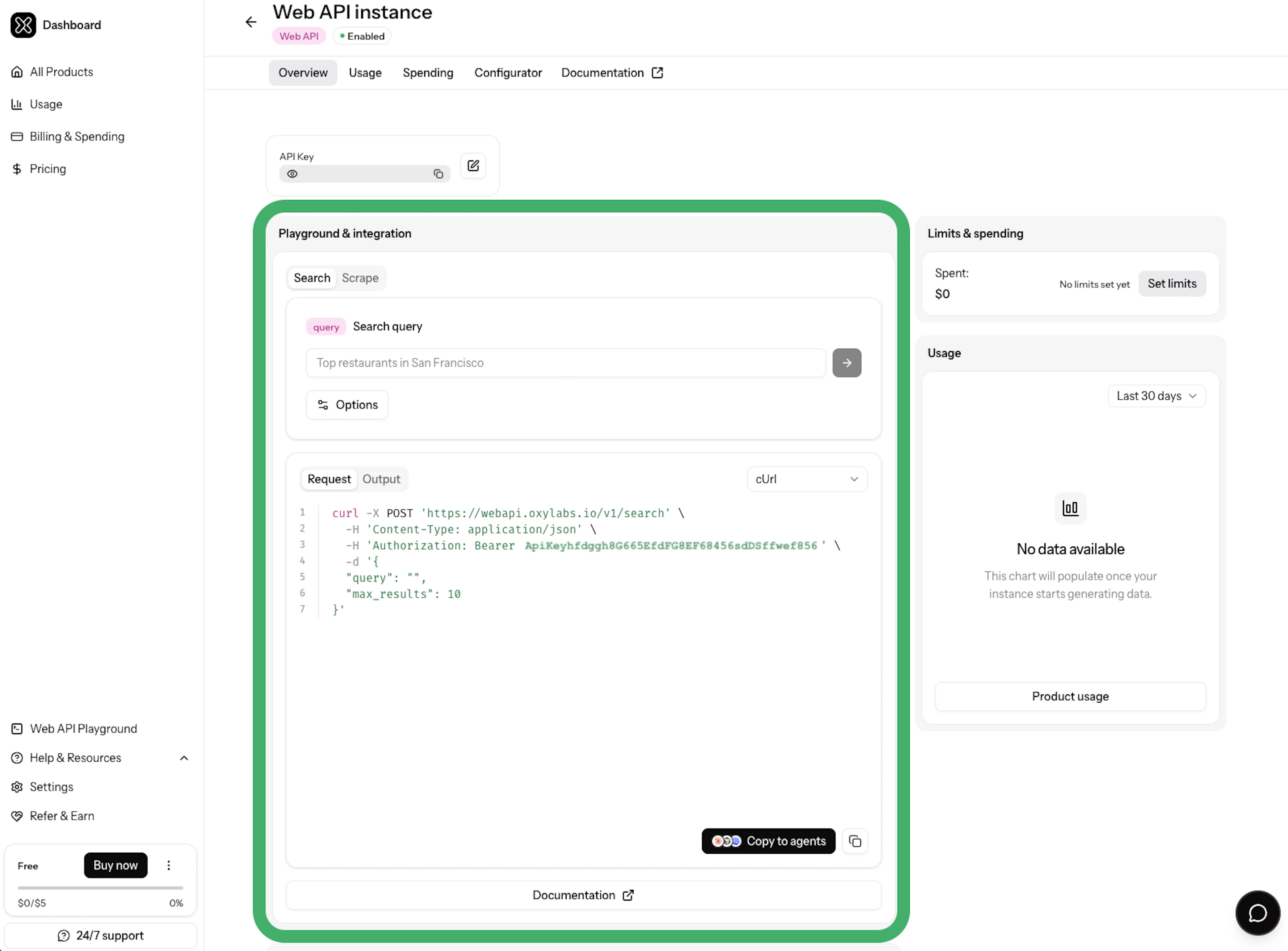
The Playground allows you to prototype both core endpoints without touching your terminal:
Prototype Search queries (/v1/search) – test Search endpoint for any queries and localize search rankings with country-level targeting.
Test Scrape requests (/v1/scrape) – paste target URLs to test real extraction. Toggle browser-level settings, such as headless JavaScript rendering or device emulation, and retrieve results in chosen output formats, such as raw HTML, clean Markdown for LLM pipelines, or screenshots.
Inspect live responses – run requests directly in the Oxylabs infrastructure to review response times, HTTP status codes, and the returned data structure in the Output console.
Export production code – once you're satisfied with the results, switch to the Request console to copy ready-to-use code snippets pre-populated with your instance's API key.
For a detailed step-by-step guide, visit our Web API Playground documentation page.
Usage statistics
The Usage section of your product instance lets you see detailed information on your Web API usage in any time range and check per-endpoint statistics. You can see usage graphs for any selected period and use finer filters.
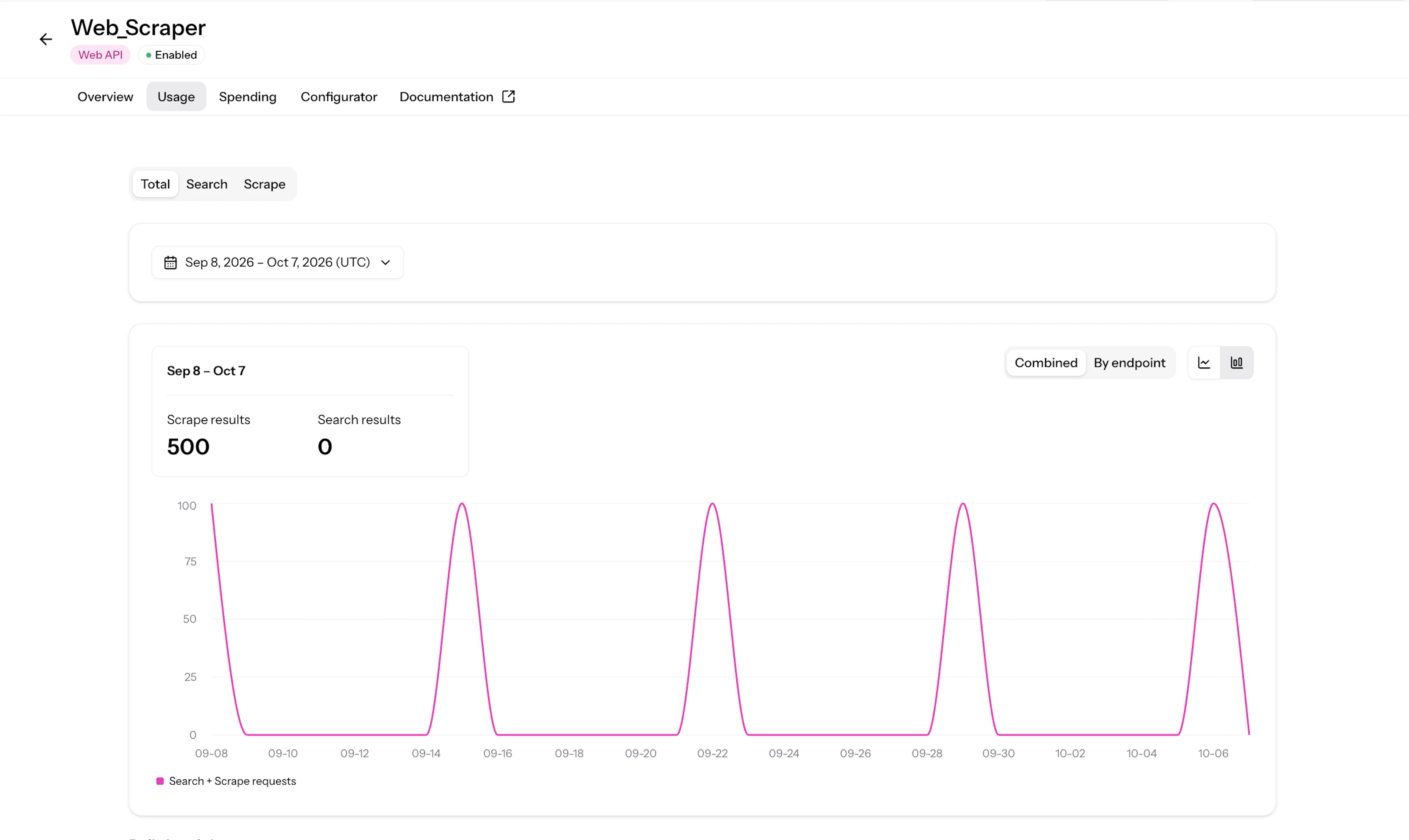
Additionally, you check daily breakdowns for each endpoint usage and their success rates.

Additional Resources
Frequently Asked Questions
How does billing work for Oxylabs Web API?
Billing is calculated per successful request (200 OK or 202 Accepted). Failed requests (4xx) and unsuccessful scraping jobs (500) are not charged from your account budget.
Do I need separate keys for /search and /scrape?
Can Web API scrape JavaScript-heavy pages?
Do I need to write code to use this?
Can I try Web API for free?
About the author

Dovydas Vėsa
Technical Content Researcher
Dovydas Vėsa is a Technical Content Researcher at Oxylabs. He creates in-depth technical content and tutorials for web scraping and data collection solutions, drawing from a background in journalism, cybersecurity, and a lifelong passion for tech, gaming, and all kinds of creative projects.
All information on Oxylabs Blog is provided on an "as is" basis and for informational purposes only. We make no representation and disclaim all liability with respect to your use of any information contained on Oxylabs Blog or any third-party websites that may be linked therein. Before engaging in scraping activities of any kind you should consult your legal advisors and carefully read the particular website's terms of service or receive a scraping license.
Related articles



One API for fresh public data
Find and extract real-time data from any public website at scale.

Get the latest news from data gathering world