
What Is an MCP Server?

Dovydas Vėsa
Last updated on
2026-09-28
12 min read
 AI Summary:
In this article, you will learn what Model Context Protocol (MCP) servers are and how they replace custom AI integrations with a single, standardized interface. It covers how host, client, and server components work together, highlights practical use cases ranging from coding assistants to enterprise automation, and compares MCP against traditional APIs. You will also discover essential security risks, key criteria for selecting or building the right server, and where to find trusted options across the ecosystem.
If you connect an AI system to ten different tools the old way, you have to write ten custom integrations. And then maintain every one of them, manually.
The Model Context Protocol (MCP) changed that. An MCP server gives AI applications one standardized interface to reach external tools and data sources. The integration work often shifts to the tool's provider or the open-source community, and it works across any MCP-compatible application.
In this article, you'll learn what an MCP server is, how AI agents work with one, MCP benefits, use cases, how it compares to APIs, and how to choose the right server.
The problem AI agents had before MCP
Before MCP, an AI application reached each tool through whatever interface it exposed, and every one was different. Most services share their features through an API, built so developers could call it from their own code, not so AI systems could use it directly. Each API comes with its own endpoints, parameters, authentication, error handling, and response formats, even when two providers sell the same kind of product. To integrate a tool, you read its documentation, wrote custom code to call it, and described each function in a way the AI model could understand and use.
And that's just one tool, for one app. Connect the same tool to a second AI application or agent framework, and you had to rebuild most of that integration to fit the new app's setup. Add a new tool, and it's more integration work. When a provider updated its API, every copy of that integration needed patching.
Wire up five tools to the app the old way, and you may tie up a small team for weeks. Connect them through MCP instead, and one developer may finish in days.
What was missing was a standard protocol: a single way for any AI application to find and use the tools it needs. That's the gap MCP addresses.
What is an MCP server
An MCP server is a backend program that connects an AI application (software running an AI model) to external tools and data sources, such as APIs, custom scripts, databases, or local files. It wraps them, describes what they can do, and gives the AI model access to their functions and underlying data.
A Model Context Protocol is a standard that defines a set of rules, while an MCP server makes the specific tool or external data source follow the rules, so any MCP-compatible application can just plug it in and use it without needing a custom integration.
Think of it as Bluetooth: your computer connects to keyboards, headphones, or speakers from any manufacturer as they use a single standardized protocol. When connected, each accessory tells your computer what it can do.
Bluetooth → the Model Context Protocol
Your computer → the AI application
Accessories → external tools and data sources
The Bluetooth chip in each accessory → the MCP server
MCP defines three distinct capabilities an MCP server can expose:
Tools – Functions the AI model can call to perform an action or data retrieval.
Resources – Read-only data, local or remote, the MCP server shares as context. The host or user decides when to give it to the model.
Prompts – Pre-written instructions for common AI tasks that are ready to use or additionally populated with custom inputs.
Benefits of an MCP server
Standard integrations
Every kind of external system connects in its own way. A web API needs an HTTP client with auth and error handling, a database needs a driver, OS controls need system calls, and local files need a file operations handler. Without MCP, you implement each of these yourself.
An MCP server already handles that work for whatever it wraps. All you write is the connection to the server, and that connection pattern looks the same no matter what sits behind it.
Easier access to external data and tools
Many service providers and open-source communities ship pre-built MCP servers that convert complex interfaces, such as APIs, into capabilities AI systems can use immediately.
Without MCP, you need to analyze the provider’s documentation, test the service to understand the flow, inputs, and responses, and write the integration that lets AI use the tool functions. With MCP, all that is already done by the provider’s development team or the community, so you only need to configure the MCP connection.
Interoperability and reusability
An MCP server runs independently from the MCP-compatible software that uses it. As both sides communicate the actions and data via a standardized protocol, neither one’s programming language or framework matters. This means each server is a building block developed once and reused across every AI agent, AI tool, and team.
If you build a LangChain tool in Python, it can only work in Python LangChain agents. It can never be used as is in Claude Desktop, Cursor, or your co-worker’s Java agent. The same tool built as an MCP server works in all of them, with the exact tool functions, resources, prompts, and access rules.
Reduced custom integration work
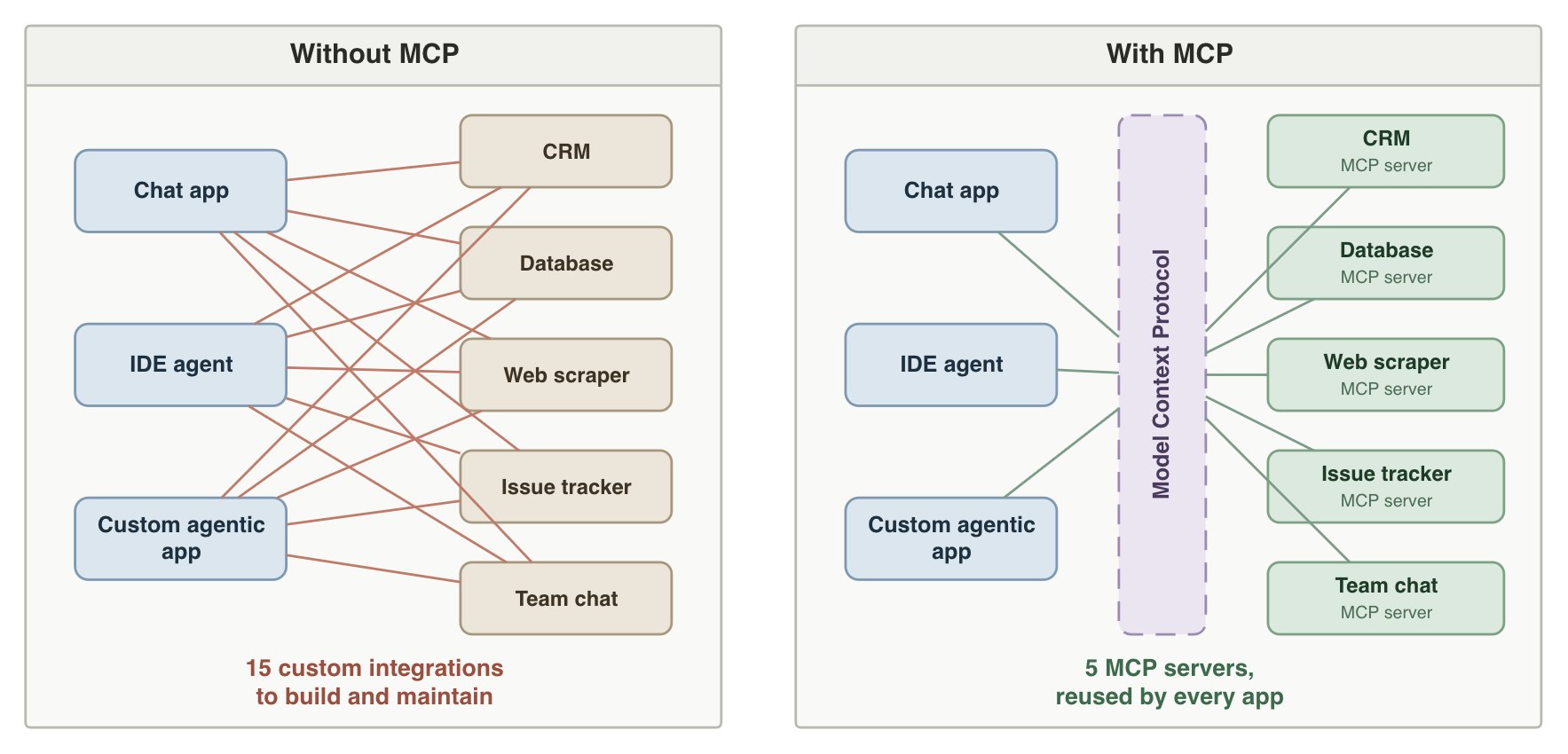
Each tool you want to connect to your project needs only one MCP server, not a separate integration for every app that uses it.
For example, with 3 AI applications and 5 third-party tools used by all apps, a custom integration requires you to build and maintain 15 connections. With MCP, you only need to adjust each app’s configuration so they connect to 5 ready-made servers.
The gap widens as your project grows – a 6th tool means 3 new custom integrations, while the MCP approach needs only a single new MCP server added to the config.
How an MCP server works: client, host, and server
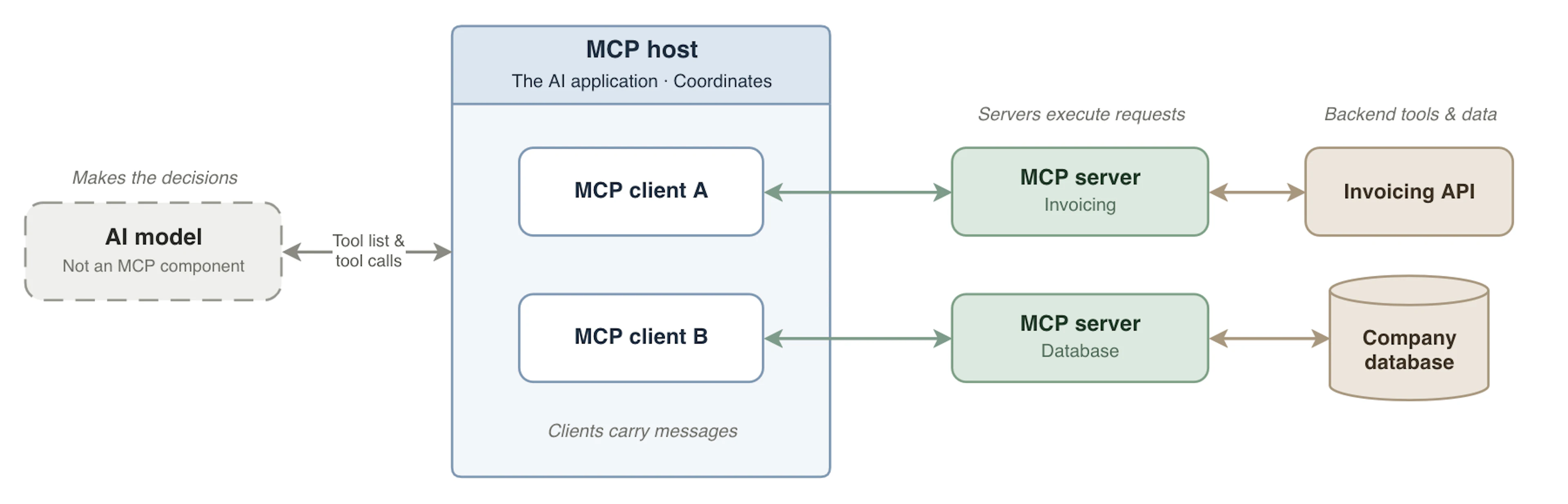
Every MCP connection involves three components: host, client, and server, often confused with each other.
Host
Purpose: coordinator.
An MCP host is the AI application that creates and manages MCP clients and coordinates communication between them and AI models. It can be an AI agent, an agent API, an integrated development environment (IDE), an AI assistant, an automation app, a CLI tool, and other AI-powered tools.
The host is the only component that directly communicates with the AI models.
Client
Purpose: message carrier.
An MCP client is the connector inside the host that manages all communication with a single MCP server.
A single client can talk to exactly one server, so a host connected to two different MCP servers runs two separate MCP clients.
Server
Purpose: request executor.
An MCP server handles client requests. It connects to the backend tools and data sources, handles tool execution, and returns data to the client.
As a reminder, a server holds the tool metadata, executable functions, resources, and prompts.
Unlike a client, a remote server can have many different MCP clients talking to it at once. However, a local server can serve a single client at once when running over the standard input/output transport layer.
All three in action
For example, say you’ve written an application that connects an AI model to an MCP server of an invoicing service. Here’s what happens:
The application (the host) launches an MCP client for the invoicing server.
The client connects to the server and uses dynamic tool discovery to get a list of its tools with names, descriptions, and supported input parameters.
You ask: “Which customers haven't paid this month?”
The host sends your question and the complete tool list to the AI model.
The AI model sees that list_unpaid_invoices fits the request. It replies with a tool call – the tool's name and inputs.
The host passes that tool call to the client, which sends it to the server.
The server makes a request to the invoicing service’s API and returns a structured response to the client.
The client passes the result to the host, which sends it to the AI model to answer your question or call another tool (e.g., send_reminder).
The AI model itself isn’t a component of the MCP architecture, but it makes the decisions. So, in essence, the host coordinates communication, the client carries messages, and the server executes actions retrieving relevant information.
Model Context Protocol server use cases
Let’s overview some of the most common MCP server use cases.
Coding assistants and dev workflows
Coding agents are already powerful: they can read and edit local files, run commands, and analyze entire codebases in minutes.
MCP servers can expand and improve their capabilities by giving context that’s outside the repository and the model’s training data. Think real-time access to extensive library documentation, CI results, issue trackers, internal dev tools, databases, and other tools and external data sources.
For example, a typical agentic development workflow automated via MCP may look like this:
An AI agent pulls a bug ticket through the issue tracker’s MCP server.
It analyzes and edits the code with the built-in tools of its agent harness.
The agent then runs the CI/CD tests.
All tests pass, and the agent comments on the ticket with a summary of the fix.
Database and data source querying
A database, warehouse, or spreadsheet MCP server gives analysts, strategists, and internal agents fresh access to enterprise data, without a custom integration for each.
Such servers can expose the database schema (tables and columns) as a resource and provide a tool for running SQL queries. The AI model reads the schema and writes the SQL, while the server runs it and returns the results. The same server works across an analyst's AI assistant, a reporting agent, or a coding agent.
Since the AI system can write any query which should not be blindly trusted, and databases often hold sensitive data, setting data access limits in both the MCP server and the database itself is important.
Customer support and CRM automation
You can also use MCP servers to improve customer relations workflows and significantly speed up communication.
Such servers can expose AI systems to support or CRM platform’s anonymized customer records, ticket history, and help desk articles, plus enable actions like tagging tickets, updating ticket fields, drafting replies, and creating follow-up tasks. In more advanced automation cases, MCP servers can be used to expose customer call transcripts as resources, use AI tools to evaluate them against your QA rubrics, and then log the scores back to CRM.
A human-in-the-loop (HITL) is important to implement here, so that sensitive actions, such as final customer-facing replies, record changes, and refunds, would require human approval.
By any means, stringent security and data privacy measures must be considered and implemented when working with sensitive customer data.
Web data and browser automation
Major AI providers give their large language models built-in web search capabilities that are usually expensive, getting worse as you scale. Sometimes, built-in web search may run into blocks and the model simply can’t access any web data at all.
This is where MCP servers provide an often cheaper, more consistent, and more successful solution. One way is agentic search: let AI control a web scraper that gets search engine results, scrapes relevant pages, and returns clean Markdown or JSON for ingestion. You can also let it control the browser itself, so AI can do actions like navigate pages, click elements, scroll, fill forms, and access real-time data.
Both methods improve agentic RAG, autonomous research, monitoring, and decision-making workflows with greater success rates at a fraction of the cost. For example, the Oxylabs MCP server wraps an enterprise-grade scraping infrastructure that handles blocks, CAPTCHAs, dynamic content, localization, session management, data parsing, and scaling, turning it into simple tools the AI can use.
Enterprise workflow orchestration
Enterprise data and workflows hardly ever live in one system. A single process may need a database, a CRM, a ticketing platform, internal documents, fresh web data, and team chat. Enterprise automation without MCP means building dedicated integrations between systems, which are rigid and break when systems change.
With MCP, each system has its own server, and one AI agent can use multiple tools across several servers at once, allowing it to read from one and act in another. This turns separate business systems into reusable building blocks.
Working across silos – Enterprise data and actions can be combined from systems that were never integrated together, without needing a direct connection between each service.
No rebuilding needed – Adding, replacing, or removing a system can be as simple as connecting, swapping, or deleting one MCP server’s configuration.
Flexibility – An agent doesn’t follow fixed steps, so whenever an exception occurs, it can take a different approach using whichever connected system the case requires.
MCP server vs. traditional APIs
The main distinction is that MCP servers are interfaces built for AI models to use on their own, while traditional APIs are for developers to code against so software can talk to a service. MCP servers don’t replace APIs; they often call APIs underneath.
Both solutions coexist. Many companies provide an API and an MCP server, both built on top of the same business logic and infrastructure. But usually, MCP isn’t an exact copy of an API. Under the hood, it may merge related operations, such as different API endpoints, into task-level tools.
Let’s lay out the differences clearly in a table:
| MCP server | API | |
| End user | AI models | Developers |
| Purpose | Let AI discover and use connected tools and data | Let programs exchange data and trigger actions in a service |
| Who decides what to call | The AI model at runtime | The developers when writing code |
| How it's documented | Tool names, descriptions, and input JSON schemas the model reads | Documentation and specifications the developer reads |
| Interface | One standard way to list and call tools on every server | Each API has its own endpoint, formats, and conventions |
| Typical unit | Tools, often one per task, sometimes combining several API calls | Endpoint, often one per operation |
| Call pattern | The model may choose different tools for similar requests | The same code makes the same calls every time |
So, when should you use each?
Use an API when the steps are fixed and known in advance, and no AI system needs to decide what happens.
Use an MCP server when an AI system should choose the actions itself, or when the same tools need to work across different AI applications.
Use both when an AI agent handles the open-ended parts of a task through MCP, while the fixed steps need direct API calls.
Where to find good Model Context Protocol servers
MCP servers are listed just about everywhere, but the harder part is picking the one you can trust.
Start with your MCP host. Many have built-in directories with one-click setup: Claude's Connectors, ChatGPT's plugins, VS Code's MCP gallery.
For a wider search and reach:
Official sources – The official MCP Registry provides public servers whose publishers have verified ownership of their namespace (a GitHub account or domain). The official MCP servers GitHub repository also hosts reference MCP server implementations, but treat those as learning examples.
Curated catalogs – The GitHub MCP Registry offers curated installs in VS Code, while the Docker MCP Catalog ships Docker-signed local servers as isolated containers, plus remote servers.
Community directories – Smithery, PulseMCP, Glama, and the awesome-mcp-servers GitHub list hold the widest selection in the MCP ecosystem, but quality and vetting principles vary.
Vendor documentation – For a specific service, you can usually find a link to the official MCP server in the documentation.
Being listed is no guarantee the server is safe and useful, so check it before connecting it to your AI application:
Source – Who publishes it? Prefer the service's own vendor.
Maintenance – Is it actively updated, and are issues answered?
Documentation – Does it cover every tool and how to set it up?
Permissions – What can it change or delete, and can you restrict that?
Authentication – OAuth or API keys, and can you scope access?
Security – Can you control what’s sent to the remote server?
MCP server risks and security considerations
While the Model Context Protocol standardizes how AI applications connect to external systems, it doesn't make those connections safe. The MCP specification leaves consent, access, and data protection to whoever sets things up, and the NSA warns that MCP adoption has outpaced its security model.
So safety comes down to your setup: which servers you trust, what your app lets them do, and which actions need approval.
Untrusted servers – A local server runs code on your machine with your permissions, and any server can hide instructions in its tool descriptions that the model reads but you don't. It can also change those descriptions after you approve it. Stick to trusted publishers, pin versions, and run local servers in containers.
Permissions – The agent can reach everything the server's credentials allow. Grant the least access that works: read-only where possible, scoped to the task, and separate accounts for different jobs.
Actions – One wrong call can delete, send, or overwrite data, whether from a model mistake or a prompt injection hidden in a web page, email, or ticket. Treat every tool output as untrusted, and keep destructive actions behind a HITL approval.
Credentials – API keys often sit in config files with broad access, and one config pushed to a repository leaks them. Use OAuth with scoped tokens where the server supports it, and a dedicated key per server.
Data exposure – Whatever a tool returns can enter the model's context and reach your model provider, and remote servers see whatever you send them. The biggest security threat is one agent that has private data, untrusted content, and a way to send data out. Remove one of the three.
Operational risks – Expect outages, rate limits, and runaway loops that rack up cost. Set timeouts and spending caps, and use audit logging for every tool call.
Choosing the right MCP server
The right MCP server is the one that fits your task, your AI application, and your workload. Consider these factors:
What it exposes – Do its tools, resources, and prompts cover your task? Watch for access you don't need.
Compatibility – Does your AI agent or app support the server and the features it uses? Not every MCP host and server supports resources or prompts. Some hosts also connect to remote servers only.
Local or remote – A local server can reach the file systems and tools on your own machine, but you handle the server setup and updates. A remote server needs no installation and works across devices, though your data passes through the provider.
Security – Evaluate the risks and data handling as covered earlier. For business data, also check where it goes and whether it's stored or logged.
Reliability and maintenance – Is the server actively updated? For remote ones, look for published uptime, rate limits, and quotas. For local ones, check that your machine can handle several AI agents at once.
The service behind it – A server that works fine on small tasks may fail once you scale up, especially at enterprise scale. Weigh its limits and pricing against your expected volume.
For specific recommendations, see our best MCP servers guide.
Conclusion
An MCP server gives an AI application a standard way to use external tools, read resources, and run built-in prompts, all without a custom integration for each one. That access isn't tied to one specific AI application either. Since every server follows the Model Context Protocol, it works with any MCP-compatible app.
But the standard doesn't guarantee trust. A server can expose too much, or too little, and someone still has to decide what it's allowed to read, change, and send. That's the part no protocol can do for you, and it's worth getting right.
Frequently asked questions
What's the difference between MCP and an MCP server?
The Model Context Protocol (MCP) is a set of rules for how AI applications and external systems communicate. An MCP server is a program that follows those rules connecting AI systems to external tools and data sources, such as APIs, databases, or local files. Put simply, MCP is the standard, and an MCP server is a program built to it. There's one protocol, and thousands of MCP server implementations run on it.
Does ChatGPT or Claude support MCP?
How do I start building my own MCP server?
Is an MCP server a real server?
What's the difference between a remote and a local MCP server?
About the author
Dovydas Vėsa
Technical Content Researcher
Dovydas Vėsa is a Technical Content Researcher at Oxylabs. He creates in-depth technical content and tutorials for web scraping and data collection solutions, drawing from a background in journalism, cybersecurity, and a lifelong passion for tech, gaming, and all kinds of creative projects.
All information on Oxylabs Blog is provided on an "as is" basis and for informational purposes only. We make no representation and disclaim all liability with respect to your use of any information contained on Oxylabs Blog or any third-party websites that may be linked therein. Before engaging in scraping activities of any kind you should consult your legal advisors and carefully read the particular website's terms of service or receive a scraping license.
Related articles





Explore Fast Search API
Organic search results scraper for AI/ML teams building apps, training models, and powering research.

Get the latest news from data gathering world
Scale up your business with Oxylabs®
Explore Fast Search API
Organic search results scraper for AI/ML teams building apps, training models, and powering research.