

 AI Summary:
Web indexing is the process search engines use to discover, organize, and store web pages in a searchable database, making near-instant search possible. This guide explains how crawling, indexing, and ranking work together, why pages may fail to get indexed, and the practical steps you can take to improve your website's visibility in search results.
Type a query into a search engine and results appear in a fraction of a second. It feels like the engine just went out and read the entire internet on your behalf, but it didn't. It read a copy it had already prepared, organized, and stored – and that copy is its web index.
Web indexing is the process that builds and maintains that copy. We can also say that web indexing is the reason search feels instant, why a page you published this morning might not be findable yet, and why two search engines can return completely different results for the same query.
This guide covers what a web index actually is, how the crawling–indexing–ranking pipeline works, why perfectly good pages get left out of it, and, finally, what you can do to speed up site indexing on your own website. Along the way, you'll find working code snippets, an HTTP status code reference, and a couple of checks you can run on your own domain.
What is a web index
A web index is a searchable database of web pages that a search engine has discovered, fetched, and processed. It is not the internet, nor a mirror of the internet. The web index is a structured store built for exactly one job – given a query, return the most relevant documents in milliseconds.
Under the hood, most web indexes are built around an inverted index. Instead of storing "this page contains these words," the engine flips the relationship and stores "this word appears on these pages," along with where it appears, how often, and what surrounds it. That inversion is what makes searching an enormous corpus fast.
But keep in mind, when you search, you are searching the search engine's index, not the live web. Results are returned from stored, processed copies. That's why a page deleted an hour ago can still appear in results, and why a page published this morning may be invisible for days.
Every search engine maintains its own index. Google, Bing, Yandex, Brave, and Mojeek all run their own crawlers, make their own decisions about what's worth storing, and refresh at their own pace. Their internet indexes overlap heavily but are never identical, which is why the same query produces different results across engines.
Some services run a crawler of their own but license most of their web results. DuckDuckGo, for instance, operates DuckDuckBot, yet leans heavily on Bing's index for traditional web results. A growing number of AI search products sit on top of a third-party index for the same reason, as building one from scratch is expensive.
How does web indexing work
The web indexing process consists of four stages:
Discovery – how a URL gets into the crawl queue in the first place.
Crawling – looking into URLs and fetching what's at them.
Indexing – parsing, interpreting, and storing what was fetched.
Ranking – ordering stored pages against a specific query, at the moment someone searches.
It's tempting to picture this as an assembly line that each page travels once. But that’s not the case. The process is continuous, so crawlers revisit known URLs on a schedule, the index gets updated or pruned, and ranking is recalculated for every query, rather than stored in advance.
The other thing worth internalizing early: every stage is a filter. Pages fall out at each step, and a page must clear all of them to appear in search results.
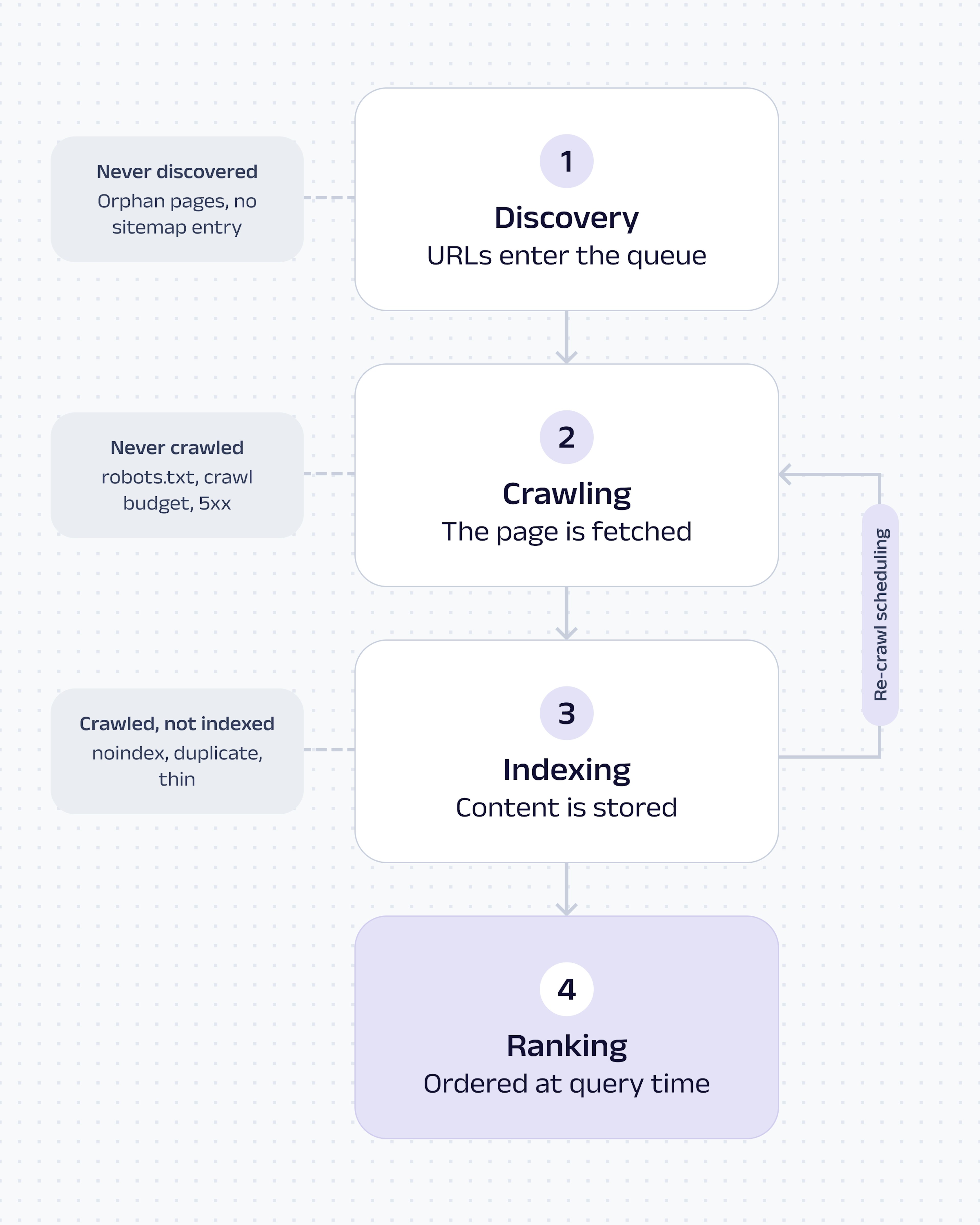
The web indexing pipeline. Discovery and crawling feed the index; ranking happens at query time.
Web crawling
Web crawlers, also called spiders or bots, are programs that request web pages automatically. Googlebot, Bingbot, and YandexBot are the best-known examples, but every search engine and most AI data pipelines run one.
The core loop is simple. A crawler starts with a list of known URLs, requests each one, reads the HTML, extracts every link it finds, adds the new URLs to its queue, and repeats. Left alone, the loop never ends, because the web keeps producing links.
If you want to build one yourself, our guide on how to crawl a website walks through the process in Python.
New pages enter that queue through four main routes:
Internal links. The most reliable route. If a crawler is already on your site, links are how it finds the rest.
Backlinks. A link from an already-crawled external page introduces your URL to engines that have never seen your site.
XML sitemaps. A machine-readable list of the URLs you consider worth crawling, with optional last-modified dates.
Direct submissions. Tools like Google Search Console or Bing Webmaster Tools let you hand over a specific URL.
Before requesting anything else on a domain, a well-behaved crawler asks for robots.txt – a plain-text file at the root of the site that tells automated clients where they should or shouldn't spend requests. Here's a minimal one:
User-agent: *
Disallow: /cart/
Disallow: /search?
Allow: /search?q=featured

Sitemap: https://example.com/sitemap.xml
And here’s how the request works line by line:
User-agent: * applies the rules to every crawler;
Disallow marks paths crawlers should skip;
Allow carves an exception out of a disallowed pattern;
Sitemap points to your URL list, which is now one of only two supported ways to hand Google a sitemap.
One nuance trips up many teams. A Disallow rule keeps compliant crawlers from fetching a page, but it does not remove that page from an index. If other sites link to the URL, a search engine can still list it – usually with no description, because it was never allowed to read the content. To keep a page out of the index, you need a noindex directive on a page that crawlers are permitted to fetch. A noindex tag on a disallowed URL is a contradiction: the crawler can't read the instruction it's supposed to obey.
What comes back from the request matters just as much as the request itself. These are the status codes that shape crawling and indexing:
| Code | Meaning | Effect on crawling and indexing |
| 200 | OK | The page was served successfully and is a candidate for indexing. |
| 301 | Moved permanently | Signals a permanent move. Ranking signals are consolidated to the target URL, which is indexed in place of the old one. |
| 302 | Found (temporary) | Signals a temporary move. Engines usually keep the original URL indexed, so it's a poor choice for permanent changes. A 302 left in place long enough is eventually treated as permanent anyway. |
| 304 | Not modified | Tells the crawler nothing has changed since the last visit. Saves bandwidth on both sides and helps preserve crawl budget. |
| 404 | Not found | The page is gone with no explanation. Engines re-check for a while before dropping it from the index. |
| 410 | Gone | An explicit "permanently removed." Usually removed marginally faster than a 404; Google describes the difference as small. |
| 429 | Too many requests | The server is asking for a slower crawl rate. Persistent 429s reduce how much of the site gets fetched. |
| 503 | Service unavailable | Treated as temporary. Fine for short maintenance windows; damaging to indexing if it persists for days. |
Some pages are never crawled at all. The usual reasons:
Nothing links to them. Orphan pages that aren't in a sitemap and have no inbound links are effectively invisible.
A robots.txt rule excludes them. Often unintentionally, via a broad pattern like
Disallow: /*?Crawl budget runs out. Search engines allocate a finite number of requests per site, based on server capacity and how valuable the site looks. Faceted navigation, session IDs, and endless URL parameters burn through that allocation on near-identical pages.
The server is slow or unreliable. Crawlers reduce their request rate when a site responds slowly or returns errors, so fewer URLs get fetched per visit.
The web content sits behind a login, paywall, or form. If a crawler can't reach it anonymously, it doesn't exist as far as the index is concerned.
The page is buried. URLs seven or eight clicks from the homepage get crawled rarely, if at all.
If you're building crawling infrastructure yourself rather than analyzing someone else's, the same mechanics apply – you just own all of them. Our Web Scraper API handles the fetching layer of that pipeline (request delivery, JavaScript rendering, retries, and structured output), so your engineering time goes into deciding what to collect and how to use it. For a deeper look at how crawlers are built and where they're used commercially, see our guide on what a web crawler is and how it works.
Page indexing
A successful fetch gets a page into the processing stage – not into the index. What happens next determines whether it's stored at all.
Parsing and rendering. The engine breaks the HTML into its components: text, headings, links, image alt attributes, and semantic elements. Because so much of the modern web builds its content in the browser, engines also render pages, executing JavaScript the way a browser would. Rendering is expensive, so it happens in a separate queue. Content that exists only after client-side JavaScript runs is therefore indexed later, and sometimes not at all, if the script fails or depends on resources the crawler can't load.
Metadata extraction. Titles, meta descriptions, heading hierarchy, hreflang annotations, and structured data are pulled out and stored alongside the text. These don't determine rankings on their own, but they shape how a page is understood and how it's displayed in results.
Canonicalization. The same content is frequently reachable at several URLs: with and without a trailing slash, with tracking parameters, in a print view, or under multiple categories. Engines cluster those duplicates and pick one version – the canonical – to index. You state your preference like this:
<link rel="canonical" href="https://example.com/page">Placed in the <head>, this tells search engines which URL you consider the primary version of the content, so ranking signals consolidate there instead of splitting across duplicates. It's a strong hint, not a command, so if your internal links, sitemap, and redirects all point somewhere else, an engine may pick a different canonical anyway.
Structured data. Schema.org markup, usually delivered as JSON-LD, describes what a page is about in a format that needs no interpretation. It's how an engine knows a page is a recipe with a 40-minute cook time rather than an essay that mentions cooking:
<script type="application/ld+json">
{
  "@context": "https://schema.org",
  "@type": "Article",
  "headline": "What Is Web Indexing? And How It Works",
  "datePublished": "2026-07-22",
  "author": { "@type": "Organization", "name": "Oxylabs" }
}
</script>
Accurate structured data makes a page eligible for rich results and gives AI-powered search tools a cleaner signal about what they're reading.
Even after all this, a crawled page can still be left out of the index. The usual causes:
A noindex directive. Explicit and absolute – engines honor it.
Duplicate content. Another URL was selected as canonical, so this one is stored only as a reference to that cluster.
Thin content. Tag archives, near-empty category pages, auto-generated location pages with one word swapped out.
Low perceived value. Proper indexing costs storage and compute. Website pages that look unlikely to ever satisfy a query may simply not be worth keeping.
The noindex directive itself is one line in the <head>:
<meta name="robots" content="noindex">For non-HTML files such as PDFs, the equivalent is an X-Robots-Tag: noindex HTTP response header. In both cases, the page must remain crawlable for the instruction to be read.
Ranking algorithms
Getting indexed is necessary for visibility. It guarantees nothing beyond eligibility. The index is the pool of candidates; ranking decides which of them a user actually sees, and it's recalculated for every query.
The signals that feed that decision fall into a few broad groups:
Relevance. How well the web content on the page, entities, and context match the meaning of the query, not just the relevant keywords.
Authority. Signals of trust and expertise, historically dominated by links from other reputable sites.
Freshness. Weighted heavily for queries where recency matters and barely at all for stable topics.
Page experience. Load performance, layout stability, mobile usability, HTTPS, and how intrusive the interface is.
User intent. Whether the format matches what the searcher wants – a definition, a comparison, a product, a video, or a local result.
These systems change constantly. Search engines ship thousands of adjustments a year, plus periodic core updates that visibly reshuffle results, and generative summaries have changed how results are presented on top of that. Any single-signal optimization strategy has a short shelf life; content that genuinely answers the query is the only input that has survived every algorithm generation so far.
Why are internet indexes important
Without an index, a search engine would have to fetch and evaluate live pages at query time. Even ignoring the load that would put on every website in the world, the response time would be measured in hours. The index is what converts an impossible problem into a solvable one.
Speed. Matching a query against a pre-built inverted index takes milliseconds, because the expensive work (fetching, parsing, rendering, scoring) was done in advance.
Scalability. Each page is processed once per crawl and then reused across billions of queries. That amortization is the only reason web-scale search is economically viable.
Relevance. Because content is stored in a normalized form, engines can pre-compute quality signals, resolve duplicates, and understand entity relationships – work that would be impossible to do on the fly.
The same architecture powers far more than public search engines. Enterprise search indexes internal documents so employees can find a contract clause without knowing which folder it's in. E-commerce site search indexes the catalog so filtering across a million SKUs stays instant. And AI-powered search (retrieval-augmented generation, research assistants, autonomous agents) depends entirely on a retrieval layer: a model can only reason about documents that some index can surface for it. The quality and freshness of that index sets a hard ceiling on the quality of the answer, which is why access to reliable, current web index data has become an infrastructure question rather than an SEO one.
Practical ways to speed up web indexing
You can't force indexing. You can remove the friction that delays it and make your pages easier to justify storing. In rough order of priority:
1. Submit an XML sitemap
A sitemap is a machine-readable list of the URLs you want crawled, with optional lastmod timestamps that help engines prioritize re-crawls. Keep the sitemap accurate: include only canonical, indexable URLs that return 200, and make sure lastmod reflects real content changes.
Two important corrections to advice you'll still find in older articles:
The sitemap ping endpoint is retired. Google announced its deprecation in June 2023, and it now returns a 404. Requests to it do nothing. Bing retired its equivalent as well.
There are two supported submission routes today. A Sitemap: line in robots.txt, and the Sitemaps report in Google Search Console or Bing Webmaster Tools.
If you want a push-style notification, the modern equivalent is IndexNow, an open protocol supported by Bing, Yandex, Seznam, and Naver.
IndexNow requires proof of ownership first: host a UTF-8 text file named after your key at the site root, https://example.com/YOUR_KEY.txt, containing the key itself. With that in place, a single URL submission looks like this:
https://api.indexnow.org/indexnow?url=https://example.com/new-page&key=YOUR_KEYGoogle does not participate in IndexNow, so treat it as coverage for the rest of the search landscape rather than a replacement for sitemaps and Search Console. It's still worth implementing: Bing's index feeds several AI search products.
2. Improve internal linking
Internal links are the primary discovery mechanism and one of the clearest signals of what you consider important. Aim for anything meaningful to be reachable within three clicks of the homepage, add contextual links from established pages to new ones, and use descriptive anchor text instead of "click here." A new page linked from a frequently crawled hub page tends to get picked up far faster than one linked from a dormant archive.
3. Publish unique, high-quality content
Indexing is a resource decision. Pages that duplicate what's already stored are the easiest ones to skip. Original data, first-hand experience, and genuine depth are what make a page worth the storage cost. This is also the most durable investment on this list, because it's the one thing every algorithm change so far has continued to reward.
4. Eliminate orphan pages
An orphan page has no internal links pointing to it. Crawlers reach it only if it appears in a sitemap or picks up an external link, and even then, it looks unimportant. Find them by crawling your own site with a tool like Screaming Frog, then comparing the discovered URL list against your CMS export or sitemap. Anything in the second list but not the first is orphaned.
5. Optimize page speed
Faster responses mean more URLs fetched per crawl session, which matters most on large sites. Site speed, or server response time, is the piece crawlers care about most directly; Core Web Vitals affect the ranking side. Compress images, cache aggressively, and keep time to first byte low.
6. Make sure pages are actually crawlable
Before assuming a page is a quality problem, verify the mechanics: it isn't disallowed in robots.txt, it doesn't carry a stray noindex from a staging environment, its canonical points at itself, it returns a 200, and its main content is present without requiring JavaScript that may not execute. Staging-environment directives shipped to production are one of the most common causes of a site disappearing from search.
7. Monitor indexing with Google Search Console
Search Console is the authoritative view of how Google sees your site. The URL Inspection tool is the fastest per-page diagnostic available:
Open Search Console and select the property that owns the URL.
Paste the full URL into the inspection bar at the top of the dashboard and press Enter.
Read the verdict. "URL is on Google" means it's indexed; "URL is not on Google" means it isn't, and the Page indexing section below explains why.
Check Page indexing for the crawl date, the Google-selected canonical, and any identified issues. If the selected canonical isn't the URL you declared, that's your answer.
Click Test Live URL to fetch the page as it exists right now. The default view reflects the last crawl, which may predate your fixes.
If the live test is clean, click Request Indexing. This adds the URL to a priority crawl queue – it's a request, not a command. Google doesn't publish the daily limit; in practice it's around ten URLs per property per day.
For site-wide patterns, the Page indexing report groups every URL by status and gives you the reasons behind each exclusion, which is far more useful than inspecting multiple pages, one at a time.
If you want to check if your page is indexed, here’s how to check it:
site:yourdomain.com
site:yourdomain.com/specific-page
Run either query in Google. The first shows roughly what's indexed for the domain; the second confirms whether one specific URL made it in.
Result counts are estimates, and the site: operator can be inconsistent for large domains. Treat it as a fast sanity check and Search Console as the source of truth.
One expectation to set before you start: indexing can be encouraged, never guaranteed. Every technique above improves the odds and shortens the delay. None of them obliges a search engine to store your page – that decision stays on their side, and it's based on whether the page looks worth keeping.
Common website indexing challenges
Most site indexing problems trace back to a short list of causes. These are the ones worth checking first:
Pages crawled but not indexed. The most common and most frustrating status: the engine fetched the page and decided against storing it. It's a quality or duplication judgment, not a technical fault, so re-submitting won't help. Strengthen the content and the internal links pointing to it.
Duplicate content. Parameter variants, HTTP and HTTPS versions, www and non-www, printer-friendly views, and syndicated posts all create clusters where only one URL gets indexed. Consolidate with redirects and canonicals rather than hoping the engine guesses right.
Canonical conflicts. Canonical tags that contradict your sitemap, your internal links, or your redirects send mixed signals. When an engine picks a different canonical than you declared, Search Console will tell you, and it's usually because the rest of your site votes against your declaration.
Thin or low-value pages. Auto-generated location pages, tag archives, and near-empty category pages dilute a site's overall quality signal. Consolidating or removing them often improves indexing for everything that remains.
Crawl budget limits. Crawl budget is a large-site problem. Google says sites under a few thousand URLs are generally crawled efficiently. Beyond that, large sites can generate more URLs than any engine will fetch, particularly with faceted navigation or calendar-style pagination. Restrict low-value parameter paths in robots.txt so the available requests go to pages that matter.
JavaScript-dependent content. If the main content only exists after client-side rendering, indexing is delayed and less reliable. Server-side rendering or static generation removes the dependency entirely. To test, disable JavaScript in your browser and see what's left.
Misconfigured robots.txt or noindex directives. A single line copied from a staging environment can remove an entire site from search. Audit both after every deployment; a Disallow: / in production is a silent, total outage in search results.
Server errors and broken links. Sustained 5xx responses cause crawlers to slow down and eventually drop URLs. Internal links to 404s waste crawl requests and dead-end the discovery path. Both are worth monitoring continuously rather than auditing occasionally.
Conclusion
Web indexing is the layer between the live web and everything built on top of it. Search engines discover URLs, crawl them, process and store what they find in an index, and only then rank the stored candidates against a query. Understanding where each stage can fail turns the mystery of "why isn't this showing up?" into a checklist.
The same principles apply well beyond SEO. Any system that retrieves web data at scale, whether for price monitoring, market research, or an AI agent grounding its answers in current sources, is building and querying an index of its own, with the same questions about coverage, freshness, and duplication.
If you want to see how that plays out on the collection side, our introduction to web scraping, what is a search operator, and our web intelligence index blogs cover how the data that feeds those indexes is gathered in the first place. You can also check out our how to build a web scraper, best web scraping APIs, and best web scraping practices blogs to help you get started with your web scraping project today.
Frequently asked questions
What happens if a website isn't indexed?
It won't appear in search results at all, no matter what someone searches for. Ranking only applies to pages already in the index, so an unindexed site is invisible to organic search – it can still be reached by direct link, email, social, or paid placement. Check status by running site:yourdomain.com or inspecting a URL in Google Search Console.
How long does it take for a new page to get indexed?
What's the difference between crawling and indexing?
Can I stop a page from being indexed?
How do AI agents and AI search tools use web indexes?
Is a web index the same as a search index?
About the author

Donata Norkūnaitė
Content Manager
Dedicated to helping people discover and engage with technology, Donata enjoys finding new and creative ways to shape messages that resonate with our readers.
All information on Oxylabs Blog is provided on an "as is" basis and for informational purposes only. We make no representation and disclaim all liability with respect to your use of any information contained on Oxylabs Blog or any third-party websites that may be linked therein. Before engaging in scraping activities of any kind you should consult your legal advisors and carefully read the particular website's terms of service or receive a scraping license.
Related articles

Scrapy vs. Puppeteer: Choosing the Right Web Scraping Tool

Shinthiya Nowsain Promi
2026-03-18
Web Crawler vs Web Scraper: The Differences

Gabija Fatėnaitė
2024-10-04
Explore Fast Search API
Organic search results scraper for AI/ML teams building apps, training models, and powering research.

Get the latest news from data gathering world
Scale up your business with Oxylabs®
Explore Fast Search API
Organic search results scraper for AI/ML teams building apps, training models, and powering research.