

In this guide, you will learn why Laravel can be a great framework for building web scrapers and how to build a complete web scraping toolkit with Laravel and PHP. By the end, you will be able to fetch web pages, parse HTML, extract necessary data, store results, and handle pagination. Plus, you’ll also learn how to scale Laravel web scraping workflows using queues, scheduling, and other automation techniques.
Why use Laravel for web scraping?
If you are writing a web application using PHP, Laravel may be the perfect solution for you. It's is a framework for creating web applications that builds applications using MVC architecture. It provides a perfect structure for your web application to begin with, and it scales very well for large and complex applications. Not only this, Laravel is also very handy for coding with AI Agents due to its well-defined structure and streamlined conventions.
As such, Laravel comes with a queue system out of the box. It means that you can push each scrape job to a queue and run many workers in parallel. Failed jobs are written into a failed_jobs table, so you can retry them later. Then a scheduler lets you run a scraper every hour or every day with a single cron entry or a scheduled task.
It is also bundled with Eloquent, which makes it easy to save data extracted from the web into your database of choice, such as MySQL, PostgreSQL, or SQLite, eliminating the need to write raw SQL yourself. Another important part is Artisan, as its commands turn your Laravel scraping tool into a clean CLI solution, not just a web application.
That said, if you only need to fetch one page once, a plain script is fine. However, for any serious scraper, you would probably want to fetch numerous pages on a schedule, store the results, retry failures, and grow the project over time, and for these scenarios, Laravel saves you a lot of time by providing you all the connecting pieces.
It’s true that scrapers can be built in many languages and web scraping frameworks (see our general guide on how to build a web scraper), but Laravel is an excellent choice if your existing stack already relies on PHP.
Best Laravel web scraping libraries
Laravel package provides you with an easy way to use any library that you want. There is no complete web scraping toolkit library, and what you use depend on your specific requirements. Here are the popular options to help you decide which one suits your requirements.
Goutte
Goutte is a lightweight library that is perfect for plain HTML pages, parsing the DOM, and fetching desired data using CSS selectors. Note that it does not render pages and is therefore not suitable for webpage rendering content using JavaScript.
However, there is a major thing to note. As of March 2026, Goutte is no longer actively maintained, and modern Laravel projects use Symfony BrowserKit (Symfony\Component\BrowserKit\HttpBrowser) with DomCrawler directly instead. The API is identical, with no change in features.
spatie/crawler
spatie/crawler is a smart choice when you want to crawl multiple pages from the same website. With this library, you start with a URL and a CrawlObserver allows it to follow the links. It supports concurrency, depth limits, and also respects robots.txt, which makes it useful for controlled and ethical crawling.
Another useful feature is that it can use a headless browser through Puppeteer. This means it can render JavaScript before parsing the page, which is helpful when the content is not available in the initial HTML response.
Roach PHP
Roach PHP can be compared to Scrapy from Python. It allows splitting scraping into multiple spiders, requests, and item pipelines. Each spider starts with a set of URLs and follows your parsing rules. Then, the pipelines clean or save the items. It’s a perfect solution for larger projects with complex flow control and item processing rules.
Laravel Dusk
Laravel Dusk is useful when you need to scrape pages that need JavaScript to render content. It works with a real Chrome browser through ChromeDriver. Meaning, it can load the page, run JavaScript, and then read the rendered HTML.
It works with any page, but is also heavier and slower because it uses a full browser for each page. If the data is already present in the initial HTML code, Dusk is usually not the best choice. In short, it’s mainly built as a browser testing tool, but you can still use the same Browser class inside an Artisan command for scraping web pages.
Prerequisites and project setup
To begin with, you’ll need PHP 8.3 or higher (minimal Laravel 13 requirement) together with Composer. You can follow our detailed installation steps covered the Web Scraping PHP tutorial to install both with your OS package manager. Once that’s done, check the version to verify the installation:
php --versionNext, create a new Laravel project and create a blank file:
composer create-project laravel/laravel laravel-scraperThen, generate Artisan keys:
cd laravel-scraper
php artisan key:generate
How to build a Laravel web scraper: step-by-step guide
In this example, we will scrape product data from https://sandbox.oxylabs.io/products. The page has 32 product cards per page, and there are 94 pages. Each card has a title, a price, and a link to the product page.
The following image shows a simple CSS selector in the HTML structure to select the entire product card:
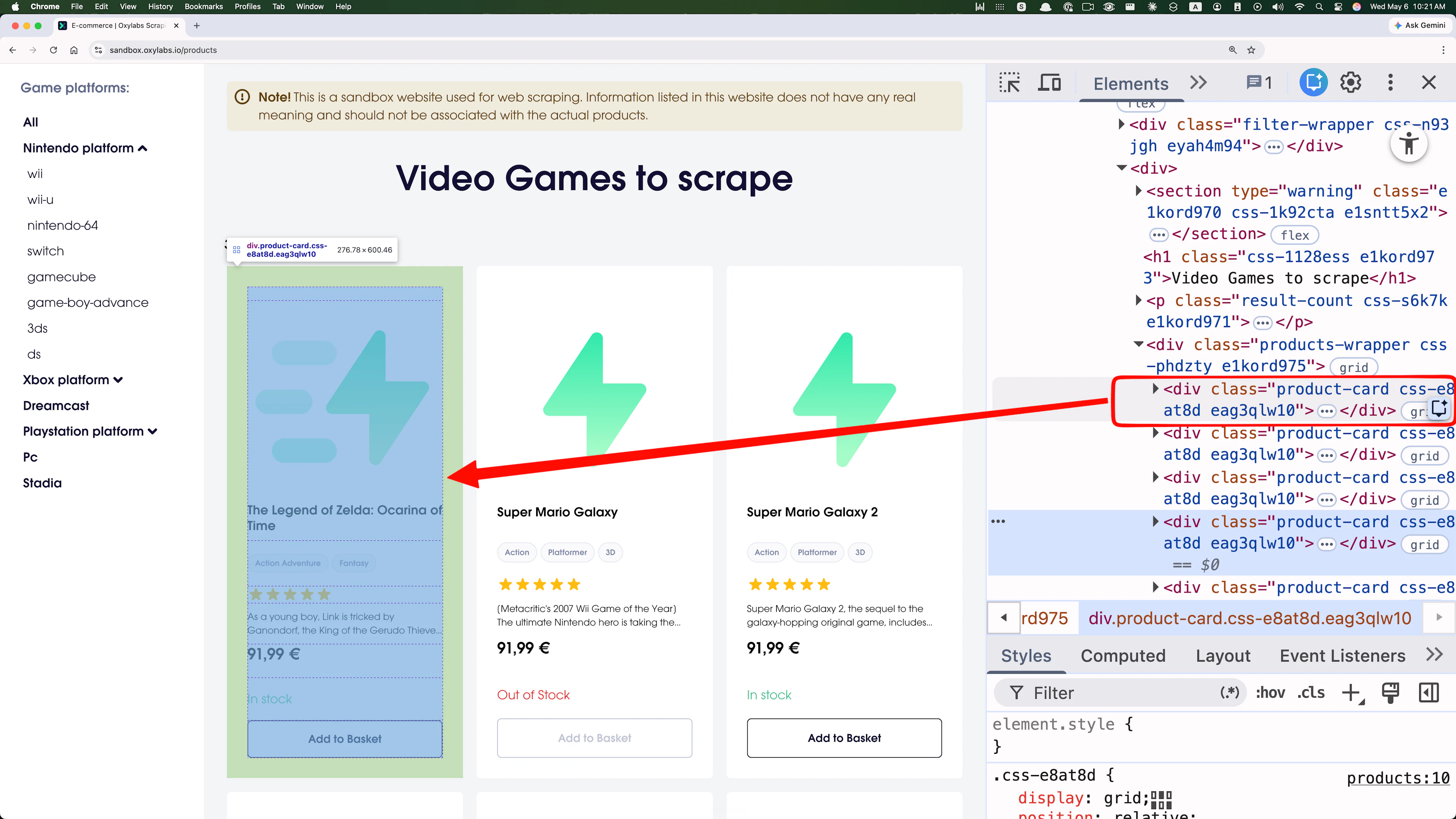
We will use the same selector .product-card in our examples.
Step 1: Install Symfony BrowserKit or Goutte and make your first request
Since Goutte is no longer actively maintained, we recommend using Symfony components it was built on for any new projects. The API is identical, so nothing outside this tutorial step changes:
composer require symfony/browser-kit symfony/http-client symfony/css-selectorTo create the placeholder files, we will use Laravel's built-in CLI tool – Artisan. Enter the following artisan command to create a file for the web scraping logic.
php artisan make:command ScrapeProducts
# OUTPUT:
# INFO  Console command [app/Console/Commands/ScrapeProducts.php] created successfully.
Open app/Console/Commands/ScrapeProducts.php and replace its contents with the following:
<?php

namespace App\Console\Commands;

use Illuminate\Console\Command;
use Symfony\Component\BrowserKit\HttpBrowser;
use Symfony\Component\HttpClient\HttpClient;

class ScrapeProducts extends Command
{
    protected $signature = 'scrape:products';
    protected $description = 'Scrape products from sandbox.oxylabs.io';

    public function handle(): int
    {
        $browser = new HttpBrowser(HttpClient::create([
            'headers' => ['User-Agent' => 'Mozilla/5.0 (compatible; LaravelScraper/1.0)'],
        ]));

        $crawler = $browser->request('GET', 'https://sandbox.oxylabs.io/products');

        $this->info('HTTP status: ' . $browser->getResponse()->getStatusCode());
        $this->info('Found product cards: ' . $crawler->filter('.product-card')->count());

        return Command::SUCCESS;
    }
}
And the run it:
php artisan scrape:products
# OUTPUT:
# HTTP status: 200
# Found product cards: 32
If you get a response code other than 200, check if the page loads in the browser. If you get a 0 count, the site likely changed its markup. Open the page in a browser and update the selector by pressing F12, and examining HTML elements. For a deeper walkthrough of the same concept, see this Python web scraping guide.
Working on a legacy project? If your Laravel project relies on an older PHP version or already has a direct Goutte dependency, you can install it instead:
composer require fabpot/goutteThe API is same as Symfony. The only difference is the class name changes from Symfony\Component\BrowserKit\HttpBrowser to Goutte\Client. Open app/Console/Commands/ScrapeProducts.php. Here is the same first request adapted for Goutte 4:
<?php

// IMPORTANT: THIS CODE IS ONLY RECOMMENDED FOR LEGACY PROJECTS

namespace App\Console\Commands;

use Goutte\Client;
use Illuminate\Console\Command;

class ScrapeProducts extends Command
{
    protected $signature = 'scrape:products';
    protected $description = 'Scrape products from sandbox.oxylabs.io';

    public function handle(): int
    {
        $client = new Client();
        $crawler = $client->request('GET', 'https://sandbox.oxylabs.io/products');

        $this->info('HTTP status: ' . $client->getResponse()->getStatusCode());
        $this->info('Found product cards: ' . $crawler->filter('.product-card')->count());

        return Command::SUCCESS;
    }
}
From this point on, $browser->request(), filter(), and each() all behave identically to the Symfony approach above, so you can follow the rest of this guide without any further changes.
Step 2: Navigate the DOM with DomCrawler
HttpBrowser::request() returns an instance of Symfony\Component\DomCrawler\Crawler. This means our basic Laravel HTML scraper already have access to the page DOM and can use CSS selectors with filter(), like we did in the previous example.
Since we are dealing with multiple product cards, we can use another method from the same DomCrawler API – each(). It allows us loop over each card and extract data from within it.
For each product card on the sandbox page, the relevant selectors are:
.product-card h4 – title
.product-card a.card-header – link to the product page (relative URL)
.product-card .price-wrapper – price
Add the following code snippet before the return Command::SUCCESS; line in app/Console/Commands/ScrapeProducts.php:
$products = $crawler->filter('.product-card')->each(function ($node) {
    return [
        'title'       => trim($node->filter('h4')->text('')),
        'url'         => 'https://sandbox.oxylabs.io'
                         . $node->filter('a.card-header')->attr('href'),
        'price'       => trim($node->filter('.price-wrapper')->text(''))
        ];
});

foreach ($products as $product) {
    $this->line($product['title'] . ' — ' . $product['price'] . ' - ' . $product['url']);
}
Calling text() on .price-wrapper returns price as an entire string, which in this case is something like 91,99 €. If you want a float number instead, you can extract only the digits and comma with a regex:
$priceFloat = (float) str_replace(',', '.', preg_replace('/[^\d,]/', '', $product['price']));You can use it inline and change the following in earlier snippet from this:
'price' => trim($node->filter('.price-wrapper')->text(''))To this:
'price' => (float) str_replace(',', '.', preg_replace('/[^\d,]/', '', trim($node->filter('.price-wrapper')->text(''))))Step 3: Extract and store data with Eloquent
Laravel's ORM, Eloquent, maps database rows to PHP objects, allowing you to insert, update, and query records without a need to write SQL. It works with MySQL, PostgreSQL, and SQLite right out of the box.
For this example, we will use SQLite. The default .env already points to SQLite, so no setup is required:
# No change required here
DB_CONNECTION=sqlite
If the SQLite database file does not exist yet, create it manually:
touch database/database.sqliteTo save the products to the database with a model and a migration, begin with the following Artisan command:
php artisan make:model Product -mOpen the new file in database/migrations/ and define the schema by modifying the up() function:
public function up(): void
{
    Schema::create('products', function (Blueprint $table) {
        $table->id();
        $table->string('title');
        $table->string('url')->unique();
        $table->float('price')->nullable();
        $table->timestamps();
    });
}
Then run the migration to create the database file:
php artisan migrateOpen app/Models/Product.php and let the model fill the columns:
class Product extends Model
{
    protected $fillable = ['title', 'url', 'price'];
}
Now open app/Console/Commands/ScrapeProducts.php and add the Product import at the top of the file:
use App\Models\Product;Then replace the foreach loop that was printing the extracted data with one that saves to the database:
foreach ($products as $product) {
    Product::updateOrCreate(
        ['url' => $product['url']],
        $product
    );
}

$this->info('Saved ' . count($products) . ' products.');
Finally, to save the products, use the Artisan command to run our web scraping tool again:
 php artisan scrape:products
 # OUTPUT
 # Saved 32 products.
To verify the results, you can use Artisan's REPL with the following lines:
php artisan tinker
> App\Models\Product::count();
=> 32
> App\Models\Product::first();
= App\Models\Product {#8070
    id: 1,
    title: "The Legend of Zelda: Ocarina of Time",
    url: "https://sandbox.oxylabs.io/products/1",
    price: 91.99,
    created_at: "2026-05-06 16:00:58",
    updated_at: "2026-05-06 16:00:58",
  }
> exit
Congratulations! You now have a small, working scraper that fetches a page, parses HTML, and stores the result. This pattern works the same way in many other stacks, such as seen on our Java web scraping guide and this Ruby web scraping walkthrough.
Handling pagination in your Laravel scraper
The sandbox site uses a query string for pages: ?page=1, ?page=2, and so on, up to page 94. There are two ways to handle this.
A simple way would be to run a for loop with a known last page:
// skeleton code
class ScrapeProductsPages extends Command
{
    public function handle(): int
    {
        $browser = new HttpBrowser(HttpClient::create());
        $base = 'https://sandbox.oxylabs.io/products';
        $total = 0;

        for ($page = 1; $page <= 94; $page++) {
            // scraping logic here
            };
        }
    return Command::SUCCESS;
}
The smarter way to build a robust web scraper is to follow the page URL link until there are no further matches. This works even if the web content changes later:
php artisan make:command ScrapeProductsPagesSmart
<?php
// app/Console/Commands/ScrapeProductsPagesSmart.php
namespace App\Console\Commands;

use App\Models\Product;
use Illuminate\Console\Command;
use Symfony\Component\BrowserKit\HttpBrowser;
use Symfony\Component\HttpClient\HttpClient;

class ScrapeProductsPagesSmart extends Command
{
    /**
     * Execute the console command.
     */
    protected $signature = 'scrape:products-pages-smart';
    protected $description = 'Scrape all pages using smart pagination approach';

    public function handle(): int
    {
        $browser = new HttpBrowser(HttpClient::create());
        $base = 'https://sandbox.oxylabs.io/products';
        $total = 0;
        $page = 1;

        while (true) {
            $crawler = $browser->request('GET', $base . '?page=' . $page);
            $cards   = $crawler->filter('.product-card');

            if ($cards->count() === 0) {
                break; // no more pages
            }

            $cards->each(function ($node) use (&$total) {
                Product::updateOrCreate(
                    [
                        'url' => 'https://sandbox.oxylabs.io'
                            . $node->filter('a.card-header')->attr('href'),
                    ],
                    [
                        'title' => trim($node->filter('h4')->text('')),
                        'price' => (float) str_replace(',', '.', preg_replace('/[^\d,]/', '', trim($node->filter('.price-wrapper')->text('')))),
                    ]
                );
                $total++;
            });

            usleep(500000); // 0.5s between requests
            $this->info("Page $page done.");
            $page++;
        }

        $this->info("Total: $total products saved.");
        return Command::SUCCESS;
    }
}
The key difference is the while (true) loop with the $cards->count() === 0 break condition. Rather than hardcoding the page count, the scraper simply stops when it finds an empty page, making it a bit more resilient to changes in the total number of web pages.
Scaling with queues and Artisan commands
Looping over 94 pages in a single process is slow and brittle. If the process crashes on page 50, everything from that point onwards is lost and you have to start over.
A better setup is one job per page, processed by Laravel's queue system.
First, set up the database queue driver:
php artisan queue:table
php artisan migrate
In your .env, set the queue connection to database:
QUEUE_CONNECTION=databaseThen create a job:
php artisan make:job ScrapePageJob<?php
// app/Jobs/ScrapePageJob.php
namespace App\Jobs;
use App\Models\Product;
use Illuminate\Bus\Queueable;
use Illuminate\Contracts\Queue\ShouldQueue;
use Illuminate\Foundation\Bus\Dispatchable;
use Illuminate\Queue\InteractsWithQueue;
use Illuminate\Queue\SerializesModels;
use Symfony\Component\BrowserKit\HttpBrowser;
use Symfony\Component\HttpClient\HttpClient;
class ScrapePageJob implements ShouldQueue
{
use Dispatchable, InteractsWithQueue, Queueable, SerializesModels;
public int $tries = 3;
public int $backoff = 10;
public function __construct(public int $page) {}
public function handle(): void
{
$browser = new HttpBrowser(HttpClient::create([
'headers' => [
'User-Agent' => env('SCRAPER_USER_AGENT', 'Mozilla/5.0 (compatible; LaravelScraper/1.0)'),
],
]));
$url = 'https://sandbox.oxylabs.io/products?page=' . $this->page;
$crawler = $browser->request('GET', $url);
if ($browser->getResponse()->getStatusCode() !== 200) {
throw new \RuntimeException("Page {$this->page} failed with status "
. $browser->getResponse()->getStatusCode());
}
$crawler->filter('.product-card')->each(function ($node) {
Product::updateOrCreate(
['url' => 'https://sandbox.oxylabs.io'
. $node->filter('a.card-header')->attr('href')],
[
'title' => trim($node->filter('h4')->text('')),
'price' => (float) str_replace(
',',
'.',
preg_replace('/[^\d,]/', '', trim($node->filter('.price-wrapper')->text('')))),
]
);
});
}
}Create a new command file using Artisan and use this code:
php artisan make:command CreateScrapeJob<?php
// app/Console/Commands/CreateScrapeJob.php
namespace App\Console\Commands;
use Illuminate\Console\Command;
use App\Jobs\ScrapePageJob;
class CreateScrapeJob extends Command
{
protected $signature = 'scrape:create-job';
protected $description = 'Create scrape jobs';
public function handle()
{
for ($page = 1; $page <= 94; $page++) {
ScrapePageJob::dispatch($page);
}
$this->info('94 jobs queued.');
return Command::SUCCESS;
}
}Run the worker in another terminal:
php artisan queue:work Failed jobs are saved in the failed_jobs table, so you can run php artisan queue:retry all later.
You can also run the scraper on a schedule. In routes/console.php, add these lines:
use Illuminate\Support\Facades\Schedule;

Schedule::command('scrape:products')->dailyAt('03:00');
Finally, add a cron entry on your server so Laravel can evaluate scheduled tasks every minute:
* * * * * cd /path-to-project && php artisan schedule:run >> /dev/null 2>&1Web scraping ethics and legal considerations
With everything shown in this guide, you should always scrape responsibly. The following are a few general guidelines to follow:
Read the site's terms of service. Some sites do not allow scraping at all, while others allow it for personal but not for commercial use. Check robots.txt for crawl rules, even if it is not legally binding in your country. If the site offers an official API, it’s always safer to use that instead. It usually is faster, more stable, and you’re guaranteed to avoid the legal gray area.
Do not scrape too fast. You can use something like usleep(500000) to wait between your HTTP requests or employ any other sufficient method. Sending too many requests to a web server can slow down others and can get your IP banned.
Avoid personal information or data extracted under logins. Privacy laws like GDPR and CCPA apply to scraped data too, just like they apply to data you collect through a form.
If in doubt, seek legal counsel. If you are planning to use scraped data for a commercial product, consult a lawyer in your country. Rules differ a lot between the EU, the US, and other places.
So, is web scraping with Laravel worth it?
Laravel is a great choice if you already use it for the rest of your project. Even as a standalone web data scraper, it is a great choice because the queue, scheduler, Eloquent, and Artisan give you a standardized code structure and save a lot of time.
However, it may be a bit overkill if your goal is just a short script. Laravel also gets harder to manage when you have to scrape thousands of web pages with heavy anti-bot protection. At that point, a managed web scraping API is often cheaper than the resources you’d spend on proxy pools and your Laravel site scraper maintenance.
Many teams use both Laravel for the parts they control and scraping APIs for the sites that require continuous monitoring and tweaking. If you are weighing options outside PHP, Python is the top choice since it has the most complete web scraping toolkit, but scraping with C# or even trying web scraping in C++ can be worthwhile alternatives to consider.
Frequently asked questions
Can Laravel scrape JavaScript-rendered pages?
Yes, Laravel can scrape JavaScript-rendered pages, but only when paired with browser automation tools. Standard libraries like Symfony BrowserKit or Goutte only access the initial HTML response, so dynamically loaded content will not appear. For JavaScript-heavy websites, you can follow our PHP web scraping guide for Symfony Panther to render pages in a real browser before the data scraping.
What are the best alternatives to Laravel for web scraping?
How do I scrape a login-protected page with Laravel?
About the author

Dovydas Vėsa
Technical Content Researcher
Dovydas Vėsa is a Technical Content Researcher at Oxylabs. He creates in-depth technical content and tutorials for web scraping and data collection solutions, drawing from a background in journalism, cybersecurity, and a lifelong passion for tech, gaming, and all kinds of creative projects.
All information on Oxylabs Blog is provided on an "as is" basis and for informational purposes only. We make no representation and disclaim all liability with respect to your use of any information contained on Oxylabs Blog or any third-party websites that may be linked therein. Before engaging in scraping activities of any kind you should consult your legal advisors and carefully read the particular website's terms of service or receive a scraping license.
Related articles





Web Scraper API for your scraping project
Make the most of the efficient web scraping while avoiding CAPTCHA and IP blocks.

Get the latest news from data gathering world