
Best Semantic Search Tools in 2026: Databases, Frameworks & APIs


Shinthiya Nowsain Promi
Last updated on
2026-09-07
15 min read
 AI Summary:
Choosing a semantic search tool means picking across four different categories, and the wrong pick is expensive to undo. This guide compares 12 vector databases, frameworks, search engines, and data APIs on pricing, deployment, and free tiers, so you can match a tool to your workload before you commit.
Semantic search tools retrieve results by meaning instead of matching exact keywords, converting text into vector embeddings so machine learning can interpret the intent behind a user's query. They fall into four categories: vector databases (Pinecone, Qdrant), frameworks and libraries (LlamaIndex, Haystack), search engines with semantic support (Elasticsearch), and data APIs (Oxylabs, Exa).
Search stopped being a text box a long time ago. In 2026, retrieval is the layer under RAG pipelines, AI agents, and enterprise knowledge search, and all three fail the same way when it is weak: the model answers confidently from the wrong passage. That is why semantic search tools have moved from a relevance upgrade to core infrastructure, and why search technology is now one of the most scrutinised parts of the AI stack.
The shift is straightforward. A traditional search engine ranks documents by the words they share with the search query. A semantic search engine goes beyond keyword matching and ranks them by what the query means. When someone types "how do I cut my cloud bill," lexical search looks for those exact words; semantic search surfaces a page titled "Reducing infrastructure spend" because the two are close in vector space. For AI agents feeding context to a language model, that difference between exact matches and genuinely more relevant results decides whether the final answer is grounded or invented.
This guide covers twelve tools across the four categories that make up a working semantic search solution: vector databases that store and query embeddings, frameworks that assemble the retrieval pipeline, search engines that add meaning to keyword indexes you already run, and data APIs that supply the text you index. Each entry lists type, deployment, pricing, free tier, and honest pros and cons, and the comparison table below narrows the field first. The foundational concepts come before the tools.
Quick comparison: 12 semantic search tools
| Tool | Category | Type | Starting price | Free tier | Open source | Best for |
| Oxylabs | Data API | Managed API | From $0.25/1K results; plans from $49/mo | Yes – 2,000-result trial | No | Structured public web data at scale |
| Exa | Data API | Managed API | Pay-as-you-go, $7 per 1,000 searches | Yes – $10 credits/mo | No | Neural web search for agents and research |
| Llamaindex | Framework | Open-source + managed | Free; LlamaCloud from $50/mo | Yes – 10,000 credits/mo | Yes – MIT | RAG over private, domain specific data |
| Firecrawl | Data API | Managed API | Hobby $16/mo | Yes – 1,000 credits/mo | Yes – AGPL-3.0 core | Clean markdown for embedding pipelines |
| Weaviate | Vector database | Managed + self-hosted | $45/mo (Cloud Flex) | 14-day sandbox | Yes – BSD-3 | Hybrid search with built-in vectorizers |
| Haystack | Framework | Open-source + enterprise platform | Free; Enterprise on request | Yes – full OSS framework | Yes – Apache 2.0 | Pipelines you need to control component by component |
| Qdrant | Vector database | Managed + self-hosted | Usage-based (hourly) | Yes – 1 GB cluster | Yes – Apache 2.0 | Filter-heavy vector similarity search on a budget |
| Pinecone | Vector database | Managed | $20/mo (Builder), $50/mo (Standard) | Yes – Starter | No | Zero-ops production vector search |
| Typesense | Search engine | Managed + self-hosted | Cloud from ~$0.01/hr (~$7.20/mo) | Self-hosted free; no cloud free tier | Yes – GPL-3.0 | Instant site and e-commerce search with vectors |
| Elasticsearch | Search engine | Managed + self-hosted | Elastic Cloud Hosted from $99/mo | Yes – self-managed tier, 14-day cloud trial | Partly – AGPL / Elastic License 2.0 | Adding semantic relevance to enterprise keyword search |
| FAISS | Framework / library | Open-source library | Free | N/A – library | Yes – MIT | In-process similarity search and prototyping |
| Milvus / Zilliz Cloud | Vector database | Managed + self-hosted | Serverless from $0, dedicated ~$99/mo | Yes – 5 GB | Yes – Apache 2.0 | Billion-scale distributed workloads |
Pricing and features checked against each vendor's public information in September 2026. Rates, free-tier allowances, and plan structures change frequently, so confirm current offering directly with the provider before committing to a plan.
What is semantic search?
Semantic search is a retrieval method that interprets the contextual meaning and intent of a search query rather than looking for exact keyword matches. It uses natural language processing (NLP) and machine learning to model how human language actually behaves, representing both queries and documents as vector embeddings – long lists of numbers that place semantically related text close together in a shared space. Retrieval then becomes a geometry problem: find the vectors nearest the query's vector, usually by cosine similarity.
That is a real departure from traditional search methods. Keyword search scores documents on term overlap, so it misses anything phrased differently and struggles with synonyms, plurals, and jargon. Meaning-based retrieval handles that automatically, because "laptop won't power on" and "notebook fails to boot" sit at high semantic similarity even with no words in common. Contextual search of this kind also copes far better with complex queries written in natural language, which is exactly how people search once they get used to talking to AI systems – they state human intent instead of guessing at search terms. The trade-off is that semantic search can be too generous – it will happily return a conceptually related document when the user wanted an exact product code – which is why most production systems combine both.
Semantic search vs. keyword search vs. vector search
These three terms get used interchangeably, and they are not the same thing. Knowing how semantic search differs from each of the others is the quickest way to avoid buying the wrong category of tool.
Keyword search (also called lexical search) matches the literal search terms in a query against an inverted index, ranked by algorithms like BM25. Precise, fast, cheap, and blind to meaning.
Semantic search is the goal: returning results that match what the user meant. It is the broader concept.
Vector search is the mechanism most commonly used to reach that goal: storing embeddings and running vector similarity search to find nearest neighbors.
So semantic search is the outcome, vector search is the technique, and keyword search is the baseline both are measured against. You can also achieve semantic understanding through other advanced techniques – knowledge graphs, query expansion, entity recognition – and vector search can be used for things that have nothing to do with meaning, like image deduplication. Hybrid search runs lexical and vector retrieval together and fuses the rankings, which is the default choice for most teams in 2026 because it keeps exact-match precision while adding deeper contextual understanding.
How do semantic search tools work?
Understanding how semantic search works is mostly a matter of following the data. Every semantic search system, whatever the vendor calls it, runs the same five-stage pipeline:
text → embeddings → vector storage → similarity search → reranking.
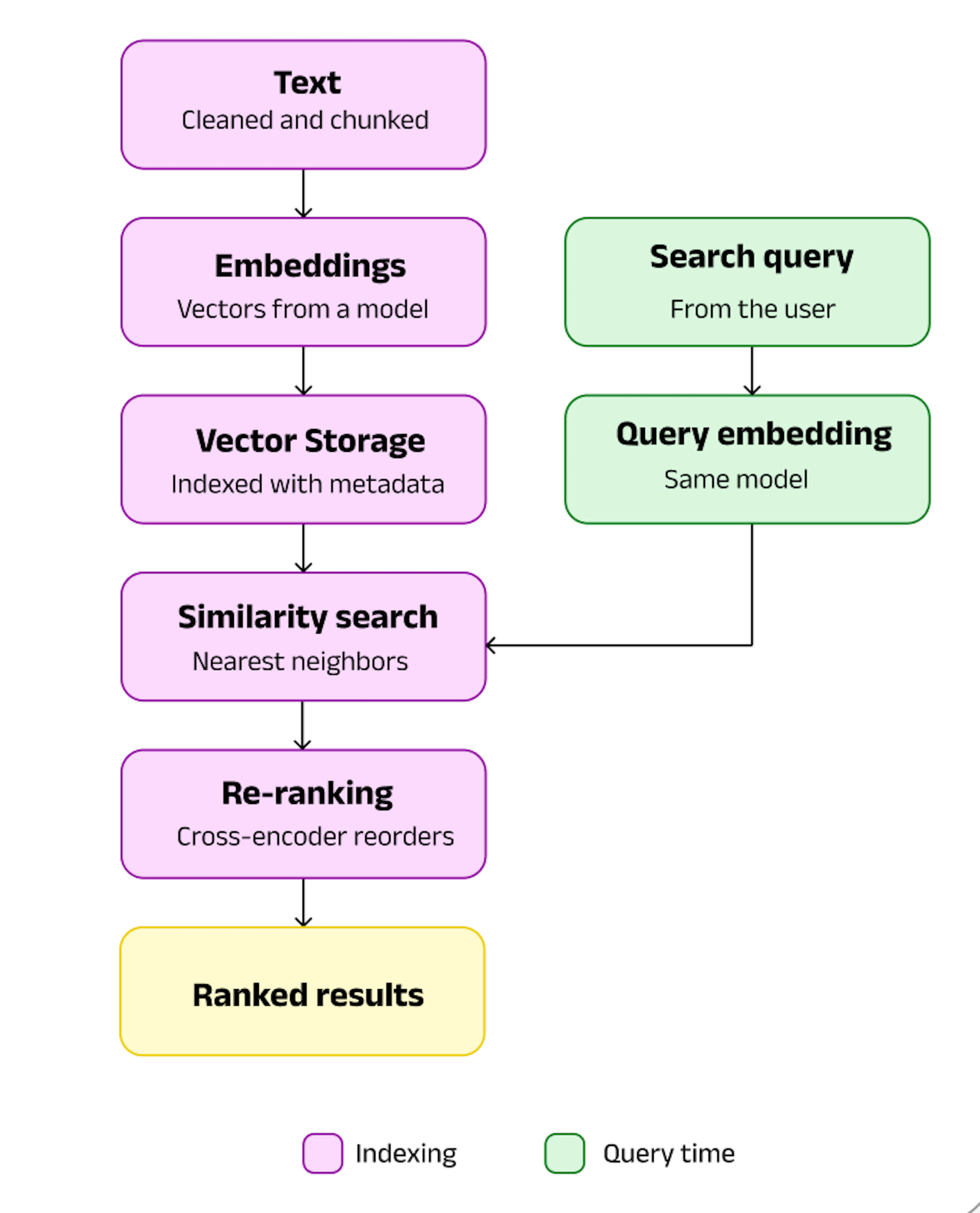
Semantic search tools work pipeline
It starts with the text. Documents are cleaned, stripped of boilerplate, and split into chunks small enough to embed but large enough to carry context. Each chunk goes through an embedding model – the modern descendants of word2vec – which returns a dense vector capturing its semantic meaning. This stage sets the ceiling on everything downstream. Poor chunking or noisy input produces embeddings that encode nothing useful, and no amount of tuning further along recovers it.
Those vectors land in a vector database or a vector-capable index, alongside metadata such as source, date, author, and permissions. Because comparing a query against millions of vectors one at a time is impractical, the index uses an approximate nearest neighbor structure like HNSW or IVF, which trades a sliver of recall for orders-of-magnitude faster lookups. Quantization compresses the vectors further so more of the index fits in memory.
At query time the same embedding model converts the user's query into a vector, and the engine uses vector similarity to retrieve relevant results, filtered by whatever metadata conditions apply. Many systems run query analysis first – identifying entities, expanding related terms, or classifying the query's intent – to sharpen what gets searched for. That step earns its keep because real user search queries are short, ambiguous, and rarely phrased the way the source documents are.
The last stage is reranking. Semantic search relies on approximate retrieval, so the top 50 candidates are usually passed to a cross-encoder that scores each one against the query directly and reorders them. It is slower per document but far more accurate, and in RAG pipelines it is often the single change that most improves answer quality. Some systems add personalization here too, weighting results by user preferences or search history so that previous searches shape what surfaces next. That context awareness is the difference between a one-shot lookup and a system that builds a comprehensive understanding of what each person keeps coming back for.
Vector databases for semantic search
A vector database stores embeddings and answers nearest-neighbour queries over them at scale, with the filtering, persistence, and replication a production system needs. You want one when your corpus outgrows memory on a single machine, when embeddings change constantly, or when search latency is user-facing.
Pinecone
Pinecone is a fully managed serverless vector database for teams who want production semantic search without operating any infrastructure themselves.
Type: Managed (proprietary)
Deployment: Serverless on AWS, Azure, and Google Cloud; BYOC available
Pricing: Builder $20/mo; Standard from $50/mo minimum; Enterprise from $500/mo
Free tier: Yes – Starter, roughly 2 GB storage
Best for: Teams shipping fast with no platform engineers to spare
Pinecone separates storage from compute and meters reads, writes, storage, and egress independently, so idle indexes cost nothing and bursty RAG traffic is billed for what it actually uses. It ships hosted embedding and reranking models, sparse-dense hybrid search, and namespace-level multi-tenancy, which means a small team can implement semantic search end to end without assembling a stack. Filtering is expressive and integrations with LlamaIndex, Haystack, and LangChain are first-party. The cost model is the thing to watch: read units scale with namespace size, so large indexes with high query volume get expensive quickly.
Pros
Genuinely no operational burden – no cluster sizing, no upgrades
Built-in embeddings and reranking remove a whole dependency
Vendor-reported single-digit millisecond latency at billions of vectors
Excellent framework and SDK coverage
Cons
Read-unit billing scales with index size and surprises teams at volume
Closed source, so no self-hosted escape hatch
Less schema and indexing control than open alternatives
Weaviate
Weaviate is an open-source vector database with built-in vectorizers and native hybrid search, suited to teams indexing mixed media as well as text.
Type: Open source (BSD-3) with managed cloud
Deployment: Weaviate Cloud, Bring Your Own Cloud, or self-hosted via Docker/Kubernetes
Pricing: Cloud Flex from $45/mo; Plus and Premium tiers above it; self-hosting free
Free tier: 14-day sandbox on Cloud; unlimited self-hosted
Best for: Multimodal and hybrid search without stitching services together
Weaviate's distinguishing feature is that it can generate the embeddings itself. Vectorizer modules for text, images, and audio run on or alongside the cluster, so you can hand it raw objects instead of pre-computed vectors – a meaningful saving when embedding API costs would otherwise dominate. BM25 and dense retrieval are fused natively, and generative queries let the database return an LLM answer directly. The schema model is richer than most competitors, with cross-references between collections that behave a little like a structured network of related objects.
Pros
Vectorizers included, cutting external embedding spend
Hybrid search and RAG queries built into the API, not bolted on
Same engine self-hosted or managed, so migration is low risk
Strong multimodal and multi-tenancy support
Cons
Cloud pricing has several dimensions and takes modelling
More concepts to learn than a pure vector store
Heavier resource footprint than leaner engines
Qdrant
Qdrant is a Rust-based open-source vector database known for aggressive quantization and fast filtered search, popular with cost-conscious production teams.
Type: Open source (Apache 2.0) with managed cloud
Deployment: Qdrant Cloud, Hybrid Cloud, Private Cloud, or self-hosted
Pricing: Cloud billed hourly on vCPU, RAM, and disk; self-hosting free
Free tier: Yes – a permanently free 1 GB cluster, no card required
Best for: Filter-heavy vector similarity search where cost control matters
Qdrant's appeal is efficiency. Written in Rust, it pairs HNSW indexing with scalar, binary, and asymmetric quantization that can cut memory use dramatically, letting large collections sit on smaller instances. Payload filtering is applied inside the search rather than after it, so queries that combine semantic relevance with strict metadata conditions stay fast – the pattern behind most real-world search over domain specific data. Because cloud pricing is resource-based rather than per query, throughput does not directly inflate the bill, and the identical API across self-hosted, hybrid, and managed modes makes the build-versus-buy decision reversible.
Pros
Quantization and Rust performance keep infrastructure costs low
Resource-based pricing does not penalise high query volume
Truly permissive Apache 2.0 licence with full features self-hosted
Hybrid Cloud keeps data in your own infrastructure
Cons
Requires you to size clusters and choose quantization settings yourself
No first-party embedding models on the free tier
Smaller ecosystem of enterprise tooling than Elastic
Milvus
Milvus is a distributed open-source vector database built for billion-scale workloads, with Zilliz Cloud as the fully managed version from the original team.
Type: Open source (Apache 2.0) with managed cloud (Zilliz)
Deployment: Self-hosted on Kubernetes, or Zilliz Cloud serverless, dedicated, and BYOC
Pricing: Zilliz serverless pay-as-you-go; dedicated clusters from roughly $99/mo; storage $0.04/GB/mo
Free tier: Yes – 5 GB storage and 2.5M vCUs monthly on Zilliz Cloud
Best for: Very large corpora where horizontal scaling is the constraint
Milvus was designed as a distributed system from the start, separating storage from compute and splitting querying, ingestion, and coordination across independent node types that scale separately. That architecture is overkill below roughly 20 million vectors and decisive above 50 million, where single-node engines start to strain. It supports dense, sparse, and hybrid retrieval with metadata filtering, multiple index types including GPU-accelerated options, and dynamic schemas. Zilliz Cloud wraps the operational complexity – etcd, object storage, node orchestration – behind compute units and adds a 99.95% SLA, SOC 2, and ISO 27001 coverage.
Pros
Proven at billion-vector scale with real horizontal scaling
Widest choice of index types, including GPU acceleration
Generous permanent free tier on Zilliz Cloud
Same team maintains both the open source project and the managed service
Cons
Self-hosting is genuinely complex and needs Kubernetes expertise
Overpowered and comparatively costly for small collections
Compute-unit billing takes work to forecast
Semantic search frameworks and libraries
Frameworks assemble the retrieval pipeline – loading, chunking, embedding, querying, reranking – rather than storing your data. They sit between your application and whichever vector database you chose above.
FAISS
FAISS is Meta's open-source similarity search library, the fastest way to run vector search in-process without standing up a database.
Type: Open-source library (MIT)
Deployment: Embedded in your Python or C++ process; CPU or GPU
Pricing: Free
Free tier: Not applicable – it is a library
Best for: Prototypes, research, and read-heavy indexes that fit in memory
FAISS implements the indexing algorithms most vector databases are built on, including IVF, HNSW, and product quantization, with GPU support that makes brute-force search viable on large datasets. Because it runs in-process there is no network hop, so latency is as low as it gets. Indexes serialize to disk via write_index and read_index, and IVF indexes can be memory-mapped. What FAISS deliberately does not provide is a server, a metadata model, authentication, or replication – you build the index, query it, and handle the rest. For a fixed corpus behind a single service that is a fair trade; for a system with constant writes and access control it is not.
Pros
Fastest option for in-memory vector similarity, especially on GPU
No infrastructure, no service, no cost
Battle-tested implementations of the core indexing algorithms
Complete control over index construction and tuning
Cons
Filtering is limited to ID selectors, with no metadata model or multi-tenancy
Scaling past one machine is entirely your problem
Durability, backups, and concurrent writes are yours to build
LlamaIndex
LlamaIndex is an open-source data framework for connecting LLMs to private data, with strong document parsing and a managed cloud layer.
Type: Open source (MIT) with managed platform (LlamaCloud)
Deployment: Python or TypeScript library; LlamaCloud for hosted parsing and indexing
Pricing: Framework free; LlamaCloud Starter $50/mo, Pro $500/mo
Free tier: Yes – 10,000 LlamaCloud credits monthly, around 1,000 pages
Best for: RAG pipelines over messy internal documents
LlamaIndex treats data quality as the central problem, and that focus shows. LlamaHub provides connectors for well over a hundred sources, while LlamaParse handles the PDFs, scanned tables, and slide decks that break naive extraction. Above that sit indexing strategies, query engines, retrievers, re-rankers, and event-driven agent workflows, all swappable. It integrates with every major vector database, so you are not locked into a storage choice. The main caveat is the split between free framework and metered cloud: parsing credits need modelling on real volumes before production.
Pros
Best-in-class document parsing for difficult real-world files
Enormous connector library shortens ingestion work dramatically
Storage-agnostic, with first-party support for all the major databases
Clear path from prototype to managed infrastructure
Cons
LlamaCloud credit consumption is hard to predict early on
The abstraction stack is deep, which obscures debugging
Frequent API changes mean tutorials go stale fast
Haystack
Haystack is deepset's open-source orchestration framework for production search and RAG, favoured when explicit pipeline control matters more than convenience.
Type: Open source (Apache 2.0) with commercial Haystack Enterprise Platform
Deployment: Python library; enterprise platform as SaaS, VPC, or on-premise
Pricing: Framework free; Enterprise priced on organization size, on request
Free tier: Yes – the full open source framework
Best for: Engineering teams that need transparent, testable retrieval pipelines
Haystack models everything as components wired into an explicit graph, so retrieval, routing, memory, and generation are all visible and individually replaceable. That verbosity is the point: when relevance regresses you can see exactly which stage caused it, and evaluation tooling is built in rather than added later. It supports every common document store, hybrid retrieval, and cross-encoder reranking, and it has been running semantic search in production at organizations like Airbus and NVIDIA for years. Compared with LlamaIndex it does less magic and asks for more configuration up front.
Pros
Explicit pipelines make behaviour easy to reason about and test
Built-in evaluation for measuring retrieval quality properly
Apache 2.0 with genuine feature parity in the open source version
Deployment options include air-gapped and on-premise
Cons
More boilerplate than higher-level frameworks
Steeper initial learning curve
Commercial platform pricing is not published
Search engines with semantic search support
If you already run keyword search in production, the cheapest route to meaning-based retrieval is often the engine you have. These platforms add vector fields and kNN queries to a mature lexical index, giving you hybrid search without a second system.
Elasticsearch
Elasticsearch is a mature distributed search engine that now combines BM25 keyword search with dense vector retrieval in one index.
Type: Source-available (AGPL / Elastic License 2.0) with managed Elastic Cloud
Deployment: Self-managed, Elastic Cloud Hosted, or Elastic Cloud Serverless
Pricing: Cloud Hosted from $99/mo (Standard); Serverless metered per VCU-hour and GB
Free tier: Yes – self-managed basic tier; 14-day cloud trial
Best for: Enterprises adding semantic relevance to existing keyword infrastructure
Elasticsearch supports dense_vector fields with HNSW indexing, sparse retrieval through ELSER, and reciprocal rank fusion to combine lexical and vector scores in a single query. The advantage over a dedicated vector database is everything around search: aggregations, faceting, permissions, cross-cluster replication, snapshots, and observability that operations teams already know. For enterprise search over a heterogeneous document estate, that breadth usually outweighs raw vector performance. The costs are complexity and licensing – subscription tiers gate features you may assume are included, and vector-heavy workloads need careful memory planning.
Pros
Hybrid search in one query, over one index, with mature ranking controls
Unmatched surrounding feature set for enterprise search
Runs anywhere: self-managed, hosted, or serverless
Huge ecosystem, documentation, and hiring pool
Cons
Operationally heavy and memory-hungry for large vector indexes
Feature access is tiered, so bills surprise teams
Licensing history makes some organizations cautious
Typesense
Typesense is a lightweight open-source search engine offering typo-tolerant keyword search and vector search from a single binary.
Type: Open source (GPL-3.0) with managed Typesense Cloud
Deployment: Self-hosted single binary or Docker; Typesense Cloud clusters
Pricing: Cloud from about $0.01/hour (~$7.20/mo) plus bandwidth; self-hosting free
Free tier: Self-hosted is free; Cloud has no free tier
Best for: Instant site, docs, and e commerce search with a semantic layer
Typesense optimizes for the search-as-you-type experience: sub-50ms responses, typo tolerance, faceting, and curation, all configured through a clean REST API. Vector search, hybrid ranking, and conversational RAG are built in, which makes it a practical single dependency for product search that needs both exact matches on SKUs and semantic relevance on descriptions. The architectural constraint is that indexes are memory-resident, so capacity planning is really RAM planning, and very large embedding sets get costly. The project is on its v30 line and actively maintained.
Pros
Simple to run – one binary, sane defaults, readable API
Excellent typo tolerance and instant-search ergonomics
Substantially cheaper than comparable hosted search products
Keyword and vector search in one engine
Cons
Everything must fit in RAM, which caps practical index size
Thin search analytics compared with Elastic
GPL-3.0 licensing is a constraint for some products
Data APIs that feed semantic search tools
Embeddings are only as good as the text you index. Raw HTML – navigation, cookie notices, footers, scripts – wastes tokens, dilutes the vector for every chunk, and quietly degrades relevance across your whole corpus. These APIs deliver clean, structured content instead, and for a lot of teams they are the highest-leverage part of the stack.
Oxylabs
Oxylabs provides enterprise-grade web data APIs that return structured public web and search results data ready for indexing at scale.
Type: Managed API (proprietary)
Deployment: Cloud API; delivery to AWS S3 or Google Cloud Storage
Pricing: Web Scraper API from $0.25 per 1,000 results; plans from $49/mo (Micro), $99 (Starter), $249 (Advanced). SERP targets are billed per result – Google $1.00/1K, Amazon $0.50/1K, other sources $1.15/1K without JavaScript rendering
Free tier: $5 welcome credit upon registration, no card required
Best for: High-volume, reliable public web data pipelines
Oxylabs sits at the collection end of the stack. Web Scraper API retrieves pages from complex targets and returns parsed JSON through Oxy Parser rather than raw HTML – the Amazon product endpoint alone exposes 129 structured fields, and Google Web Search 269 – which removes the custom parsers that usually rot first in any pipeline. The SERP scrapers are part of the same API, gathering organic and paid search results localised to 195+ countries, useful for building domain specific corpora or tracking how a semantic search engine ranks your content. Billing is per successful result, with a scheduler for recurring jobs.
Pros
Structured JSON output removes most parsing engineering
Per-successful-result billing, so failed requests cost nothing
City and country-level localization across 195 countries
Enterprise support, compliance posture, and S3/GCS delivery
Cons
Entry plans carry fixed monthly result allowances with overage rates
Closed source with no self-hosted option
Priced for scale rather than hobby projects
Firecrawl
Firecrawl is a scraping and crawling API that turns any URL into clean, LLM-ready markdown or structured JSON in a single call.
Type: Managed API with open source core (AGPL-3.0)
Deployment: Cloud API or self-hosted
Pricing: Hobby $16/mo (5,000 credits); Standard $83/mo (100,000 credits); Growth and Scale above
Free tier: 1,000 credits, no card required – Firecrawl's page has described this as a monthly refresh and as a one-time grant at different points, so verify before planning around it
Best for: Getting web pages into an embedding pipeline with minimal code
Firecrawl was built for exactly the problem described above: you POST a URL and get back markdown with the boilerplate already gone, no headless browser to run yourself. Crawl walks a whole site, map returns its URL structure, and extract pulls schema-validated JSON, which covers most ingestion patterns for RAG. Integrations with LlamaIndex and LangChain mean it drops into an existing pipeline in a few lines. Two things to plan for: credits do not roll over month to month, and premium features such as JSON output or enhanced extraction add several credits per page, so effective capacity can be far below the headline number.
Pros
Clean markdown output is genuinely ready for chunking and embedding
Generous recurring free tier for testing real targets
Open source core available for self-hosting
Simple, predictable API surface for scrape, crawl, and map
Cons
Feature multipliers make credit consumption hard to forecast
Unused credits expire at the end of each billing cycle
Cheapest tier gets expensive per page relative to larger plans
Exa
Exa is a neural web search API that returns semantically relevant pages and token-efficient content, designed for AI agents rather than humans.
Type: Managed API (proprietary)
Deployment: REST API with Python and JavaScript SDKs, plus an MCP server
Pricing: Pay-as-you-go – $7 per 1,000 searches; contents $1 per 1,000 pages; deep search $12–15 per 1,000
Free tier: Yes – $20 credits at signup plus $10 credits monthly
Best for: Live web retrieval where semantic quality beats keyword coverage
Exa runs its own embeddings-based index of the web, so queries are matched by meaning instead of by matching keywords against a link graph. That makes it good at the descriptive, intent-heavy queries agents actually produce – "companies building retrieval infrastructure for legal documents" returns a usable set where a conventional search API returns noise. Search modes range from sub-150ms instant lookups to multi-step deep research with citations, and page contents for the first ten results are bundled into the search price. There is no subscription or minimum spend, though per-endpoint metering means costs need watching as agent traffic grows.
Pros
Neural index handles natural language queries other search APIs mishandle
No subscription or minimum – pure usage-based pricing
Contents for the first ten results included in the search rate
Recurring monthly credits keep small projects running free
Cons
Deep search and agent runs cost several times the base rate
Monthly free credits expire and do not roll over
Closed index, so you cannot inspect or self-host it
Wrapping up
There is no single best semantic search tool, only the right one for your scale, budget, and team. Work from the category down: a vector database if embeddings are your main workload, a framework if you are assembling a pipeline, the search engine you already run if you want meaning added to keyword results. Whichever you pick, retrieval quality starts upstream – clean, structured text beats a better index every time. Check our blogs to learn how semantic search and semantic chunking works. Try the Oxylabs Web Scraper API free with $5 welcome credit upon registraion, no card required.
Frequently asked questions
Is semantic search the same as vector search?
No – semantic search is the goal and vector search is the usual method. Semantic search aims to return results matching a user's intent, and most systems achieve it through vector similarity over embeddings. But knowledge graphs and query expansion also produce semantic understanding, and vector search has non-semantic uses like image deduplication.
Do I need a vector database for semantic search?
What is the best free semantic search tool?
How does semantic search work without keywords?
What are the benefits of semantic search over traditional search?
Should I build or buy a semantic search tool?
About the author
Shinthiya Nowsain Promi
Technical Content Researcher
With a background in Computer Science, Shinthiya likes to turn technical jargons into clear, perspective-driven writing that rewards a reader's time rather than wasting it.
All information on Oxylabs Blog is provided on an "as is" basis and for informational purposes only. We make no representation and disclaim all liability with respect to your use of any information contained on Oxylabs Blog or any third-party websites that may be linked therein. Before engaging in scraping activities of any kind you should consult your legal advisors and carefully read the particular website's terms of service or receive a scraping license.
Related articles

What Is AI-Ready Data? A Practical Guide to Data Readiness

Danielė Virinaitė
2026-10-12

What Is Semantic Search and How Does It Work?
Shinthiya Nowsain Promi
2026-10-07


Forget about complex web scraping processes
Choose Oxylabs' advanced web intelligence collection solutions to gather real-time public data hassle-free.

Get the latest news from data gathering world