
How to Feed AI Agents Real-Time Web Data


Dovydas Vėsa
Last updated on
2026-07-23
5 min read
 AI Summary:
This guide shows how to power AI applications with real-time web intelligence while maintaining consistent web data access and avoiding server timeouts. It covers building a clean ingestion pipeline using Oxylabs Web Scraper API to collect, filter, and schedule web data efficiently. Finally, it explains how to turn raw web pages into structured JSON and searchable vector embeddings.
Large Language Models (LLMs) are famously constrained by static training cutoffs. While base models are typically great at reasoning and synthesis, they have no awareness of current events, fresh articles, or market shifts happening after their training is done. As such, building an intelligent and professional application often requires grounding AI outputs in fresh and trustworthy data.
In this article, we look into the essential design patterns for building clean, reliable web data pipelines for AI applications and the challenges that come with them.
Building a Grounded AI Application
To see these principles applied in a live application, a developer education channel JavaScript Mastery built Skew – an AI-driven news intelligence platform that aggregates stories across global outlets, analyzes political framing and sentiment, and groups related articles using semantic search.
You can watch the full implementation guide right here:

While the video walks through the whole step-by-step codebase build, we’ll analyze the core data engineering principles that allow systems, like this one, to scale reliably.
High-Level Overview
A core design rule for AI applications is to strictly separate data collection from user interaction. The user-facing app should never trigger live web scraping or long AI generation tasks directly during a page load. Instead, according to many AI engineers, a background pipeline should continuously update a database so the frontend could simply read the ready data on a whim.
An example application workflow could look something like this:
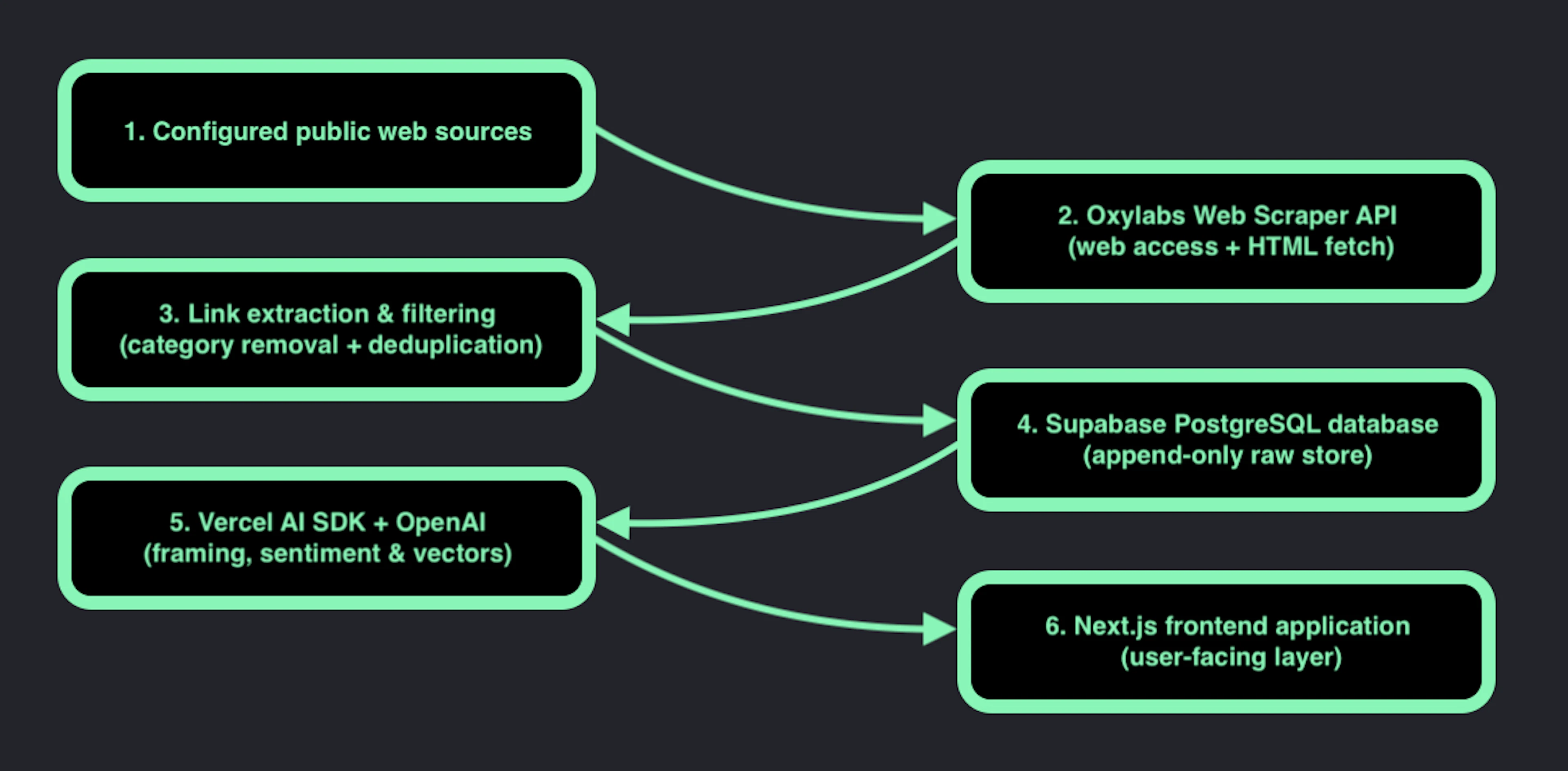
This decoupled flow ensures that if a target website goes down or takes time to respond, your web app itself stays fast and responsive for its users.
Real-Time Data and Common Challenges
A common trap when building AI aggregators is relying on basic HTTP libraries like standard fetch() or axios. While these work on simple static blogs, big high-profile websites (such as news sites in this case) are well-known to deploy a whole line of various defenses that keep basic scripts at bay:
Behavioral & Fingerprint Analysis: IP reputation scoring, TLS fingerprinting, and header verification that trigger HTTP 403 errors or present CAPTCHAs.
Dynamic JavaScript Rendering: Content that loads asynchronously via client-side frameworks after the initial page request.
Localized access: Content availability control based on client IP geolocation.
Rate Limits: Blocking whole IP ranges from access when too many requests originate from known cloud hosting servers or specific IPs.
If an automated system encounters a CAPTCHA or has no access to the site and saves that raw HTML, your AI model under the app’s hood will attempt to analyze the error page instead of the real content, wasting both your API credits and generating bad outputs. Of course, this can be solved by implementing various tools, like proxies or managed scraping APIs, which will ensure uninterrupted access.
A good example of the latter is an all-in-one Oxylabs Web API that handles proxy management, IP rotation, headless browser rendering, and even data parsing. In this case, a pipeline can simply use a single API call to receive clean, fully rendered HTML in return.
Furthermore, modern AI-assisted engineering workflows can benefit greatly from well-prepared integration layers. Developers using AI coding agents (such as Cursor or Claude Code) can easily upgrade them with official MCPs to let the models interface with external tools and APIs directly.
On top of that, coding agents are known to invent API calls or rely on outdated documentation. Instead of repeatedly explaining the API in prompts, developers can install official agent skills that supply their agent with up-to-date details about the tool or task at hand. For example, integrating agent skills for all Oxylabs tools is as easy as a single command:
mpx skills add github.com/oxylabs/agent-skillsIn this case, the agent now understands:
authentication
request structure
best practices
supported endpoints
recommended implementation patterns
This keeps prompts smaller while reducing implementation errors.
How to Design an Efficient Data Pipeline
The principle of “Garbage In, Garbage Out” applies to AI applications even more than in your typical old-school apps. If raw HTML containing navigation menus, cookie banners, and irrelevant sidebar links end up in your LLM prompt, the model's accuracy drops almost immediately.
For a news aggregator app, as we saw before, you should try to keep data clean and costs low by following a simple sequence for the data ingestion pipeline:
Homepage collection: Request target landing pages through reliable scraping tools, such as Oxylabs Web Scraper API.
Core data extraction: Parse the DOM to pull links from main content cards.
Strict filtering: Immediately drop non-article pages (e.g., /category/, /video/, /subscribe/).
Deduplication: Check extracted URLs against existing database entries and discard duplicates before making full content requests.
Detail page storage: Scrape only new, verified article pages and save the cleaned body text to the database.
Filtering non-article links and duplicates before sending data to an LLM protects your API token budget and keeps database records clean.
How to Automate Background Ingestion
Running web scrapers, extracting content, and calling AI models all in a single synchronous web request takes time. In modern serverless deployments (like Vercel or AWS Lambda), long-running tasks tend to notoriously hit execution timeouts and fail. To build an autonomous data collection pipeline and keep your background tasks running without timeouts, separate the data fetching step from the AI processing step.
First, you fetch and store. An automated background schedule (such as Oxylabs Scheduler) can run on a recurring basis to fetch target homepage HTML and store it with no manual triggers or even complex preparations.
Then, as your step 2, you process and analyze. A lightweight application cron job triggers shortly after, picking up the unanalyzed HTML records from the database, running them through the AI model in small batches, and updating the application feed.
This simple two-step split prevents the very common serverless timeouts and ensures the background errors don't bring down your application out of nowhere.
From Web Data to AI Insights
Raw HTML is messy by nature, and unfocused LLMs are known to generate unpredictable results. To build a reliable data layer for your use cases, we recommend considering the following:
Schema validation. Avoid relying on free-form text prompts when saving data to a database. Instead, use schema validation libraries like Zod alongside AI frameworks like the Vercel AI SDK to force the model into returning clean, typed JSON. This ensures that metrics like sentiment scores, summaries, or categories always match your database schema without breaking your application.
Semantic search (vectors). Standard keyword queries often fail when articles cover the same topic using completely different phrasing. To connect related content based on meaning, convert your cleaned text into vector embeddings using models such as OpenAI's text-embedding-3-small. You can store and call these vectors directly in your existing database using open-source tools like the pgvector extension for PostgreSQL.
Combining schema enforcement with vector embeddings is one of the best-known strategies to turn valuable but messy data into a structured, highly queryable web intelligence system for your AI applications.
Key Takeaways
Building a reliable AI data pipeline comes down to three foundational practices. Reliable web access is your cornerstone, so avoid raw HTTP requests for dynamic web targets and offload proxy rotation and access challenges to specialized web scraper APIs for the best results. Also, filter out the noise and duplicates before passing it to LLMs for better data control and more efficient token usage. And finally, keep web scraping and AI inference separate so your application stays fast and unaffected by server timeouts.
To see this stack built from scratch, watch the full JavaScript Mastery tutorial on YouTube. Ready to upgrade your own pipeline? Get Web Scraper API with up to 2000 free results and try it with our Agent Skills on GitHub to see how real-time data changes the game.
Access data faster than ever before
Help us shape the future of Web Intelligence Index.
About the author
Dovydas Vėsa
Technical Content Researcher
Dovydas Vėsa is a Technical Content Researcher at Oxylabs. He creates in-depth technical content and tutorials for web scraping and data collection solutions, drawing from a background in journalism, cybersecurity, and a lifelong passion for tech, gaming, and all kinds of creative projects.
All information on Oxylabs Blog is provided on an "as is" basis and for informational purposes only. We make no representation and disclaim all liability with respect to your use of any information contained on Oxylabs Blog or any third-party websites that may be linked therein. Before engaging in scraping activities of any kind you should consult your legal advisors and carefully read the particular website's terms of service or receive a scraping license.
Related articles





Get the latest news from data gathering world