
Scala web scraping provides native, compile-time guarantees for data pipelines that typical Python scraping scripts often lack. Scala is also a first-class language in scalable JVM ecosystems such as Apache Spark and Akka, and it fits naturally into Kafka-based streaming and big data pipelines. That makes web scraping with Scala a practical choice when the scraped data needs to move into production workflows rather than remain in a small one-off script.
This tutorial builds a Scala 3 scraper that fetches and parses pages with Scala Scraper, extracts typed data, handles pagination, exports results to CSV, and scrapes JavaScript-rendered pages with Selenium.
What is Scala web scraping?
Scala is a statically typed language that runs on the JVM. It blends object-oriented and functional programming into a single concise syntax. For web scraping, that combination pays off in three concrete ways.
First, typed pipelines. When you model scraped data as a case class, the compiler enforces the data shape across your entire pipeline. Shape and field-name mismatches surface at compile time, and Scala's Option type makes missing values explicit instead of silent nulls in production.
Second, concurrency. Scala's Future, cats-effect, and ZIO give you structured parallel scraping with built-in backpressure (to control the request flow and avoid overload) and cancellation. Fetching an enormous number of pages in parallel can be done in just a few lines of idiomatic code.
Third, Spark integration. If your scraped data feeds into big data processing, Scala is the native language of Apache Spark. No serialization overhead, no language boundary.
How web scraping with Scala works
Before jumping into Scala-specific tooling, it helps to ground a few basic concepts. Web scraping is essentially a data pipeline: you point it at a URL, pull the page content, make sense of the HTML structure, and pull out only the fields you care about. In Scala, each of those stages is explicit, typed, and composable – which makes the pipeline easier to debug and extend as your scraping needs grow.
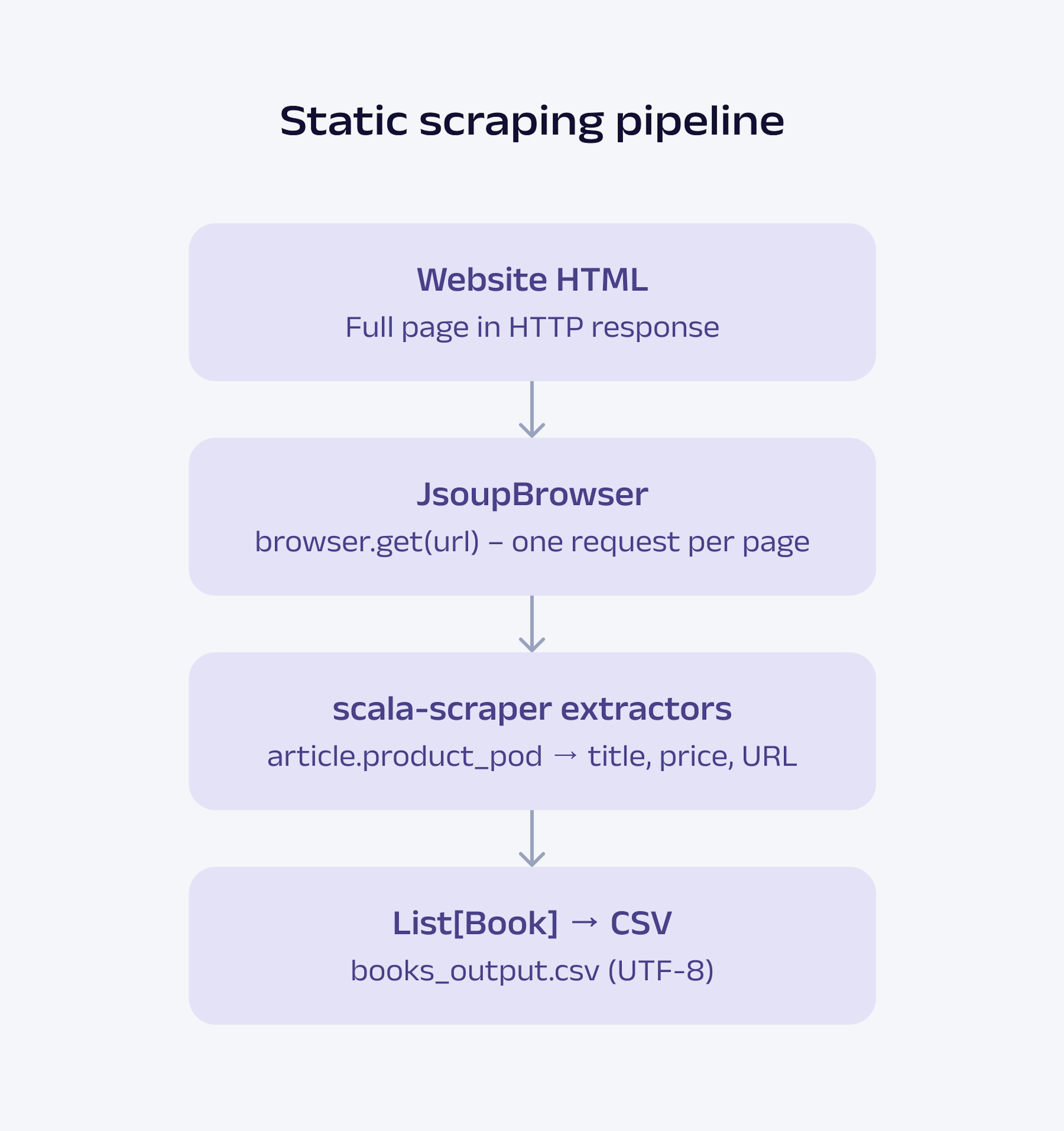
That pipeline follows three stages: fetch, parse, and extract.
Fetch. An HTTP client sends a GET request to a target URL and retrieves raw HTML elements. In this tutorial, Scala Scraper's JsoupBrowser handles this. It wraps jsoup's HTTP client and returns a parsed document object in a single call.
Parse. The raw HTML is converted into a traversable document tree and jsoup builds this tree. It handles malformed markup, resolves relative URLs, and exposes every node via a CSS selector API. Scala Scraper sits on top and provides a Scala-native interface to that tree.
Extract. You query the document tree using CSS selectors, read text content or HTML attributes, and map the results into typed data structures. From this point, your data is fully typed, and the compiler keeps it that way.
Libraries used in the tutorial and why
Before writing any code, it's helpful to understand what each library does and how they relate to each other. This tutorial uses three core scraping libraries – jsoup, Scala Scraper, and Selenium – plus scala-csv for the CSV export. They are not interchangeable, as each one handles a different part of the scraping workflow.
jsoup, Scala Scraper, and Selenium explained
jsoup is one of the most established Java libraries for HTML parsing and the de facto standard on the JVM. It is stable, fast, and handles real-world messy HTML without any configuration. You will not call jsoup directly in this tutorial, but it is running in the background.
Under the hood, Scala Scraper still relies on jsoup, but the API feels much more natural in Scala projects. It adds the >> extractor operator, for-comprehensions over document trees, and a DSL that feels native to Scala 3. Think of it as jsoup with a Scala-friendly interface on top.
Selenium is for JavaScript-rendered pages. When a page builds its content client-side, jsoup's static fetch returns empty or incomplete HTML because it never executes JavaScript. Selenium launches a real browser, runs the JavaScript code, and gives you the fully rendered DOM.
Playwright is an emerging alternative for JavaScript-rendered scraping and browser automation. It is generally faster and more modern than Selenium, with built-in support for automatic waits, browser contexts, and cross-browser automation APIs. However, Selenium still has broader documentation, more mature JVM ecosystem support, and significantly more Scala/JVM tutorial coverage today. For that reason, Selenium remains the safer choice for a Scala-focused tutorial where long-term compatibility and community examples matter more than adopting newer tooling.
Setting up your environment
Prerequisites
To follow along with this tutorial, ensure you have the following:
A 64-bit operating system (Windows 10/11, macOS 12+, or Ubuntu 20.04+).
Administrator or sudo access on your machine (recommended).
A stable internet connection (dependencies are downloaded during setup).
At least 4GB of free disk space (recommended for the JDK, sbt dependency caches, Scala libraries, browsers, and Selenium drivers).
Installing Java and Scala
Scala runs on the JVM, so JDK 17+ must be installed first. Then install Scala and sbt via Coursier, the official Scala installer.
Step 1: Install the JDK
Windows
Go to https://adoptium.net.
Download the Windows x64 .msi file for Temurin 17 LTS (or higher).
Run the installer. When you see the optional features screen, tick the Set JAVA_HOME variable and Add to PATH checkboxes. Both are unchecked by default.
Complete the installation and restart your terminal.
macOS
brew install --cask temurin@17If you don't have Homebrew, install it first from here: https://brew.sh.
Linux (Ubuntu/Debian)
sudo apt update
sudo apt install -y openjdk-17-jdk
On macOS and Linux, many Scala developers also use SDKMAN! as an alternative to Coursier for managing JVM tooling. SDKMAN! simplifies switching between multiple Java, Scala, and sbt versions across projects. After installing it from SDKMan, you can install tools with commands such as:
sdk install java 17-tem
sdk install scala
sdk install sbt
Verify on all platforms with the following command:
java -version
Expected output:
openjdk version "17.x.x"
If you see a command not found message, your PATH is not set correctly. On Windows, restart your terminal and try again.
Step 2: Install Scala and sbt via Coursier
Coursier installs Scala, sbt, and the Scala CLI in one command. The installation command varies by OS.
Windows (PowerShell)
For Windows, open PowerShell and run the following command:
Invoke-WebRequest -Uri "https://github.com/coursier/launchers/raw/master/cs-x86_64-pc-win32.zip" -OutFile "cs.zip"

Expand-Archive -Path "cs.zip" -DestinationPath "."

.\cs setup
Close PowerShell completely after running the setup and reopen it. Coursier adds itself to PATH, but the change only takes effect in a new terminal session.
macOS
For macOS, run the following command:
curl -fL https://github.com/coursier/launchers/raw/master/cs-x86_64-apple-darwin.gz | gzip -d > cs

chmod +x cs

./cs setup
Close and reopen your terminal after setup.
Linux
For Linux, run the following command:
curl -fL https://github.com/coursier/launchers/raw/master/cs-x86_64-pc-linux.gz | gzip -d > cs

chmod +x cs

./cs setup
Close and reopen your terminal after setup.
Verify on all platforms with the following command:
scala -version
sbt -version
You should see Scala 3.x and sbt 1.x in the output. Exact minor versions vary, but as long as both commands run successfully, you are ready.
Choosing an IDE
IntelliJ IDEA with the Scala plugin is the recommended choice. It gives you full refactoring support, implicit resolution, and integrated sbt. You can download the free Community Edition from JetBrains. After installation, go to Plugins, search for Scala, and install it.
VS Code with Metals is a lighter alternative. Install VS Code, open the Extensions panel, search for Metals, and install it. Open your project folder, and Metals automatically imports the build.
Creating an sbt project
Run the following command in your terminal:
sbt new scala/scala3.g8When prompted, enter scala-scraper-demo as the project name. Now open build.sbt and replace its entire contents with the following:
val scala3Version = "3.8.3"
lazy val root = project
  .in(file("."))
  .settings(
    name := "scala-scraper-demo",
    version := "0.1.0",
    scalaVersion := scala3Version,
    libraryDependencies ++= Seq(
      "net.ruippeixotog" %% "scala-scraper" % "3.2.0",
      "com.github.tototoshi" %% "scala-csv" % "2.0.0",
      "org.seleniumhq.selenium" % "selenium-java" % "4.44.0",
      "io.github.bonigarcia" % "webdrivermanager" % "6.3.4",
      "org.slf4j"            % "slf4j-nop"        % "2.0.13",
    )
  )
Also, add the sbt version in the project-> build.properties file:
sbt.version=1.12.11Then run the following command:
sbt compileThis downloads all dependencies. Once you see the [success] message, you are ready to proceed with the actual scraper code.
Step-by-step guide: coding the Scala web scraper
This section provides a step-by-step demo on building the full scraper for the demo web scraping site: books.toscrape.com. Each step adds to the previous one.
The diagram below outlines the entire pipeline used to scrape a static website using Scala.
Step 1: Import the required libraries
Start by importing everything the scraper needs:
import net.ruippeixotog.scalascraper.browser.JsoupBrowser
import net.ruippeixotog.scalascraper.dsl.DSL.*
import net.ruippeixotog.scalascraper.dsl.DSL.Extract.*
import com.github.tototoshi.csv.CSVWriter
import java.io.{FileOutputStream, OutputStreamWriter}
import scala.util.Using
Here is what each import does:
JsoupBrowser – the HTTP client that fetches pages and returns a parsed document.
DSL.* and Extract.* – give you the >> and >?> extractor operators for querying elements.
CSVWriter – from scala-csv, handles writing rows to a CSV file.
Using – from Scala's standard library, closes file resources automatically even if an exception occurs.
Step 2: Define the data model
Before writing any extraction logic, define the shape of the data you want. In Scala, a case class does this in one line:
case class Book(
  title: String,
  price: String,
  availability: String,
  detailUrl: String
)
This is where Scala's type system starts paying off. Every book extracted from the page will be a Book instance. The compiler enforces that all four fields are present and of the correct type throughout the rest of the pipeline.
Step 3: Fetch the page
Initialize JsoupBrowser with a User-Agent string. Scala Scraper exposes the User-Agent as a constructor argument on JsoupBrowser. Many production sites block requests without a realistic User-Agent.
// Use `new` to access the constructor that accepts a User-Agent string
val browser = new JsoupBrowser("Mozilla/5.0 (compatible; ScalaBot/1.0)")
val doc = browser.get("http://books.toscrape.com")
The browser.get() call sends an HTTP GET request to the website and returns a fully parsed document object. Everything after this point works on that document. There are no further network calls until you explicitly make one.
Adding custom headers
If you need to set additional headers beyond User-Agent (for example, Accept-Language, Referer, or Authorization), you need to access the underlying jsoup connection directly.
Scala Scraper does not expose a high-level API for per-request headers, so drop down to jsoup for this:
import org.jsoup.Jsoup

val doc = Jsoup.connect("http://books.toscrape.com")
  .userAgent("Mozilla/5.0 (compatible; ScalaBot/1.0)")
  .header("Accept-Language", "en-US,en;q=0.9")
  .header("Referer", "https://www.google.com/")
  .get()

val scalaDoc = browser.parseString(doc.outerHtml())
This gives you full control over headers. Once you have the jsoup Document, pass it through browser.parseString() to get it back into Scala Scraper's type system. This pattern is common when you need fine-grained control over the request but still want Scala Scraper's >> operators for extraction.
Step 4: Select elements and extract data
This is where the actual scraping happens. You query the page for every book element, pull out the four fields you need, and pack them into a typed Book instance:
def extractBooksFrom(doc: browser.DocumentType): List[Book] =

  (doc >> elements("article.product_pod")).map { article =>

    val title        = article >> attr("title")("h3 > a")

    val price        = (article >> element("p.price_color")).text

    val availability = (article >> element("p.availability")).text.trim

    val href = article >> attr("href")("h3 > a")

    val cleanHref = href.replace("../", "").replace("catalogue/", "")

    val detailUrl = s"http://books.toscrape.com/catalogue/$cleanHref"

    Book(title, price, availability, detailUrl)

  }.toList
Start with the doc >> elements("article.product_pod") selector. This selects every book card on the page as a list. The >> operator is Scala Scraper's way of running a CSS selector against a document or element. Each item in that list is then passed into the map block, where you extract the individual fields.
Inside the map, two extraction methods do all the work:
.text reads the visible text content of a matched element. Both price and availability are plain text inside their respective tags.
attr("name") reads a named HTML attribute instead of text content. The book title lives in the title attribute of the link tag, not as visible text, which is why attr("title") is used there instead of .text. The same goes for the attr("href"), which pulls the raw URL string from the anchor tag.
One extra step for the URL: books.toscrape.com uses relative paths whose form changes depending on which page you are on. From page 1, the raw href is catalogue/book-name/index.html; from pages 2 through 50 (which themselves live under catalogue/), it is ../book-name/index.html.
Chaining .replace("../", "") and .replace("catalogue/", "") strips both prefixes, so the same string interpolation rebuilds a correct absolute URL no matter which page the book was extracted from. Without the second replacement, page-1 detail URLs would contain …/catalogue/catalogue/book/… and return 404.
The result of the entire function is a List[Book], which is fully typed, ready for pagination in Step 5 and CSV export in Step 6.
Step 5: Scrape multiple pages
The books.toscrape.com site has 50 web pages. This step uses a recursive function to follow the next page link until it disappears on the last page.
The raw href attribute extracted by jsoup is a relative URL, and its value changes depending on which page you are currently on. From page 1 (the root), jsoup returns catalogue/page-2.html. From page 2 onward, it returns just page-3.html because those pages sit inside the catalogue folder, and the browser resolves the link relative to its current location. The fix strips catalogue/ if it is present and always rebuilds a consistent absolute URL, so the recursive call works correctly across all 50 pages.
def scrapePages(url: String, acc: List[Book] = Nil): List[Book] =
  println(s"Scraping: $url")
  Thread.sleep(500) // wait 500ms between requests — be polite to the server
  val doc   = browser.get(url)
  val books = extractBooksFrom(doc)
  // Explicit braces avoid Scala 3 indentation parsing issues after a closing }
  (doc >?> attr("href")("li.next > a")) match {
	case Some(href) =>
  	val cleanHref = href.replace("catalogue/", "")
  	scrapePages(s"http://books.toscrape.com/catalogue/$cleanHref", acc ++ books)
	case None => acc ++ books
  }
>?> is the safe extractor. On the last page, there is no next button. >?> returns None cleanly instead of crashing. The recursion stops and returns everything collected so far.
Thread.sleep(500) adds a 500-millisecond delay between page requests. Do not remove this. Hammering a server with back-to-back requests is a common cause of IP bans.
Parallel fetching with Future.sequence
The recursive scraper above fetches listing pages sequentially, which is usually the safest approach for pagination. However, Scala also makes it easy to fetch independent pages in parallel. This is useful when scraping detail pages after collecting their URLs.
The example below fetches multiple book detail pages concurrently using Future.sequence:
import scala.concurrent.Future
import scala.concurrent.ExecutionContext.Implicits.global
import scala.concurrent.Await
import scala.concurrent.duration.*

def fetchBook(url: String): Future[Book] =
  Future {
    Thread.sleep(500) // still be polite to the server
    val doc = browser.get(url)
    val title = (doc >> element("div.product_main > h1")).text
    val price = (doc >> element("p.price_color")).text
    val availability = (doc >> element("p.availability")).text.trim
    Book(title, price, availability, url)
  }

val detailUrls = List(
  "http://books.toscrape.com/catalogue/a-light-in-the-attic_1000/index.html",
  "http://books.toscrape.com/catalogue/tipping-the-velvet_999/index.html",
  "http://books.toscrape.com/catalogue/soumission_998/index.html"
)

val futures = detailUrls.map(fetchBook)
val books = Await.result(
  Future.sequence(futures),
  30.seconds
)

println(s"Fetched ${books.size} books in parallel.")
The Future.sequence method converts List[Future[Book]] into a single Future[List[Book]]. Each request runs concurrently, significantly reducing scrape time when fetching hundreds of independent detail pages.
This is one of Scala's major advantages for web scraping. Concurrency is built directly into the language ecosystem, making parallel scraping much cleaner than managing threads manually. Even when using parallel requests, keep delays and rate limits in place to avoid overwhelming the target server.
Step 6: Export to CSV
Write the scraped books to a CSV file using scala-csv:
def saveBooksToCSV(books: List[Book], path: String): Unit =
  Using(CSVWriter.open(
	new OutputStreamWriter(new FileOutputStream(path), "UTF-8")
  )) { writer =>
	writer.writeRow(List("Title", "Price", "Availability", "URL"))
	books.foreach { b =>
  	writer.writeRow(List(b.title, b.price, b.availability, b.detailUrl))
	}
  }
  println(s"Saved ${books.size} rows to $path")
The UTF-8 encoding argument is not optional. Book titles may contain special characters, such as £ and accented letters. Without explicit UTF-8 encoding, these characters get corrupted on Windows systems that default to a different charset.
The Using utility wraps the writer and closes it automatically when the block finishes, even if an exception is thrown during the write.
Step 7: Run the script
Wire everything together in a main function:
@main def scrapeBooks(): Unit =
  println("Starting scrape...")
  val allBooks = scrapePages("http://books.toscrape.com")
  println(s"\nTotal books scraped: ${allBooks.size}")
  saveBooksToCSV(allBooks, "books_output.csv")
Run it with the following command:
sbt "runMain scrapeBooks"The following example combines everything covered so far into a complete scraper. Save it as src/main/scala/BooksScraper.scala and run it with the sbt "runMain scrapeBooks" command.
Note: for clarity, this example keeps the browser, the case class, and the helper functions at the top level of a single file. In a larger project, wrap them inside an object BooksScraper { ... } to avoid edge cases with path-dependent types like browser.DocumentType across files and packages.
import net.ruippeixotog.scalascraper.browser.JsoupBrowser
import net.ruippeixotog.scalascraper.dsl.DSL.*
import net.ruippeixotog.scalascraper.dsl.DSL.Extract.*
import com.github.tototoshi.csv.CSVWriter
import java.io.{FileOutputStream, OutputStreamWriter}
import scala.util.Using

case class Book(
  title: String,
  price: String,
  availability: String,
  detailUrl: String
)

// Use `new` to access the class constructor that accepts a User-Agent string
val browser = new JsoupBrowser("Mozilla/5.0 (compatible; ScalaBot/1.0)")

def extractBooksFrom(doc: browser.DocumentType): List[Book] =
  (doc >> elements("article.product_pod")).map { article =>
    val title        = article >> attr("title")("h3 > a")
    val price        = (article >> element("p.price_color")).text
    val availability = (article >> element("p.availability")).text.trim
    val href = article >> attr("href")("h3 > a")
    val cleanHref = href.replace("../", "").replace("catalogue/", "")
    val detailUrl = s"http://books.toscrape.com/catalogue/$cleanHref"
    Book(title, price, availability, detailUrl)
  }.toList

def scrapePages(url: String, acc: List[Book] = Nil): List[Book] =
  println(s"Scraping: $url")
  Thread.sleep(500)
  val doc   = browser.get(url)
  val books = extractBooksFrom(doc)
  // Explicit braces avoid Scala 3 indentation parsing issues after a closing }
  (doc >?> attr("href")("li.next > a")) match {
    case Some(href) =>
      val cleanHref = href.replace("catalogue/", "")
      scrapePages(s"http://books.toscrape.com/catalogue/$cleanHref", acc ++ books)
    case None       => acc ++ books
  }

def saveBooksToCSV(books: List[Book], path: String): Unit =
  Using(CSVWriter.open(
    new OutputStreamWriter(new FileOutputStream(path), "UTF-8")
  )) { writer =>
    writer.writeRow(List("Title", "Price", "Availability", "URL"))
    books.foreach { b =>
      writer.writeRow(List(b.title, b.price, b.availability, b.detailUrl))
    }
  }
  println(s"Saved ${books.size} rows to $path")

@main def scrapeBooks(): Unit =
  println("Starting scrape...")
  val allBooks = scrapePages("http://books.toscrape.com")
  println(s"\nTotal books scraped: ${allBooks.size}")
  saveBooksToCSV(allBooks, "books_output.csv")
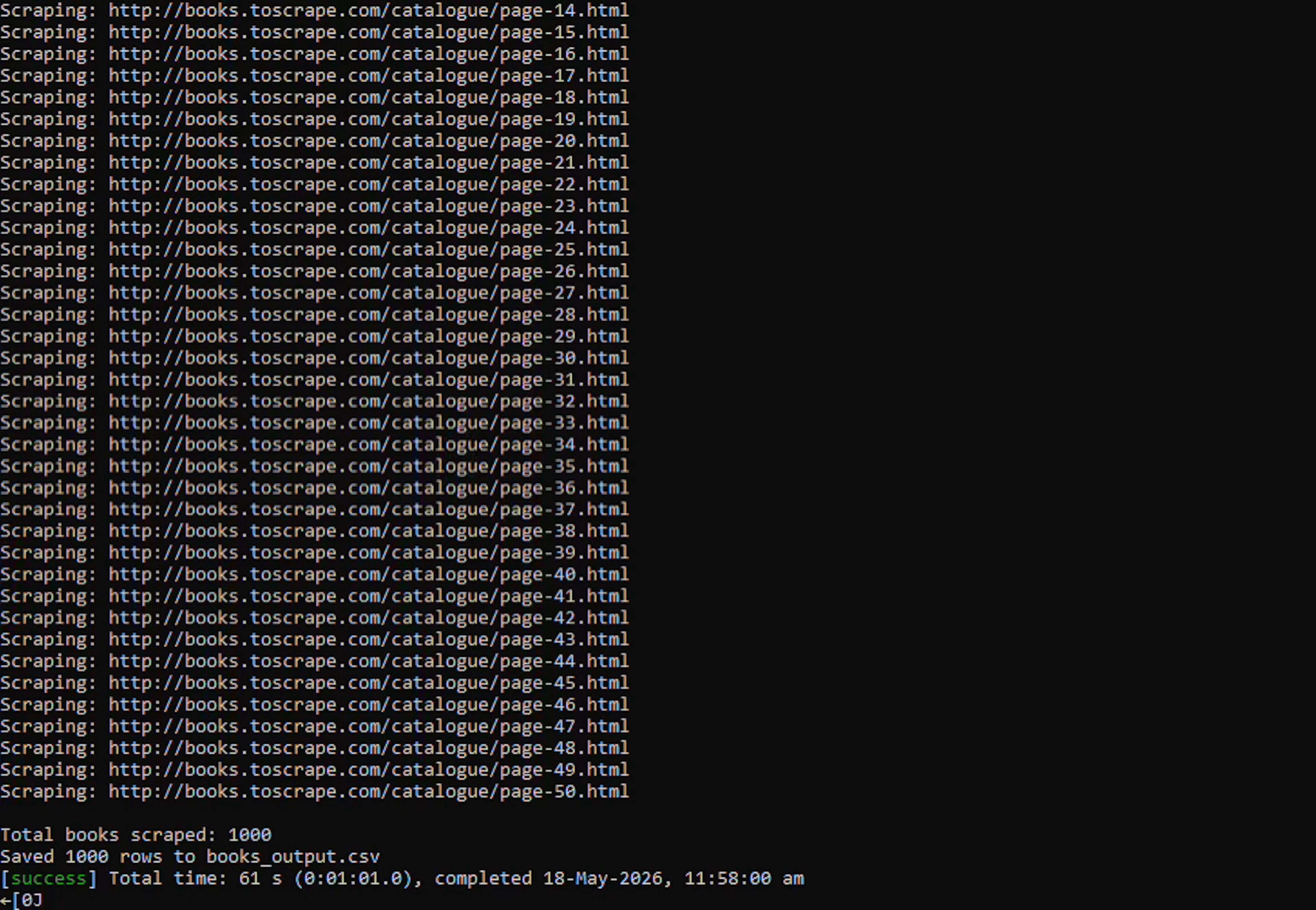
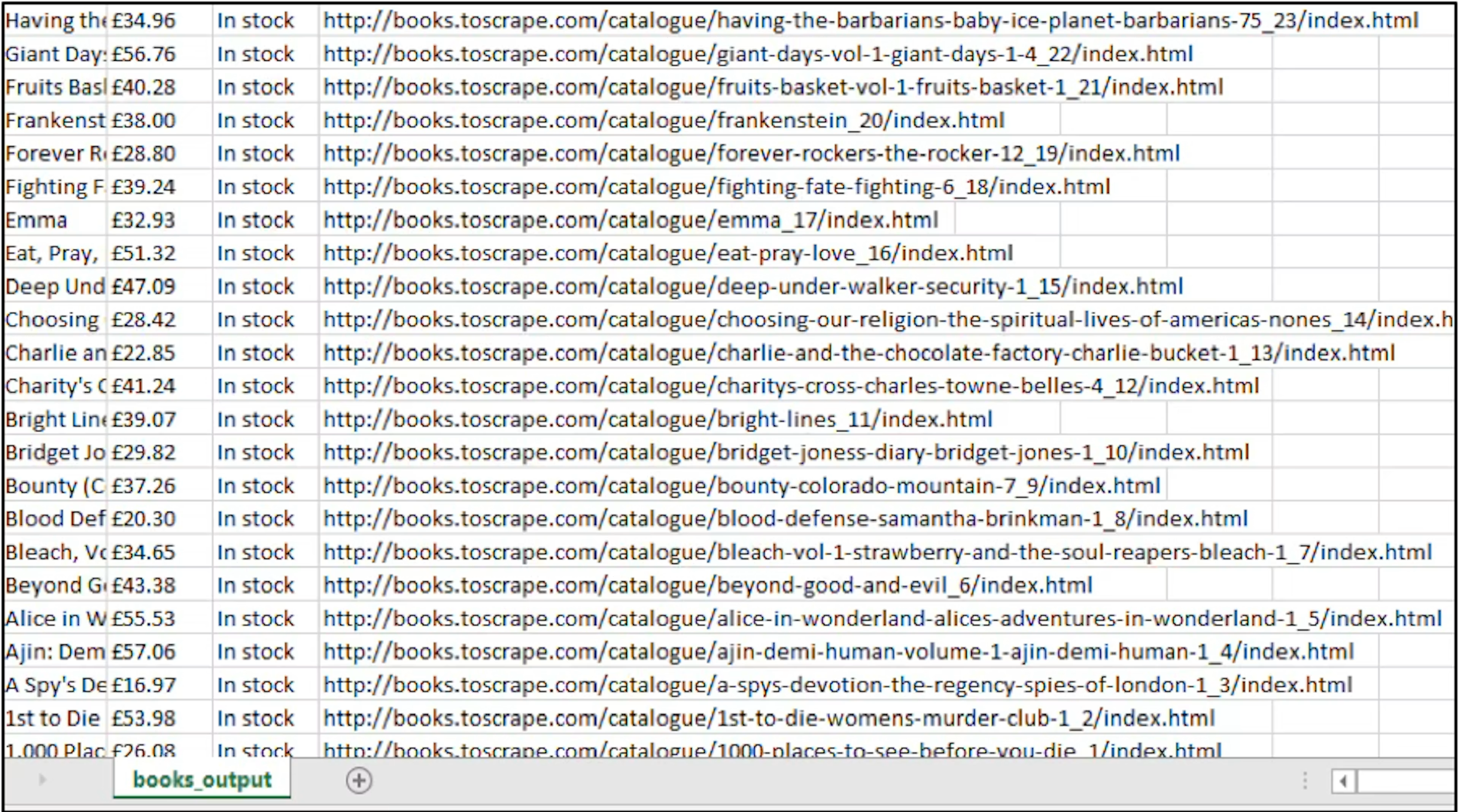
The output CSV will contain all 1,000 books across all 50 pages, with title, price, availability, and URL columns. Here are the clipped snippets for the console and the corresponding CSV file outputs:
Scrape JavaScript-rendered pages
The scraper above works well on static HTML websites like books.toscrape.com because the server returns complete markup. However, not every site behaves this way.
Some pages build their content with JavaScript after the page loads. When jsoup sends a GET request to these pages, the server returns a skeleton HTML file with little or no content. The actual data is injected by JavaScript running in the browser. jsoup never executes JavaScript, so those elements simply do not exist in what jsoup receives.
The quotes.toscrape.com/js/ page is a JavaScript-rendered version of the quotes sandbox. If you try fetching it with jsoup, you get an empty page. Selenium solves this by launching a real browser, loading the full page, executing all JavaScript, and giving you the completed DOM to work with.
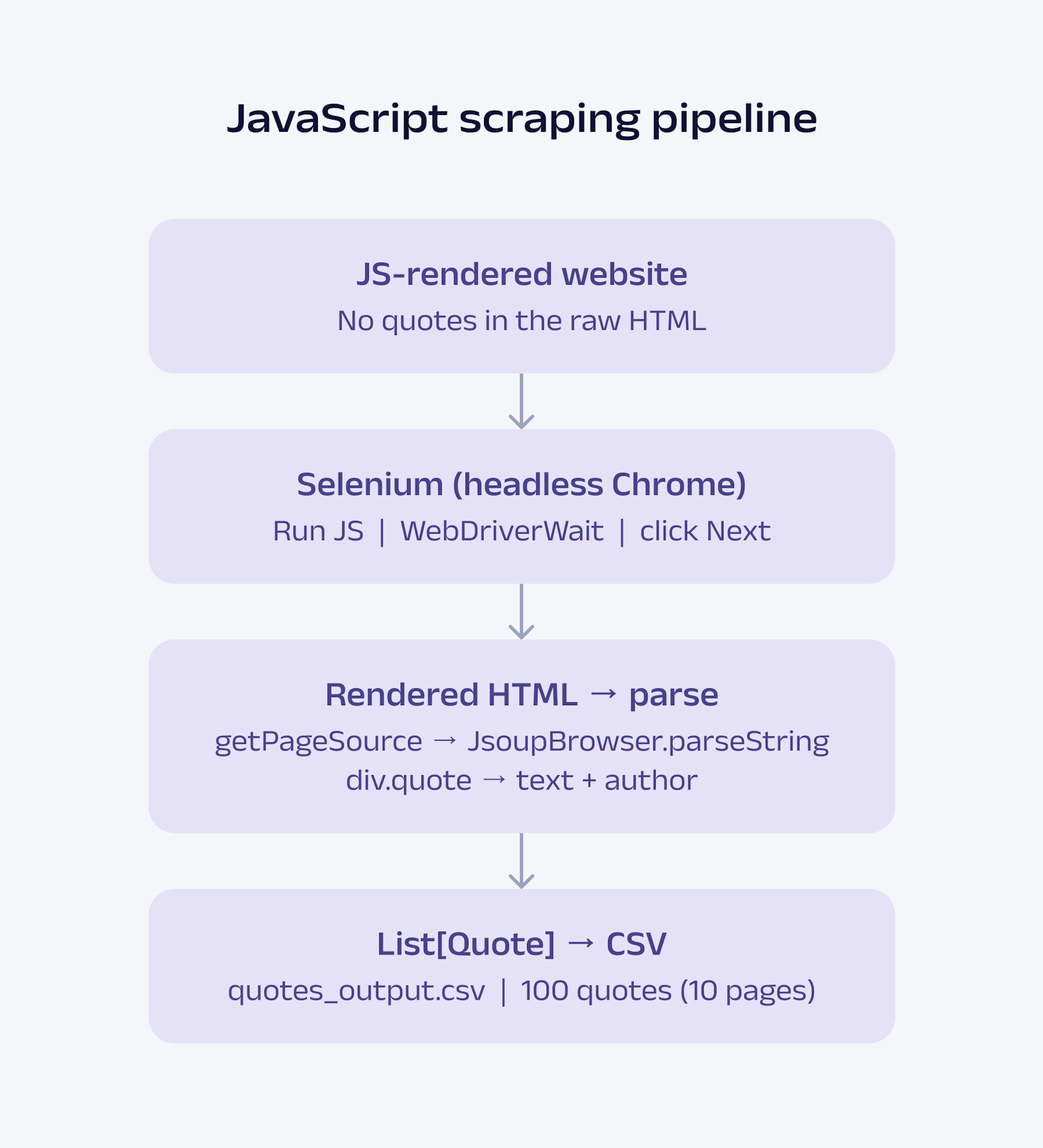
This section builds the full scraper step by step, with each step adding to the previous one. The complete process flow is illustrated in the chart below.
Step 1: Import the required libraries
The first step is to import all the required libraries:
import io.github.bonigarcia.wdm.WebDriverManager
 import org.openqa.selenium.chrome.{ChromeDriver, ChromeOptions}
 import org.openqa.selenium.support.ui.{ExpectedConditions, WebDriverWait}
 import org.openqa.selenium.By
 import net.ruippeixotog.scalascraper.browser.JsoupBrowser
 import net.ruippeixotog.scalascraper.dsl.DSL.*
 import net.ruippeixotog.scalascraper.dsl.DSL.Extract.*
 import com.github.tototoshi.csv.CSVWriter
 import java.io.{FileOutputStream, OutputStreamWriter}
 import java.time.Duration
 import scala.util.Using
Here is what each import does:
WebDriverManager downloads and configures the correct ChromeDriver binary for your machine.
ChromeDriver / ChromeOptions launch Chrome and pass flags (headless mode, sandbox, custom User-Agent).
WebDriverWait / ExpectedConditions / By wait until elements (e.g., div.quote) appear before scraping.
JsoupBrowser parses HTML strings (here, the rendered page source from Selenium).
DSL.* and Extract.* give you the >> extractor operators for CSS queries (same as the books scraper).
CSVWriter from scala-csv handles writing rows to a CSV file.
Duration is used with WebDriverWait for a 10-second timeout.
Using from Scala's standard library closes file resources automatically, even if an exception occurs.
Step 2: Define the data model
Before writing any extraction logic, define the structure of the data you want to collect:
case class Quote(text: String, author: String)Using a case class keeps the scraper predictable as it grows. Every result from the extraction step now has a guaranteed schema, making later steps such as CSV export and parallel processing much easier to manage.
Step 3: Set up the browser and load the page
JavaScript-rendered sites require a browser. WebDriverManager sets up ChromeDriver. It detects your installed Chrome version and automatically downloads the matching ChromeDriver binary. You do not manage it manually.
WebDriverManager.chromedriver().setup()

 val options = ChromeOptions()
 options.addArguments(
   "--headless=new",
   "--no-sandbox",
   "--disable-dev-shm-usage",
   "--user-agent=Mozilla/5.0 (Windows NT 10.0; Win64; x64) AppleWebKit/537.36"
 )

 val driver = ChromeDriver(options)
 driver.get("https://quotes.toscrape.com/js/")
What this does:
driver.get(...) opens the URL in Chrome and runs the site's JavaScript until the first batch of quotes appears.
--headless=new runs without a visible window (suitable for servers and CI).
--no-sandbox and --disable-dev-shm-usage are common flags for Linux/Docker; they help avoid Chrome startup failures in restricted environments.
Step 4: Select elements and extract data
Selenium exposes the fully rendered HTML through the driver.getPageSource after JavaScript execution completes. You can pass that HTML into JsoupBrowser().parseString(...) and continue extracting data using the same >> selectors style as introduced earlier in the tutorial:
def extractQuotesFrom(html: String): List[Quote] =
   val doc = JsoupBrowser().parseString(html)
   val quotes  = doc >> elements("div.quote span.text")
   val authors = doc >> elements("div.quote small.author")
   quotes.zip(authors).map { case (q, a) => Quote(q.text, a.text) }.toList
What happens here:
doc >> elements("div.quote span.text") selects every quote text on the current page (up to 10).
doc >> elements("div.quote small.author") selects every author on the current page.
.text reads the visible text inside each matched element.
zip pairs the nth quote with the nth author (in the same order in the DOM).
map { case (q, a) => Quote(...) } builds typed Quote values.
The result is a List[Quote] for a single page. Step 5 repeats this for all pages.
Step 5: Scrape multiple pages
quotes.toscrape.com/js/ shows 10 quotes per page. A single-page scrape stops at 10 because it never clicks Next. This step uses a recursive function: extract the current page, click li.next a if it exists, wait briefly, then repeat:
def scrapeAllPages(driver: ChromeDriver, wait: WebDriverWait, acc: List[Quote] = Nil, page: Int = 1): List[Quote] =
   println(s"Scraping page $page...")
   wait.until(ExpectedConditions.presenceOfElementLocated(By.cssSelector("div.quote")))
   val pageQuotes = extractQuotesFrom(driver.getPageSource)
   val nextLinks  = driver.findElements(By.cssSelector("li.next a"))
   if nextLinks.isEmpty then acc ++ pageQuotes
   else
 	nextLinks.get(0).click()
 	Thread.sleep(500)
 	scrapeAllPages(driver, wait, acc ++ pageQuotes, page + 1)
Key points:
wait.until(...) blocks until at least one div.quote exists (avoids racing the JS loader).
findElements(By.cssSelector("li.next a")) – on the last page (page 10), the Next control is missing, so the list is empty and recursion stops.
nextLinks.get(0).click() loads the next page in the same browser session (required for /js/).
acc ++ pageQuotes accumulates quotes from all pages visited so far.
Thread.sleep(500) adds a short pause after each click, allowing new quotes to be rendered.
Step 6: Export to CSV
Write the scraped quotes to a CSV file using scala-csv:
def saveQuotesToCSV(quotes: List[Quote], path: String): Unit =
   Using(CSVWriter.open(
 	new OutputStreamWriter(new FileOutputStream(path), "UTF-8")
   )) { writer =>
 	writer.writeRow(List("Text", "Author"))
 	quotes.foreach { q =>
   	writer.writeRow(List(q.text, q.author))
 	}
   }
   println(s"Saved ${quotes.size} rows to $path")
As in the earlier CSV export example, the writer uses explicit UTF-8 encoding and Scala's Using helper for automatic resource cleanup. The implementation stays the same here, only the data source changes from books to quotes.
Step 7: Run the script
Wire together browser setup, pagination, console output, and CSV export, and always close the driver in finally (so Chrome does not stay open if something fails):
@main def scrapeQuotes(): Unit =

   WebDriverManager.chromedriver().setup()

   val options = ChromeOptions()
   options.addArguments(
 	"--headless=new",
 	"--no-sandbox",
     "--disable-dev-shm-usage",
 	"--user-agent=Mozilla/5.0 (Windows NT 10.0; Win64; x64) AppleWebKit/537.36"
   )

   val driver = ChromeDriver(options)

   try
 	driver.get("https://quotes.toscrape.com/js/")

 	val wait	= WebDriverWait(driver, Duration.ofSeconds(10))
 	val results = scrapeAllPages(driver, wait)

    println(s"Total quotes scraped: ${results.size}")

 	saveQuotesToCSV(results, "quotes_output.csv")

   finally
 	driver.quit()
 	println("Driver closed.")
Run it with the following command:
sbt "runMain scrapeQuotes"Here is the full scraper code in one place. Copy this into src/main/scala/QuotesScraper.scala and run it with sbt runMain scrapeQuotes.
import io.github.bonigarcia.wdm.WebDriverManager
import org.openqa.selenium.chrome.{ChromeDriver, ChromeOptions}
import org.openqa.selenium.support.ui.{ExpectedConditions, WebDriverWait}
import org.openqa.selenium.By
import net.ruippeixotog.scalascraper.browser.JsoupBrowser
import net.ruippeixotog.scalascraper.dsl.DSL.*
import net.ruippeixotog.scalascraper.dsl.DSL.Extract.*
import com.github.tototoshi.csv.CSVWriter
import java.io.{FileOutputStream, OutputStreamWriter}
import java.time.Duration
import scala.util.Using

// ----------------------------
// Data model
// ----------------------------
case class Quote(text: String, author: String)

def saveQuotesToCSV(quotes: List[Quote], path: String): Unit =
  Using(CSVWriter.open(
    new OutputStreamWriter(new FileOutputStream(path), "UTF-8")
  )) { writer =>
    writer.writeRow(List("Text", "Author"))
    quotes.foreach { q =>
      writer.writeRow(List(q.text, q.author))
    }
  }
  println(s"Saved ${quotes.size} rows to $path")

def extractQuotesFrom(html: String): List[Quote] =
  val doc = JsoupBrowser().parseString(html)
  val quotes  = doc >> elements("div.quote span.text")
  val authors = doc >> elements("div.quote small.author")
  quotes.zip(authors).map { case (q, a) => Quote(q.text, a.text) }.toList

def scrapeAllPages(driver: ChromeDriver, wait: WebDriverWait, acc: List[Quote] = Nil, page: Int = 1): List[Quote] =
  println(s"Scraping page $page...")
  wait.until(ExpectedConditions.presenceOfElementLocated(By.cssSelector("div.quote")))
  val pageQuotes = extractQuotesFrom(driver.getPageSource)
  val nextLinks  = driver.findElements(By.cssSelector("li.next a"))
  if nextLinks.isEmpty then acc ++ pageQuotes
  else
    nextLinks.get(0).click()
    Thread.sleep(500)
    scrapeAllPages(driver, wait, acc ++ pageQuotes, page + 1)

// ----------------------------
// Entry point
// ----------------------------
@main def scrapeQuotes(): Unit =

  println("Starting scrape (quotes.toscrape.com/js/)...")

  println("Setting up ChromeDriver (first run may download the driver; this can take a minute)...")
  WebDriverManager.chromedriver().setup()

  val options = ChromeOptions()
  options.addArguments(
    "--headless=new",
    "--no-sandbox",
    "--disable-dev-shm-usage",
    "--user-agent=Mozilla/5.0 (Windows NT 10.0; Win64; x64) AppleWebKit/537.36"
  )

  println("Launching headless Chrome...")
  val driver = ChromeDriver(options)

  try
    println("Loading page and waiting for JavaScript quotes...")
    driver.get("https://quotes.toscrape.com/js/")

    val wait    = WebDriverWait(driver, Duration.ofSeconds(10))
    val results = scrapeAllPages(driver, wait)

    println(s"Total quotes scraped: ${results.size}")
    saveQuotesToCSV(results, "quotes_output.csv")

  finally
    driver.quit()
    println("Driver closed.")
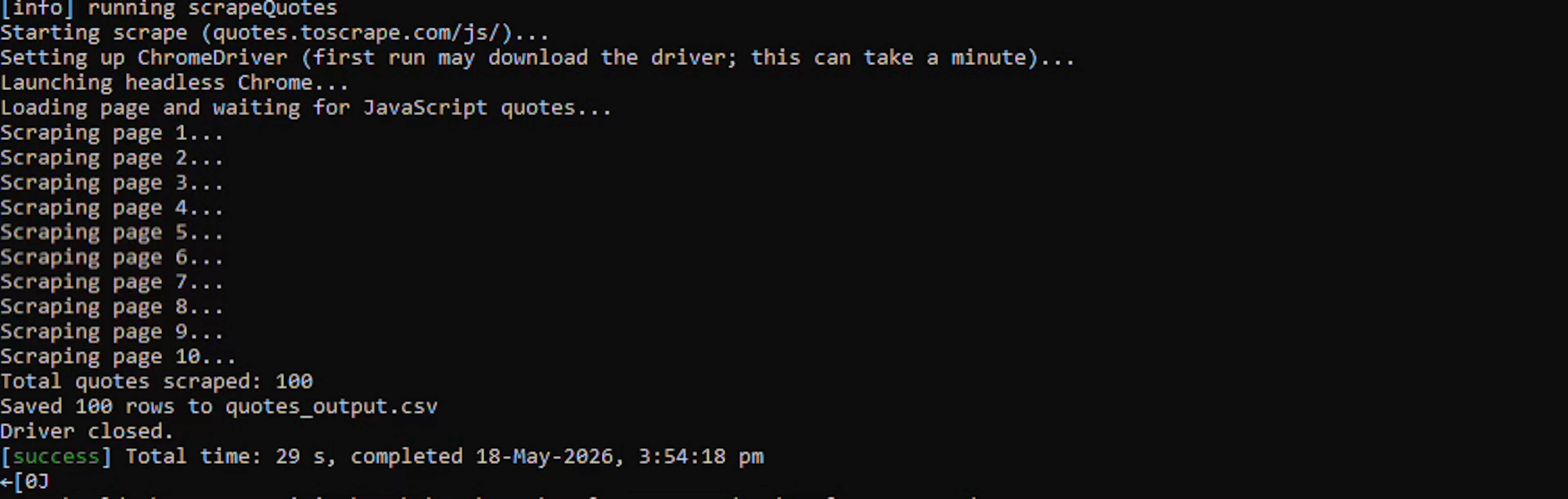
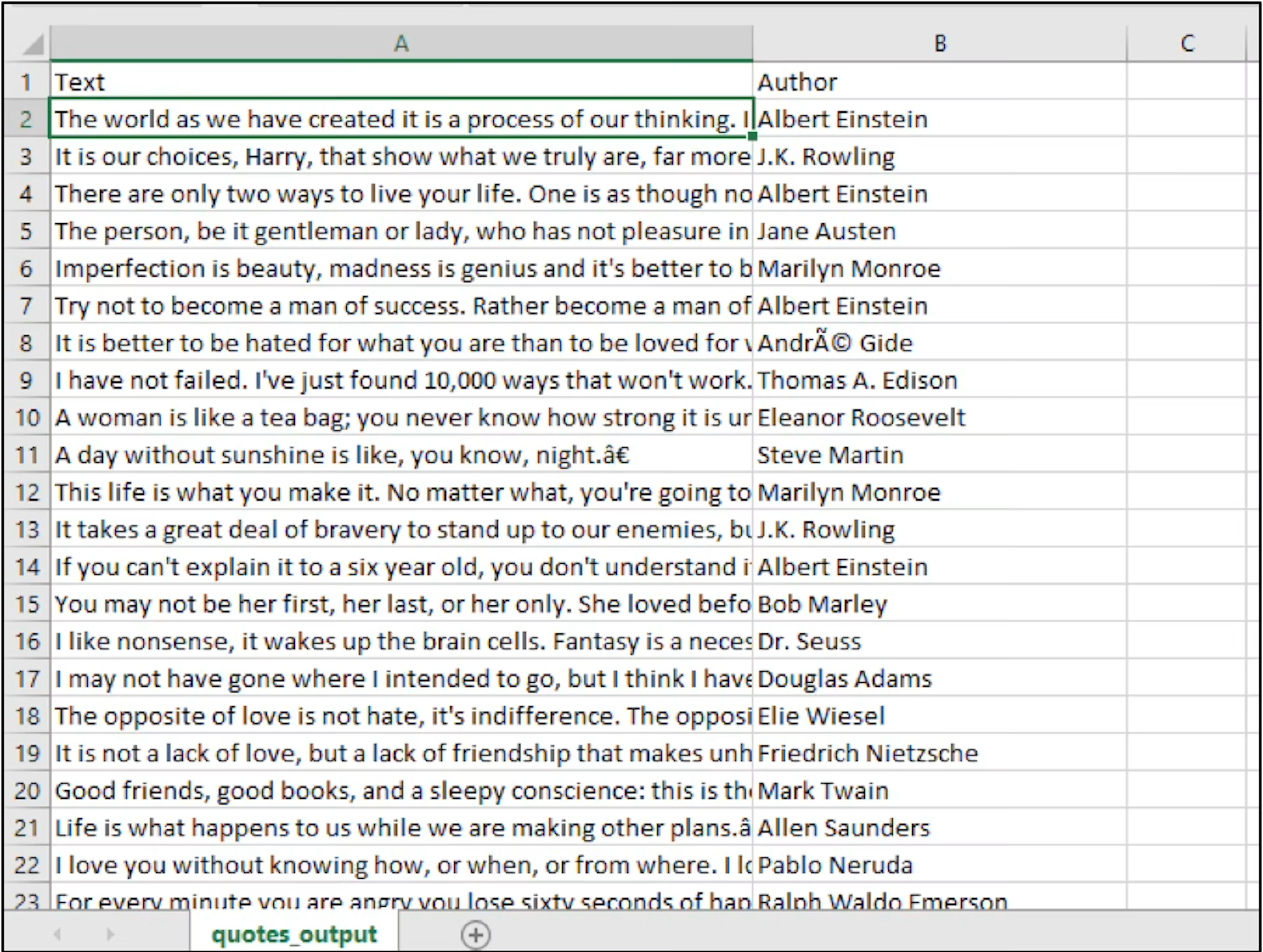
You should see Scraping page 1... through Scraping page 10..., then Total quotes scraped: 100, and quotes_output.csv with 100 data rows plus a header.
Here is what the output looks like:
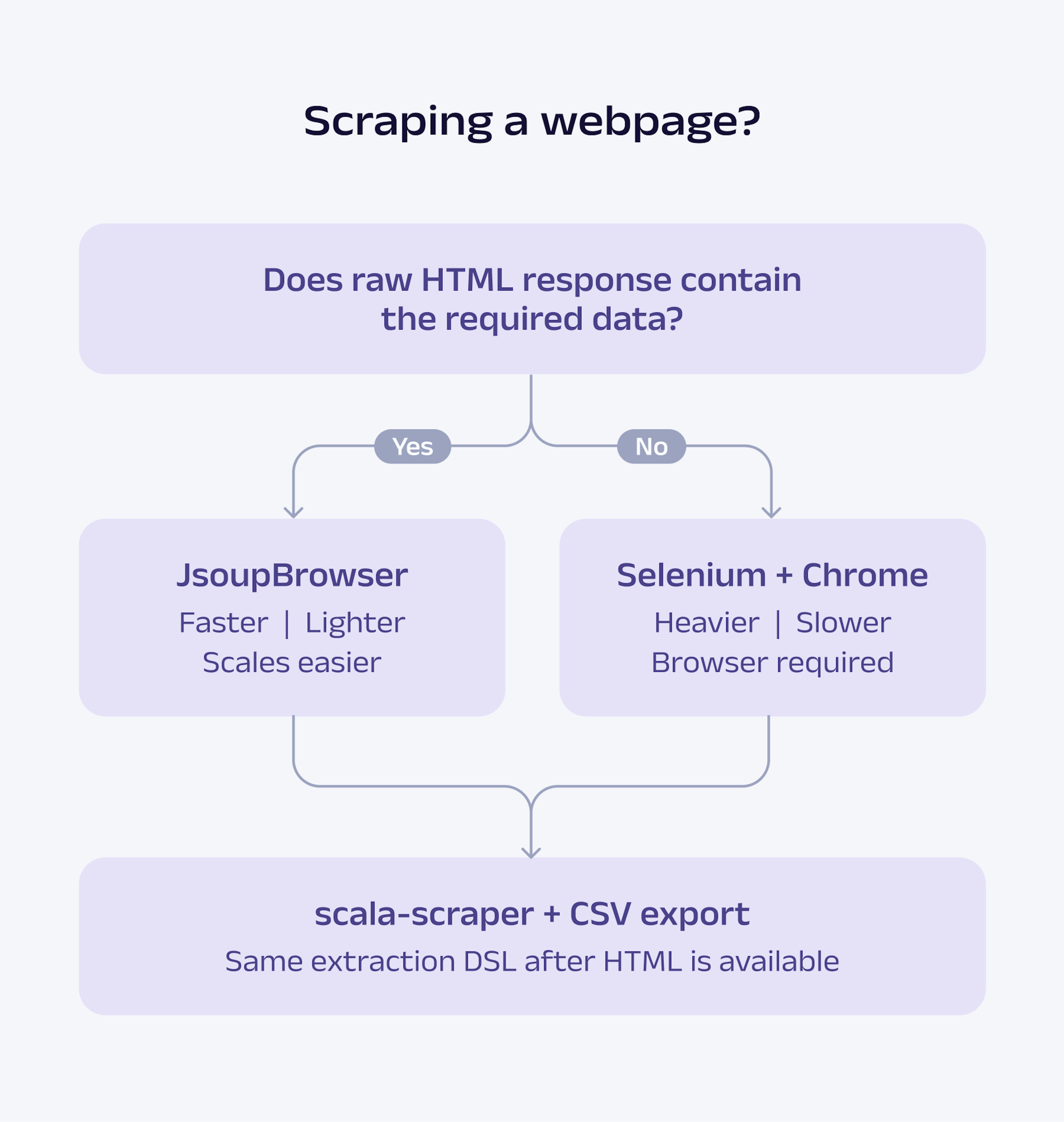
Selenium is heavier, slower, and harder to scale than jsoup-based scraping because each session runs a full Chrome process (driver, browser, JS execution, and explicit waits), whereas jsoup only downloads and parses HTML.
Use Selenium for dynamic content rendered in the browser, such as quotes.toscrape.com/js/. For static pages such as books.toscrape.com, jsoup and Scala Scraper are usually simpler and faster.
Here's a quick rule of thumb for determining whether a site can be scraped using jsoup alone or whether it requires a browser automation tool such as Selenium:
Scala web scraping best practices
Respect robots.txt and rate limiting. Check the robots.txt file for each target domain before scraping. Add Thread.sleep between requests. For production pipelines, use a proper scheduler, such as Akka Scheduler, to enforce request intervals without blocking threads.
Set a realistic User-Agent. Pass it to the JsoupBrowser constructor as shown in Step 3. The default jsoup User-Agent is recognized and blocked by many production sites.
Handle errors with Try and Either. This is where Scala genuinely outperforms Python. Wrapping network calls in Try forces callers to handle failures explicitly. Using Either[ScraperError, Book] in your extraction functions makes the error path visible in the type signature:
import scala.util.Try
def safeFetch(url: String): Try[browser.DocumentType] =
  Try(browser.get(url))
def safeExtract(url: String): Either[String, Book] =
  safeFetch(url).toEither
    .left.map(_.getMessage)
    .flatMap(doc =>
      extractBooksFrom(doc).headOption.toRight("No books found")
    )
Use proxies for large-scale scraping. Proxy rotation handles IP bans. Configure a proxy directly in jsoup:
import org.jsoup.Jsoup
val doc = Jsoup.connect("https://target-site.com")
  .proxy("pr.oxylabs.io", 7777)
  .header("Proxy-Authorization", "Basic YOUR_BASE64_CREDENTIALS")
  .userAgent("Mozilla/5.0 (compatible; ScalaBot/1.0)")
  .get()
Oxylabs Residential Proxies support automatic rotation and geo-targeting, a combination that keeps large scraping pipelines running without manual IP management.
Use Future or cats-effect for concurrent scraping. Future.sequence covers simple parallel use cases. For production workloads with rate limiting, retry logic, and cancellation, cats-effect or ZIO provide structured concurrency that scales cleanly.
Cache responses during development. Save raw HTML to disk as you build your CSS selectors. This avoids hitting the target server repeatedly during debugging and keeps your development loop fast.
Conclusion
Scala is not the most beginner-friendly scraping language, but it becomes compelling once scraping pipelines grow beyond one-off scripts. Typed models, structured concurrency, and direct JVM integration make it a strong fit for large-scale, production-oriented data workflows.
In this tutorial, you built both a static scraper with Scala Scraper and a JavaScript-rendered scraper with Selenium. The same foundation can later be extended with proxy management, database export, Kafka pipelines, or Spark-based analytics.
Frequently asked questions
Is Scala good for web scraping?
Yes. The type system catches data shape errors at compile time, the concurrency model cleanly handles parallel scraping, and the JVM ecosystem gives you direct access to mature Java libraries like the jsoup HTML parser. If your downstream processing uses Apache Spark, Scala is the native language, and no conversion layer is needed.
What is the best Scala web scraping library?
How do I scrape JavaScript pages with Scala?
How do I maintain connection when scraping with Scala?
Are there easier alternatives to web scraping with Scala?
Scala vs Python for web scraping: which should I use?
About the author

Agnė Matusevičiūtė
Technical Copywriter
With a background in philology and pedagogy, Agnė focuses on making complicated tech simple.
All information on Oxylabs Blog is provided on an "as is" basis and for informational purposes only. We make no representation and disclaim all liability with respect to your use of any information contained on Oxylabs Blog or any third-party websites that may be linked therein. Before engaging in scraping activities of any kind you should consult your legal advisors and carefully read the particular website's terms of service or receive a scraping license.
Related articles




Web Scraper API for your scraping project
Make the most of the efficient web scraping while avoiding CAPTCHA and IP blocks.

Get the latest news from data gathering world
Scale up your business with Oxylabs®
Web Scraper API for your scraping project
Make the most of the efficient web scraping while avoiding CAPTCHA and IP blocks.