
Playwright Web Scraping Tutorial for 2026



Iveta Liupševičė
Last updated by Danielė Virinaitė
2026-02-11
9 min read
 AI Summary:
Explore how Playwright can be used for web scraping and browser automation across multiple browsers and programming languages. This tutorial covers core features, setup, and practical examples of extracting data, handling dynamic content, and working with proxies.
This article was checked by Povilas Kudriavcevas, R&D Engineer at Oxylabs.
From extracting product prices to monitoring market trends, web scraping tools are essential across industries. The impact of automation extends beyond just time savings – it empowers decision-making by delivering real-time data that would be too labor-intensive to collect.
It is crucial to have good tools to test web applications. Libraries such as Playwright help speed up processes by opening web applications in a browser and facilitating user interactions likek clicking elements, typing text, and, of course, extracting public data from the web.
This article explains how to use Playwright web scraping automation. For your convenience, we also prepared this tutorial in a video format:
What is Playwright?
Playwright is a testing and browser automation framework developed by Microsoft that can automate web browser interactions. Simply put, you can write code that can open a browser. This means that all the web browser capabilities are available for use. The automation scripts can navigate to URLs, enter text, click buttons, extract text, and more.
It supports most browsers such as Google Chrome, Microsoft Edge using Chromium, Firefox. Safari is supported when using WebKit. In fact, cross-browser web automation is Playwright’s strength. The same code can be efficiently executed for all the browsers. Moreover, Playwright supports various programming languages such as Node.js, Python, Java, and .NET. You can write the code that opens websites and interacts with them using any of these languages.
Playwright’s documentation is extensive. It covers everything from getting started to a detailed explanation about all the classes and methods. To learn more about it, we recommend reading our blogpost about what is playwright.
Core Playwright features
What makes Playwright stand out as a web scraper and browser automation tool? Here are the key Playwright features that make it a strong choice for data extraction and testing:
Multi-browser support. Run the same code across Chromium, Firefox, and WebKit without modification. This cross-browser capability is one of Playwright's biggest advantages over alternatives like Puppeteer.
Multi-language support. Write your Playwright scraper in Node.js, Python, Java, or .NET, depending on what fits your stack.
Auto-waiting and reliability. Playwright automatically waits for elements to be actionable before performing actions, reducing flaky scripts and the need for manual timeouts.
Concurrent page handling. One of the most exciting Playwright features is the ability to work with multiple pages at the same time, while maintaining reliable web access or having to wait for operations to complete in any of them.
Network interception. Intercept and modify HTTP requests and responses. This is invaluable for data extraction tasks that require blocking unnecessary resources or customizing headers.
While these features are powerful on their own, you can maximize their potential by following these 9 Playwright best practices for cleaner and more reliable scripts.
Basic web scraping with Playwright
Let’s move to another topic that will cover how to get started with Playwright using Node.js and Python. We also have a separate blog post on how to scrape Amazon with Python which you might find useful. If you're new to scraping with JavaScript, you can learn the basics by following this comprehensive JavaScript & Node.js scraping tutorial. You can also build a Playwright scraper with Scrapy for more advanced use cases.
If you’re using Node.js, create a new project and install the Playwright library. This can be done using these two simple commands:
npm init -y
npm install playwright
A basic script that opens a dynamic page is as follows:
const playwright = require('playwright');

(async () => {
    for (const browserType of ['chromium', 'firefox', 'webkit']) {
        const browser = await playwright[browserType].launch();
        const context = await browser.newContext();
        const page = await context.newPage();
        await page.goto('https://amazon.com');
        await page.screenshot({ path: `nodejs_${browserType}.png`, fullPage: true });
        await page.waitForTimeout(1000);
        await browser.close();
    }
})();
Let’s look at the above code – the first line of the code imports Playwright. Then, multiple instances of browsers are launched. It allows the script to automate Chromium, Firefox, and Webkit. Then, a new browser page is opened. Afterward, the page.goto() function navigates to the Amazon web page. After that, there’s a wait of 1 second to show the page to the end user. Finally, the browser is closed.
The same code can be written in Python easily. First, install the Playwright Python library using the pip command and also install the necessary browsers afterward using the install command:
python -m pip install playwright
playwright install
Note that Playwright supports two variations – synchronous and asynchronous. The following example uses the asynchronous API:
import asyncio
from playwright.async_api import async_playwright


async def main():
    browsers = ['chromium', 'firefox', 'webkit']
    async with async_playwright() as p:
        for browser_type in browsers:
            browser = await p[browser_type].launch()
            page = await browser.new_page()
            await page.goto('https://amazon.com')
            await page.screenshot(path=f'py_{browser_type}.png', full_page=True)
            await page.wait_for_timeout(1000)
            await browser.close()

asyncio.run(main())
This code is similar to the Node.js code. The biggest difference is the use of the asyncio library. The browser object launches a headless mode instance of Chromium, Firefox, and Webkit. Another difference is that the function names change from camelCase to snake_case.
In Node.js, if you want to create more than one browser context or if you want to have finer control, you can create a context object and create multiple pages in that context. This would open pages in new tabs:
const context = await browser.newContext()
const page1 = await context.newPage()
const page2 = await context.newPage()
You may also want to handle page context in your code. It’s possible to get the browser context that the page belongs to using the page.context() function.
Locating elements
To extract data from any element or to click any element, the first step is to locate it. Playwright supports both CSS and XPath selectors, allowing you to locate elements by class name.
This can be understood better with a practical example. Open the following Amazon link: https://www.amazon.com/b?node=17938598011
You can see that all the items are under the International Best Seller category, which has div elements with the two class names a-section and a-spacing-base:
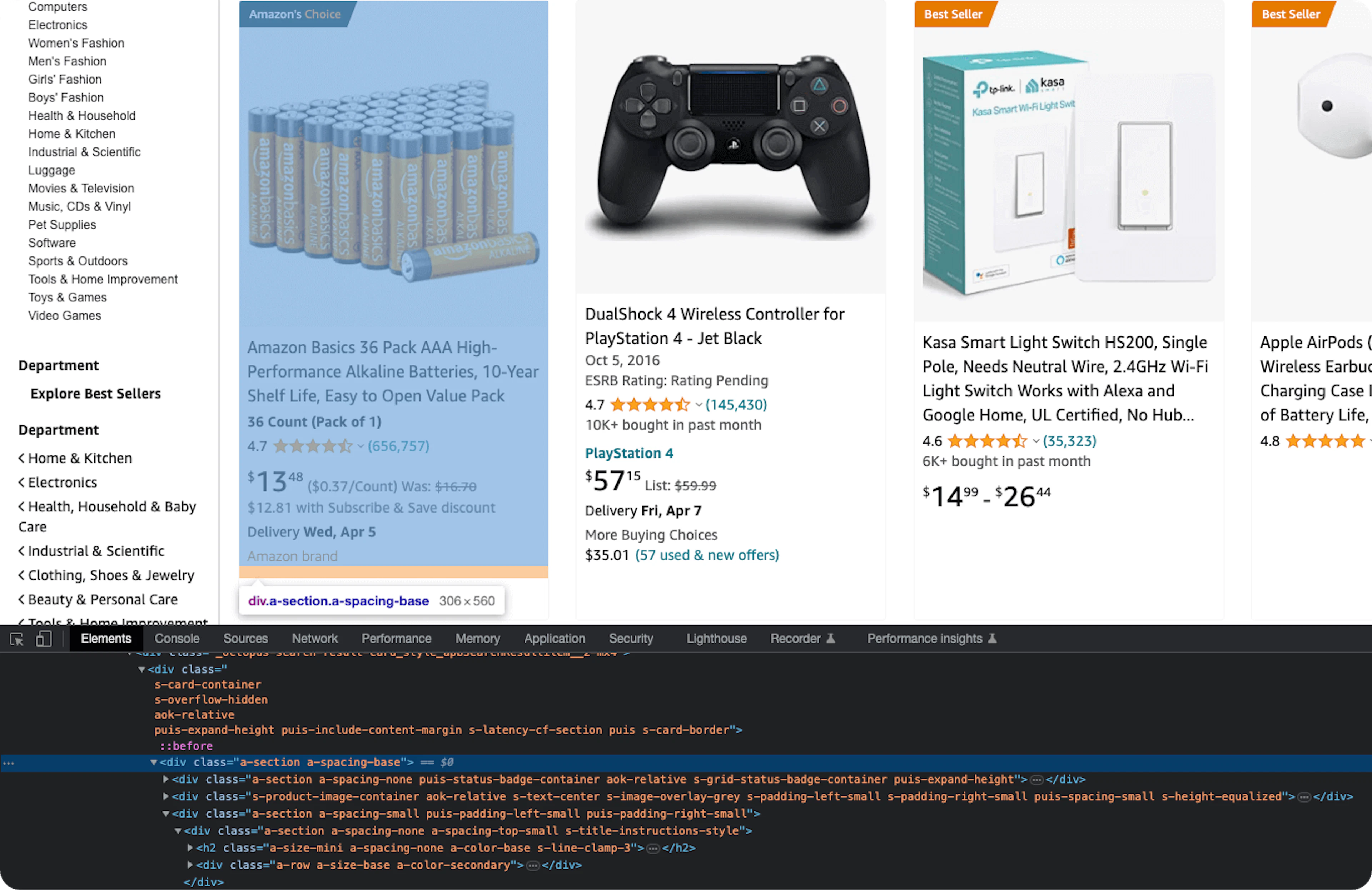
To select all the div elements, you need to run a loop over all these elements. These div elements can be selected using one of the CSS selectors mentioned previously:
.s-card-container > .a-spacing-baseSimilarly, the XPath selector would be as follows:
//*[contains(@class, "s-card-container")]/*[contains(@class, "a-spacing-base")]To use these selectors in Playwright, the most common functions are as follows:
$eval(selector, function) – selects the first element, sends the element to the function, and the result of the function is returned;
$$eval(selector, function) – same as above, except that it selects all elements;
querySelector(selector) – returns the first element;
querySelectorAll(selector) – return all the elements.
These methods will work correctly with both CSS and XPath Selectors.
And if you need higher-level ways to find and interact with elements, you could utilize Playwright locators, which enable reliable actions like clicking, typing, and waiting for visibility or state changes, even when the DOM updates dynamically.
Scraping text
Continuing with the example of Amazon, after the page has been loaded, you can use a selector to extract all products using the $$eval function:
const products = await page.$$eval(
    '.s-card-container > .a-spacing-base',
    all_products => {
    // run a loop here
    }
);
Now all the elements that contain product data can be extracted in a loop:
all_products.forEach(product => {
   const title = product.querySelector('.a-size-base-plus').innerText
});
Finally, the innerText attribute can be used to extract data from each data point. Here's the complete code in Node.js:
const playwright = require('playwright');

(async () => {
    const launchOptions = {
        headless: false,
        proxy: {
            server: 'https://us-pr.oxylabs.io:10000',
            username: 'customer-USERNAME',
            password: 'PASSWORD'
        }
    };

    const browser = await playwright.firefox.launch(launchOptions);
    const page = await browser.newPage();
    await page.goto('https://www.amazon.com/b?node=17938598011');
    await page.waitForTimeout(5000);

    const products = await page.$$eval(
        '.s-card-container > .a-spacing-base',
        all_products => {
            const data = [];
            all_products.forEach(product => {
                const titleEl = product.querySelector('.a-size-base-plus');
                const title = titleEl ? titleEl.innerText : null;

                const priceEl = product.querySelector(
                    '.a-price[data-a-size="xl"] > span:first-of-type'
                );
                const price = priceEl ? priceEl.innerText : null;

                const ratingEl = product.querySelector('.a-icon-alt');
                const rating = ratingEl ? ratingEl.innerText : null;

                data.push({ title, price, rating });
            });
            return data;
        }
    );

    console.log(products);
    await browser.close();
})();
The Python code will be a bit different. Python has a function eval_on_selector, which is similar to $eval of Node.js, but it’s not suitable for this scenario. The reason is that the second parameter still needs to be JavaScript. This can be good in a certain scenario, but in this case, it will be much better to write the entire code in Python.
It would be better to use query_selector and query_selector_all which will return an element and a list of elements respectively.
import asyncio
from playwright.async_api import async_playwright


async def main():
    async with async_playwright() as pw:
        browser = await pw.firefox.launch(
            headless=False,
            proxy={
                'server': 'https://us-pr.oxylabs.io:10000',
                'username': 'customer-USERNAME',
                'password': 'PASSWORD'
            }
        )
        page = await browser.new_page()
        await page.goto(
            'https://www.amazon.com/b?node=17938598011'
        )
        await page.wait_for_timeout(5000)

        all_products = await page.query_selector_all(
            '.s-card-container > .a-spacing-base'
        )
        data = []
        for product in all_products:
            result = {}

            title_el = await product.query_selector('.a-size-base-plus')
            result['title'] = (
                await title_el.inner_text() if title_el else None
            )

            price_el = await product.query_selector(
                '.a-price[data-a-size="xl"] > span:first-of-type'
            )
            result['price'] = (
                await price_el.inner_text() if price_el else None
            )

            rating_el = await product.query_selector('.a-icon-alt')
            result['rating'] = (
                await rating_el.inner_text() if rating_el else None
            )

            data.append(result)

        print(data)
        await browser.close()


if __name__ == '__main__':
    asyncio.run(main())
The output of both the Node.js and the Python code will be the same. For your convenience, check our GitHub repository to find the complete code used in this article.
Scraping Images
Please note that all information provided herein is for informational purposes only and does not grant you any rights with regards to the described data or images, both of which may be protected copyright, intellectual property or other rights. Before engaging in web scraping activities of any kind you should consult your legal advisors and carefully read the particular website's terms of service or receive a web scraping license.
This section will explore the process of web scraping images with Playwright. We’ll extract all images from Oxylabs e-commerce sandbox and save them in our current directory. First, let’s analyze how we can accomplish this using Node.js.
Node.js
The code will be similar to the one that we’ve written earlier. There are multiple ways to extract data using the JavaScript Playwright wrapper, but we’ll use these two libraries: https and fs. They'll help us make web requests to download the images and store them in the current directory. Let’s see the complete code below:
const playwright = require('playwright');
const https = require('https');
const fs = require('fs');

(async () => {
    const launchOptions = {
        headless: false,
        proxy: {
            server: 'https://pr.oxylabs.io:7777',
            username: 'customer-USERNAME',
            password: 'PASSWORD'
        }
    };

    const browser = await playwright.chromium.launch(launchOptions);
    const page = await browser.newPage();
    await page.goto('https://sandbox.oxylabs.io/products');
    await page.waitForTimeout(5000);

    const images = await page.$$eval('img', all_images => {
        const image_links = [];
        all_images.forEach((image) => {
            if (!image.src.startsWith('data:')) {
                image_links.push(image.src);
            }
        });
        return image_links;
    });

    images.forEach((imageUrl, index) => {
        const path = `image_${index}.svg`;
        const file = fs.createWriteStream(path);
        https.get(imageUrl, (response) => {
            response.pipe(file);
        });
    });

    console.log(images);
    await browser.close();
})();
As you can see, we’re initializing a browser instance with the Oxylabs Residential Proxies, just like we did in the previous example. After navigating to the website, the $$eval extracts all the image elements.
After that, the forEach loop iterates over every image element:
    images.forEach((imageUrl, index) => {
        const path = `image_${index}.svg`;
        const file = fs.createWriteStream(path);
        https.get(imageUrl, (response) => {
            response.pipe(file);
        });
    });
Inside this forEach loop, we construct the image name using the index and the path of the image. We’re using a relative path to store the images in the current directory.
Then, we initiate a file object by calling the createWriteStream method of the fs library. Finally, the https library helps us send a GET request to download the image using the image.src. We also pipe the response directly to the file stream which will write it in the current directory.
Once we execute this code, the script loops through each image available on the target website and downloads them to the directory.
Python
Python’s built-in support for file I/O operations makes this task way easier than Node.js. We’ll also use the requests library to communicate with the website, which you can install in your terminal with the following:
python -m pip install requestsSimilar to the Node.js code, we’ll first extract the images using the Playwright wrapper. Just like in the previous Amazon example, we can use the query_selector_all method to extract all the image elements. After extracting the elements, the script will send a GET request to each image source URL and store the response content in the current directory.
You can accomplish this with the following code sample:
import asyncio
from playwright.async_api import async_playwright
import requests


async def main():
    async with async_playwright() as pw:
        browser = await pw.chromium.launch(
            headless=False,
            proxy={
                'server': 'https://pr.oxylabs.io:7777',
                'username': 'customer-USERNAME',
                'password': 'PASSWORD'
            }
        )
        page = await browser.new_page()
        await page.goto('https://sandbox.oxylabs.io/products')
        await page.wait_for_timeout(5000)

        all_images = await page.query_selector_all('img')
        images = []

        for i, img in enumerate(all_images):
            image_url = await img.get_attribute('src')
            if image_url and not image_url.startswith('data:'):
                full_url = 'https://sandbox.oxylabs.io' + image_url
                content = requests.get(full_url).content

                with open(f'py_{i}.svg', 'wb') as f:
                    f.write(content)

                images.append(image_url)

        print(images)
        await browser.close()


if __name__ == '__main__':
    asyncio.run(main())
Intercepting HTTP Requests with Playwright
Intercepting HTTP requests can be valuable in advanced Playwright web scraping, debugging, testing, and performance optimization. For example, with Playwright, we can intercept the HTTP requests to abort loading images, customize headers, and even modify the response output. Let’s see some examples in Python and Node.js.
Python
Start by defining a new function named handle_route, which Playwright will invoke to intercept the HTTP requests.
The function is simple: it fetches and updates the title of the HTML code and then replaces the header to make the content-type: text/html. Another lambda function also helps us prevent images from loading. So, when we execute the script, the website will load without any images, and both title and header will be modified. Let’s see this in Python code:
import asyncio
from playwright.async_api import async_playwright, Route


async def handle_route(route: Route) -> None:
    response = await route.fetch()
    body = await response.body()
    body_decoded = body.decode('latin-1')
    body_decoded = body_decoded.replace('<title>', '<title>Modified Response')
    await route.fulfill(
        response=response,
        body=body_decoded.encode(),
        headers={**response.headers, 'content-type': 'text/html'},
    )


async def main():
    async with async_playwright() as pw:
        browser = await pw.chromium.launch(
            headless=False,
            proxy={
                'server': 'http://pr.oxylabs.io:7777',
                'username': 'customer-USERNAME',
                'password': 'PASSWORD'
            }
        )

        page = await browser.new_page()
        await page.route('**/*.{png,jpg,jpeg,svg}', lambda route: route.abort())
        await page.route('**/*', handle_route)
        await page.goto('https://sandbox.oxylabs.io/products')
        await page.wait_for_timeout(5000)
        await page.unroute_all(behavior='ignoreErrors')
        await browser.close()


if __name__ == '__main__':
    asyncio.run(main())
The route() method lets Playwright know which function to call when intercepting the requests. It takes two parameters:
A regex pattern to match the URL path;
The name of the function or lambda.
When we use the "**/*.{png,jpg,jpeg,svg}" regex pattern, we’re telling Playwright to match all the URLs that end with the given extensions: .png, .jpg, .jpeg, and .svg.
Node.js
The same thing can be achieved using Node.js as well, with a code that’s also quite similar to Python:
const playwright = require('playwright');

(async () => {
    const launchOptions = {
        headless: false,
        proxy: {
            server: 'http://pr.oxylabs.io:7777',
            username: 'customer-USERNAME',
            password: 'PASSWORD',
        },
    };

    const browser = await playwright.chromium.launch(launchOptions);
    const context = await browser.newContext();
    const page = await context.newPage();

    await page.route(/\.(png|jpeg|jpg|svg)$/i, route => route.abort());

    await page.route('**/*', async route => {
        const response = await route.fetch();
        let body = await response.text();
        body = body.replace('<title>', '<title>Modified Response: ');

        route.fulfill({
            response,
            status: response.status(),
            body,
            headers: {
                ...response.headers(),
                'content-type': 'text/html',
            },
        });
    });

    await page.goto('https://sandbox.oxylabs.io/products');
    await page.waitForTimeout(5000);
    await browser.close();
})();
The page.route method intercepts the HTTP requests and modifies the title and headers of the response. It also prevents any images on the web page from loading. This handy trick speeds up page loading and improves the Playwright web scraping performance. Again, you can find all of the source code files in our GitHub repository.
Support for proxies in Playwright
Playwright supports the use of proxies. Before exploring this subject further, here is a quick code snippet showing how to start using a proxy with Chromium:
Node.js:
const playwright = require('playwright');
const browser = await playwright.launch();
Python:
import asyncio
from playwright.async_api import async_playwright
async def main():
   async with async_playwright() as p:
       browser = await p.chromium.launch()
This code needs only slight modifications to fully utilize proxies.
In the case of Node.js, the launch function can accept an optional parameter of LaunchOptions type. This LaunchOptions object can, in turn, send several other parameters, e.g., headless. The other parameter needed is proxy. This proxy is another object with properties such as server, username, password, etc. The first step is to create an object where these parameters can be specified. And, then pass it to the launch method like the below example.
Node.js:
const playwright = require('playwright');

(async () => {
    for (const browserType of ['chromium', 'firefox', 'webkit']) {
        const launchOptions = {
            headless: false,
            proxy: {
                server: 'https://pr.oxylabs.io:7777',
                username: 'customer-USERNAME',
                password: 'PASSWORD',
            },
        };

        const browser = await playwright[browserType].launch(launchOptions);
        const page = await browser.newPage();
        await page.goto('https://ip.oxylabs.io/');
        await page.waitForTimeout(3000);
        await browser.close();
    }
})();
In the case of Python, it’s slightly different. There’s no need to create an object of LaunchOptions. Instead, all the values can be sent as separate parameters. Here’s how the proxy dictionary will be sent.
Python:
import asyncio
from playwright.async_api import async_playwright


async def main():
    browsers = ['chromium', 'firefox', 'webkit']
    async with async_playwright() as p:
        for browser_type in browsers:
            browser = await p[browser_type].launch(
                headless=False,
                proxy={
                    'server': 'https://pr.oxylabs.io:7777',
                    'username': 'customer-USERNAME',
                    'password': 'PASSWORD'
                }
            )
            page = await browser.new_page()
            await page.goto('https://ip.oxylabs.io/')
            await page.wait_for_timeout(3000)
            await browser.close()


if __name__ == '__main__':
    asyncio.run(main())
When deciding on which proxy to use, it’s best to use residential proxies as they don’t leave a footprint and won’t trigger any anti-web scraping systems. Oxylabs’ Residential Proxies can help you with an extensive and stable proxy network. You can access proxies in a specific country, state, or even a city. What’s essential, you can integrate them easily with Playwright as well.
Playwright vs Puppeteer and Selenium
There are other tools like Selenium and Puppeteer that can also do the same thing as Playwright.
However, Puppeteer is limited when it comes to browsers and programming languages. The only language that can be used is JavaScript, and the only browser that works with it is Chromium.
Selenium, on the other hand, supports all major browsers and a lot of programming languages. It is, however, slow and less developer friendly.
The following table is a quick summary of the differences and similarities:
| PLAYWRIGHT | PUPPETEER | SELENIUM | |
| SPEED | Fast | Fast | Slower |
| DOCUMENTATION | Excellent | Excellent | Fair |
| DEVELOPER EXPERIENCE | Best | Good | Fair |
| PROGRAMMING LANGUAGES | JavaScript, Python, C#, Java | JavaScript | Java, Python, C#, Ruby JavaScript, Kotlin |
| BACKED BY | Microsoft | Community and Sponsors | |
| COMMUNITY | Small but active | Large and active | Large and active |
| BROWSER SUPPORT | Chromium, Firefox, and WebKit | Chromium | Chrome, Firefox, IE, Edge, Opera, Safari, and more |
Comparison of performance
As discussed in the previous section, because of the vast difference in the programming languages and supported browsers, it isn’t easy to compare every scenario.
The only combination that can be compared is when scripts are written in JavaScript to automate Chromium. This is the only combination that all three tools support.
A detailed comparison would be out of the scope of this article. You can read more about the performance of Puppeteer, Selenium, and Playwright in this article. The key takeaway is that Puppeteer is the fastest, followed by Playwright. Note that in some scenarios, Playwright was faster. Selenium is the slowest of the three.
Again, remember that Playwright has other advantages, such as multi-browser support, supporting multiple programming languages.
If you’re looking for a fast cross-browser web automation or don’t know JavaScript, Playwright will be your only choice.
Conclusion
Due to its asynchronous nature and cross-browser support, Playwright web scraping is a good alternative to other web automation tools.
With Playwright web scraping, you can navigate to URLs, enter text, click buttons, extract text, etc. Most importantly, it can extract text that is rendered dynamically. These things can also be done by other tools such as Puppeteer and Selenium, but if you need to work with multiple browsers, or if you need to work with a language other than JavaScript/Node.js, then Playwright would be a great choice.
Learn how to easily configure proxies with Playwright by checking out a detailed tutorial on our website.
If you’re interested in other similar topics, check out our blog posts on web scraping with Selenium, Puppeteer tutorial, Nodriver web scraping guide, or a detailed guide on making asynchronous requests with Python. Lastly, don’t hesitate to try the functionality of our own general-purpose web scraper for free.
Frequently asked questions
Is Playwright good for web scraping?
Yes, Playwright web scraping is considered to be a good solution to extract data. It is easy to use, allows for fast deployment and execution, and provides browser automation capabilities that allow users to perform tasks with minimal human input. Playwright supports multiple browsers, applications, and programming languages, making it suitable for different needs.
Using Playwright for scraping requires more resources than traditional tools like BeautifulSoup or Scrapy, as it requires running a full browser engine. However, Playwright excels in dealing with dynamic websites that heavily rely on JavaScript.
Can Playwright be detected?
Does Playwright have a UI?
What is the best platform for Playwright scraping?
About the author
Iveta Liupševičė
Head of Content & Research
Iveta Liupševičė is a Head of Content & Research at Oxylabs. Growing up as a writer and a challenge seeker, she decided to welcome herself to the tech-side, and instantly became interested in this field. When she is not at work, you'll probably find her just chillin' while listening to her favorite music or playing board games with friends.
All information on Oxylabs Blog is provided on an "as is" basis and for informational purposes only. We make no representation and disclaim all liability with respect to your use of any information contained on Oxylabs Blog or any third-party websites that may be linked therein. Before engaging in scraping activities of any kind you should consult your legal advisors and carefully read the particular website's terms of service or receive a scraping license.
Related articles

Scrapy Playwright Tutorial: How to Scrape JavaScript Websites

Agnė Matusevičiūtė
2025-07-31
Playwright vs Puppeteer: The Differences

Augustas Pelakauskas
2025-04-04
Playwright vs Selenium: Which One to Choose

Enrika Pavlovskytė
2023-01-10
Explore Fast Search API
Organic search results scraper for AI/ML teams building apps, training models, and powering research.

Get the latest news from data gathering world