
List Crawling in Python: Tools, Tips, and Techniques


Danielė Virinaitė
Last updated on
2026-06-17
8 min read
 AI Summary:
This guide shows how to crawl structured, list-based pages in Python, from product catalogs to directories and job boards. It covers identifying crawlable lists, handling pagination and infinite scroll, and choosing the right tool for static versus JavaScript-rendered pages. For teams that would rather not maintain their own crawler, it also points to where a managed scraping API fits in.
Say the data you want is sitting on a page in front of you, laid out in a tidy repeating list. Could be products, job postings, business names with phone numbers. Forty rows here, a few hundred there, sometimes thousands once you click through the pagination. Pulling it into a spreadsheet by hand is the kind of job that eats an afternoon and leaves you cross-eyed.
List crawling is how you automate that. Some people call it paginated scraping or category scraping, though those names emphasize the pagination and slightly miss the point: the core move is teaching a script to recognize one repeating pattern and lift every instance of it off the page. Search results, product catalogs, directories, review feeds. Python handles all of them well, and this guide walks through the what, the when, and the how, with code you can actually run.
By the end, you'll know what list crawling is, when it's the right approach, which Python tools fit which situation, and how to get past the usual obstacles. Developer or not, if you need structured data at scale, this should get you moving.
What is list crawling, exactly?
It's the automated extraction of data from structured, repeating elements on a page. A "list" here has nothing to do with bullet points. It's any group of similar items in a predictable shape: a grid of products, a table of job listings, a directory of businesses, a stream of customer reviews.
Three conditions have to hold before something is worth treating as a list:
Every item is built the same way, with the same fields in the same HTML layout.
There's more than one of them on the page.
The set keeps going past the first screen, through pagination or infinite scroll.
Miss any one of those, and you're doing something else. This is also where list crawling parts ways with generic web crawling. A crawler's job is discovery: it follows links to map out which pages exist. A list crawler assumes you already know where the data lives and just wants a systematic way to collect it.
List crawling vs. web crawling
The terms get used interchangeably, but they answer different questions. A quick comparison:
| Criteria | List Crawling | Web Crawling |
| Goal | Extract data from structured list pages | Discover and index URLs across a site |
| Scope | Targeted – specific list pages | Broad – follows links across the site |
| Output | Structured data (CSV, JSON, database) | URL index or sitemap |
| Complexity | Low to medium | Medium to high |
| Typical tools | BeautifulSoup, Scrapy, Playwright | Scrapy, Crawlee, custom spider bots |
Put simply, crawling is about finding and navigating pages; list scraping is about collecting clean entries from pages whose layout you already understand. They often run together, one discovering product pages while the other empties each one of its data.
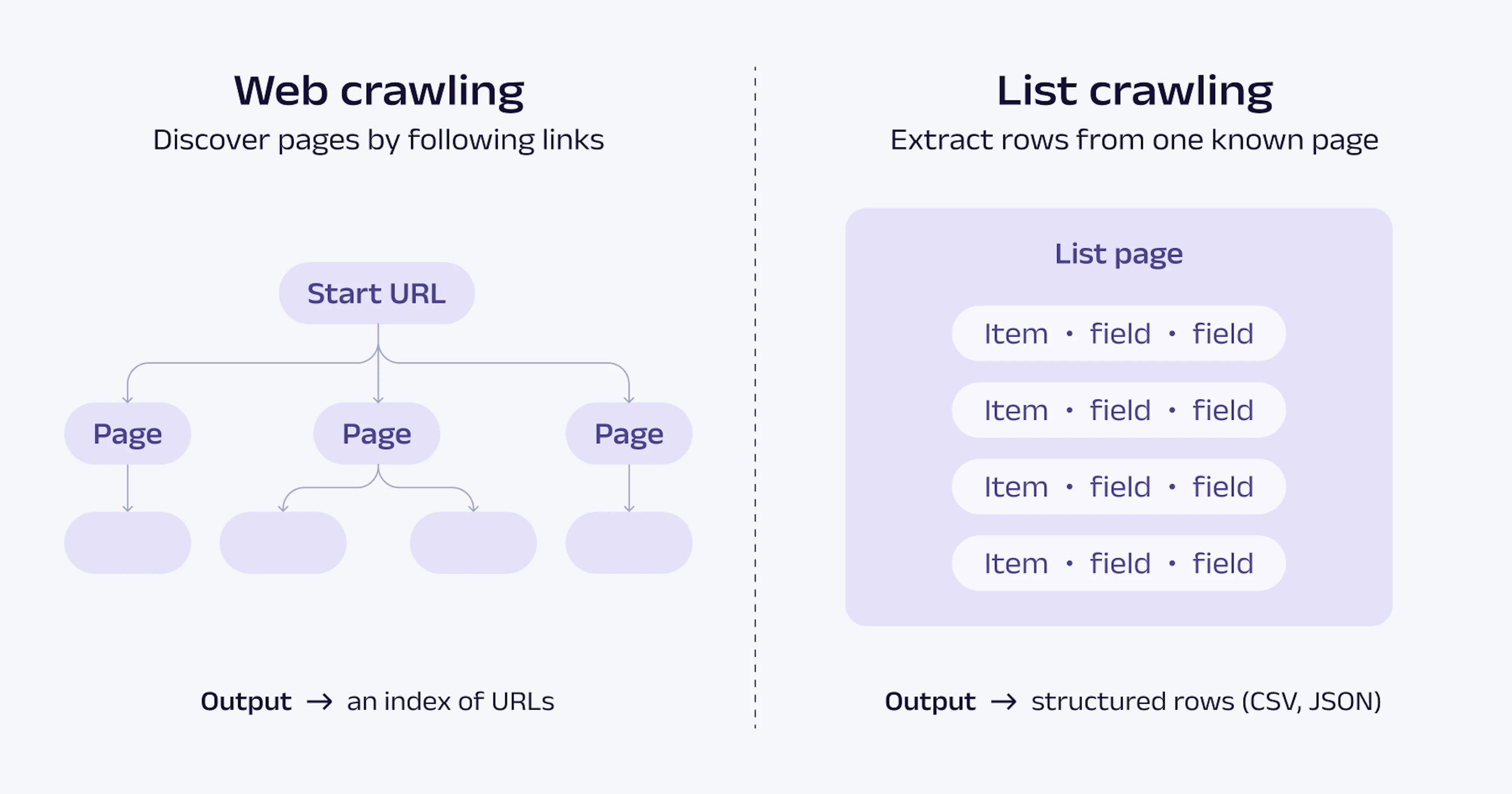
For more on how these two concepts differ, see the Oxylabs guide on crawling vs. scraping.
Types of websites worth list crawling
The technique earns its keep wherever you've got structured, repeating data in volume. A few situations come up again and again.
E-commerce and product catalogs
Product pages are the classic target. Names, prices, SKUs, ratings, availability, descriptions, multiplied across hundreds or thousands of items. If you're monitoring prices, sizing up competitors, or assembling a product database, this is the obvious fit. Our guide on scalable web scraping for product listings goes deeper on it.
Business directories and lead generation
Sites like Yelp or Yellow Pages stack NAP data (Name, Address, Phone number) next to emails, categories, and ratings, all in consistent rows. That regularity is exactly what makes them easy to crawl. Worth flagging, though: check a site's robots.txt and Terms of Service before you start. Some restrict automated access, and harvesting personal data at scale can carry legal weight depending on where you are. Stick to publicly available business information and stay inside the site's stated rules.
Job boards and review platforms
Indeed, Glassdoor, Trustpilot and the like present everything in repeating card formats, which suits list crawling perfectly. Job title, company, location, salary, posting date, the same shape repeating across page after page. Expect pagination and infinite scroll on these sites, often both, so plan for each.
List structure types and how to crawl them
Lists aren't all built the same way, and the right approach follows from how a given list is constructed. So before any code, figure out which kind you're dealing with.
How to tell if a site's lists are crawlable
Three quick checks first.
Read the robots.txt. Visit https://example.com/robots.txt. It's a widely respected convention where a site lists the paths it would rather bots leave alone. It isn't a technical barrier, though, and nothing actually enforces it. Ignoring it isn't illegal on its own, but it does mean you're brushing past the site's stated wishes, which can get your IP blocked and may matter for Terms-of-Service compliance. If the paths you're after sit under Disallow, treat that as a yellow flag and read the Terms before going further.
Static vs. JavaScript test. Open the page, right-click, choose "View Page Source." If the list data shows up in the raw HTML, the page is static and straightforward to scrape. If all you see is empty containers or placeholder text, the content is being rendered by JavaScript, and you'll want Playwright or Selenium.
Watch the Network tab. Open DevTools (F12), go to Network, filter by XHR/Fetch, then scroll and watch for new requests. On infinite-scroll pages, the data tends to arrive as you scroll rather than on first load, so you often won't see these calls until you start moving down the page. Spot a request returning JSON full of your list data, and you can probably hit that endpoint directly, which beats rendering a whole browser.
Paginated lists
Pagination breaks a list across several pages, usually behind a "Next" button or numbered links. It's the pattern you'll meet most often, and happily it's the most forgiving to handle. For a fuller treatment, see this guide on handling pagination in web scraping.
Two styles dominate:
Page-number parameters, where the URL shifts like ?page=2, ?page=3, and so on.
Next-page buttons, where you dig the link out of the button and follow it.
A simple example using Requests and BeautifulSoup to walk through paginated results:
import requests
import time
import random
from bs4 import BeautifulSoup

BASE_URL = "https://example.com/listings?page={}"
results = []

for page_num in range(1, 11):  # Crawl pages 1 through 10
    url = BASE_URL.format(page_num)
    response = requests.get(url)
    response.raise_for_status()        # Raise on 4xx/5xx instead of parsing an error page

    soup = BeautifulSoup(response.text, "html.parser")

    items = soup.select(".listing-card")
    if not items:
        break  # Stop if we run out of pages

    for item in items:
        title = item.select_one(".title").get_text(strip=True)
        price = item.select_one(".price").get_text(strip=True)
        results.append({"title": title, "price": price})

    time.sleep(random.uniform(1, 3))   # Jittered delay, more human-like than a fixed wait

print(f"Collected {len(results)} items")
One small habit that pays off: vary the gap between requests with something like random.uniform(1, 3) instead of a fixed wait. It's gentler on the server and reads less like a machine.
Infinite scroll and dynamically loaded content
Some sites drop page numbers entirely and just load more content as you scroll. That's infinite scroll, and JavaScript drives it. Since the data isn't in the initial HTML, a plain Requests call comes up empty. There are two ways to deal with this, and it's worth trying them in order.
Start by looking for a background API. Infinite scroll is nearly always the page calling its own JSON endpoint each time you scroll, as an XHR or fetch request. Find that endpoint, and you can call it directly from Requests and skip the browser, which is faster, cheaper, and much less fragile than rendering a full page. To track it down, open DevTools (F12), go to Network, filter by XHR/Fetch, and scroll. Watch for a request that returns JSON with your list data. When you find one, look at its URL and parameters (usually a page or offset value you can bump up) and request it yourself:
import requests

# Example endpoint discovered in the Network tab
api_url = "https://example.com/api/items"
results = []

for offset in range(0, 200, 20):  # Page through 20 items at a time
    response = requests.get(api_url, params={"offset": offset, "limit": 20})
    response.raise_for_status()
    batch = response.json()["items"]
    if not batch:
        break  # No more data
    results.extend(batch)

print(f"Collected {len(results)} items")
Fall back to a real browser when no clean API exists. Plenty of sites obfuscate or encrypt these calls, sign them with tokens, or render everything client-side with nothing tidy to hit. On those harder targets, let Playwright drive an actual browser, scroll the page, and give the JavaScript room to load:
import asyncio
from playwright.async_api import async_playwright

async def scrape_infinite_scroll():
    async with async_playwright() as p:
        browser = await p.chromium.launch()
        page = await browser.new_page()
        await page.goto("https://example.com/feed")

        # Scroll repeatedly to trigger new content
        for _ in range(10):
            await page.evaluate("window.scrollTo(0, document.body.scrollHeight)")
            await page.wait_for_timeout(2000)  # Wait for content to load

        # Extract all loaded items in one call
        texts = await page.locator(".feed-item").all_inner_texts()
        for text in texts:
            print(text)

        await browser.close()


asyncio.run(scrape_infinite_scroll())
For a thorough walkthrough of both approaches, see our guide on dynamic web scraping with Python.
Table lists and filtered results
HTML tables, the kind with <thead> and <tbody>, are some of the easiest things to parse, whether with BeautifulSoup or pandas. You'll find them on financial data sites, government databases, and comparison pages.
import pandas as pd
from io import StringIO
import requests


html = requests.get(
    "https://en.wikipedia.org/wiki/List_of_countries_by_GDP_(nominal)",
    headers={
        "User-Agent": "Mozilla/5.0 (Windows NT 10.0; Win64; x64) AppleWebKit/537.36",
        "Accept-Language": "en-US,en;q=0.9",
    },
    timeout=15,
).text


tables = pd.read_html(StringIO(html), match="IMF")
gdp = tables[0]   # First table that contains "IMF"
print(gdp.head())
When pandas can't parse a table cleanly, drop down to BeautifulSoup's find_all('tr') and walk the rows yourself.
Choosing the right tool for the job
Everything hinges on one question: is the content already in the page's HTML source, or does JavaScript load it after the page opens?
Static lists: Scrapy, BeautifulSoup, Requests
If the data's in the HTML, you don't need a browser at all. Three libraries cover most static work, each suited to a different scale:
Requests fetches the raw HTML. Pair it with BeautifulSoup to parse, and you've got everything a quick one-off script needs.
BeautifulSoup parses that HTML and lets you grab elements by class, tag, or attribute. Gentle learning curve, and a fine fit for small to mid-sized jobs.
Scrapy s a full framework with built-in pagination, pipelines, and rate limiting. This is what you reach for on bigger projects or anything that has to run at scale.
A minimal paginated spider:
import scrapy
class ListSpider(scrapy.Spider):
    name = "list"
    start_urls = ["https://example.com/products?page=1"]
    def parse(self, response):
        for card in response.css("div.product-card"):
            yield {
                "name": card.css(".title::text").get(),
                "price": card.css(".price::text").get(),
            }
        next_page = response.css("a.next::attr(href)").get()
        if next_page:
            yield response.follow(next_page, self.parse)
The framework overhead pays for itself the second time you're babysitting a fragile Requests script at 3 AM, thanks to Scrapy's concurrency, auto-throttle, retry middleware, and item pipelines. The full Scrapy web scraping tutorial covers how to get started.
A rough guideline: run-it-once jobs are happy with Requests and BeautifulSoup. Recurring, production-grade scrapers belong in Scrapy.
Dynamic lists: Playwright, Selenium
When JavaScript renders the list, you need something that can run a genuine browser. Two real options here.
Playwright is the modern pick. It's faster, steadier, has better async support, and sets up with less fuss. It drives Chromium, Firefox, and WebKit, and it's what we'd point most new projects toward. The Playwright web scraping guide has the full walkthrough.
Selenium is the older, well-worn alternative. Bigger community, but slower and more brittle by comparison. Still handy if you're maintaining something that already uses it or you need a specific browser quirk it handles.
Starting from scratch? Go with Playwright.
Common list crawling challenges
Scraping list data rarely runs clean the whole way through. Here are the snags that surface most, with the way past each.
Pagination errors and duplicate data
Off-by-one errors easily slip into pagination loops. You skip the last page, or hit the first one twice. Check your page count and test the edges deliberately: the first page, the last page, and a search that returns just a single page of results.
Duplicates are the other recurring headache. When some items ride along on every page (featured listings love to do this), you end up with repeats. A small dedup step with a Python set sorts it out.
Assuming you've gathered every page's results into one list called all_scraped_items, drop the repeats by tracking the IDs you've already seen:
import scrapy
class ListSpider(scrapy.Spider):
    name = "list"
    start_urls = ["https://example.com/products?page=1"]
    def parse(self, response):
        for card in response.css("div.product-card"):
            yield {
                "name": card.css(".title::text").get(),
                "price": card.css(".price::text").get(),
            }
        next_page = response.css("a.next::attr(href)").get()
        if next_page:
            yield response.follow(next_page, self.parse)
Staying within rate limits
Send requests too aggressively, and a site will throttle you. Most sites apply rate limits, CAPTCHA checks, and per-IP request caps to manage automated traffic, so the goal is steady, reliable access rather than a burst that gets cut short. A few practices help:
Vary the delay between requests instead of using a fixed interval.
Route requests through rotating proxies so they're distributed across multiple IP addresses rather than concentrated on one. The managing rate limiting in scrapers guide covers the strategies in depth.
Send a complete, realistic set of request headers. That means not just User-Agent, but also Accept, Accept-Language, and often Referer. Many sites expect the full set a standard browser environment sends, and a partial set is a common cause of failed requests.
Keep concurrency modest. A large number of simultaneous requests is the quickest way to hit a limit.
JavaScript rendering issues
Empty results or missing fields almost always mean the content is rendered with JS. To confirm it, view the page source, the raw source, not DevTools. If your target data isn't in there, switch from Requests to Playwright.
The fix is simple enough: use Playwright's page.goto() and wait for the elements to appear before extracting anything.
await page.goto("https://example.com/jobs")
await page.wait_for_selector(".job-card")  # Wait for list items to load
items = page.locator(".job-card")
To summarize
List crawling sits behind a lot of ordinary, useful work: watching prices, building lead lists, tracking job postings, gathering reviews. Once the landscape makes sense, the technical part stops being the hard part.
Static content belongs to Requests, BeautifulSoup, or Scrapy, and dynamic content to Playwright. A paginated list wants a loop; infinite scroll wants either a browser or a direct call to the API behind it. Blocked requests call for slower timing and rotating proxies. Match the tool to the list in front of you, run your robots.txt-and-page-source check before you start, and most of these jobs come together without much drama.
Want to go further? A few deep dives worth your time:
Frequently asked questions
What's the difference between list crawling and web scraping?
Web scraping is the umbrella term for pulling data off websites. List crawling is one slice of it, aimed at structured, repeating data: product lists, directories, job boards, and the like. All list crawling is web scraping; plenty of web scraping isn't list crawling.
How do you manage rate limits when crawling large lists?
What's the most effective approach for infinite scroll list crawling?
About the author
Danielė Virinaitė
Technical Copywriter
Danielė graduated from business school and, from day one, saw copywriting as her way of connecting companies with the people they serve.
All information on Oxylabs Blog is provided on an "as is" basis and for informational purposes only. We make no representation and disclaim all liability with respect to your use of any information contained on Oxylabs Blog or any third-party websites that may be linked therein. Before engaging in scraping activities of any kind you should consult your legal advisors and carefully read the particular website's terms of service or receive a scraping license.
Related articles


Web Scraping: What Is It & How to Scrape Data from a Website?

Iveta Liupševičė
2026-03-13
Web Crawler vs Web Scraper: The Differences

Gabija Fatėnaitė
2024-10-04
Explore Oxylabs Residential Proxies
175M+ ethically sourced IPs built for the highest reliability.

Get the latest news from data gathering world
Scale up your business with Oxylabs®
Explore Oxylabs Residential Proxies
175M+ ethically sourced IPs built for the highest reliability.